Turn on suggestions
Auto-suggest helps you quickly narrow down your search results by suggesting possible matches as you type.
- Canon Community
- Discussions & Help
- Printer
- Printer Software & Networking
- Re: MP Navigator X and macOS Mojave
Options
- Subscribe to RSS Feed
- Mark Topic as New
- Mark Topic as Read
- Float this Topic for Current User
- Bookmark
- Subscribe
- Mute
- Printer Friendly Page

Options
- Mark as New
- Bookmark
- Subscribe
- Mute
- Subscribe to RSS Feed
- Permalink
- Report Inappropriate Content
09-27-2018 06:35 AM
My father has a canon scanner Lide 110 that uses MP Navigator X.
That software does not longer work with macOS Mojave, it wont even start. That sucks.
Does anyone know of a good scanning software that works with Lide 110?
Preferably software that detects multiple photos and saves them individually as jpegs.
thanks.
Solved! Go to Solution.
69 REPLIES 69
Options
- Mark as New
- Bookmark
- Subscribe
- Mute
- Subscribe to RSS Feed
- Permalink
- Report Inappropriate Content
11-03-2018 01:53 AM
i wish i can revert back to my old OS...sigh.....
don't make me go to Amazon and buy another printer...
Options
- Mark as New
- Bookmark
- Subscribe
- Mute
- Subscribe to RSS Feed
- Permalink
- Report Inappropriate Content
11-03-2018 04:18 AM
Just found the latest version MP Navigator EX ver 2.1.6 and drivers in the Canon Australia site -- which are 64 bit versions as reported by High sierra system report. Working fine. So should be okay with Mojave
Options
- Mark as New
- Bookmark
- Subscribe
- Mute
- Subscribe to RSS Feed
- Permalink
- Report Inappropriate Content
11-03-2018 09:54 AM - edited 11-03-2018 09:56 AM
thank you!! I literally copy and pasted your recommendation onto google search engine.
showed up HK site, I was thinking.. it is about the same region, gave that link a try.
link:
https://support-hk.canon-asia.com/contents/HK/EN/0200572632.html?
worked fabulously...(BTW, i have Mojave OS)
I had to turn on and off of the printer in order to reset itself, just FYI for an additional process to make a seamless solution.
absolutely resolve this 32~64 bit issue!!
thank you again!!!
Options
- Mark as New
- Bookmark
- Subscribe
- Mute
- Subscribe to RSS Feed
- Permalink
- Report Inappropriate Content
11-04-2018 09:28 AM
This 2.1.6 does not work with Canon MG8220 printer scanner.
Options
- Mark as New
- Bookmark
- Subscribe
- Mute
- Subscribe to RSS Feed
- Permalink
- Report Inappropriate Content
11-04-2018 10:36 AM
Did you use the link from above?
i have the MX 860, which also is a printer/scanner/fax
Options
- Mark as New
- Bookmark
- Subscribe
- Mute
- Subscribe to RSS Feed
- Permalink
- Report Inappropriate Content
11-04-2018 05:19 PM - edited 11-05-2018 10:16 AM
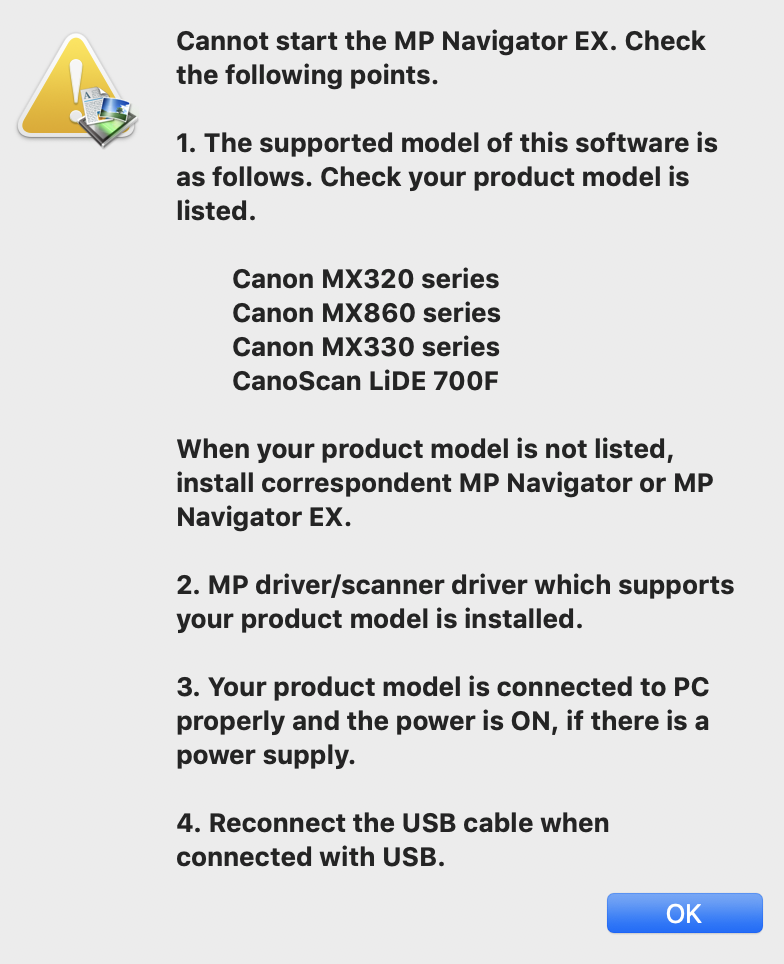
I used the link. This driver is only good for 3 printers and one scanner.
Options
- Mark as New
- Bookmark
- Subscribe
- Mute
- Subscribe to RSS Feed
- Permalink
- Report Inappropriate Content
11-05-2018 10:15 AM
Here is the dialog box.
Options
- Mark as New
- Bookmark
- Subscribe
- Mute
- Subscribe to RSS Feed
- Permalink
- Report Inappropriate Content
11-16-2018 01:42 PM - edited 11-16-2018 02:17 PM
I have MP Navigator 5.1 installed on my Macbook Pro 2017. I just upgraded to Mojave. The application no longer will appear on my desktop when I try to start it. I don't believe there is a new version of the application and I have verfified that all drivers have been installed. Is there a way I can get the application to work?
I have Pixma MP432 printer
I tried IJ Scan Utility Lite and it worked. I liked MP Navigator better because of the interface. Are there other options that have a better interface?
Thank you,
Teri
Options
- Mark as New
- Bookmark
- Subscribe
- Mute
- Subscribe to RSS Feed
- Permalink
- Report Inappropriate Content
11-16-2018 05:00 PM
I was enhancing the same, however shut everything off and restarted worked for me


Options
- Mark as New
- Bookmark
- Subscribe
- Mute
- Subscribe to RSS Feed
- Permalink
- Report Inappropriate Content
11-21-2018 02:04 PM
teribear515,
The MX432 is not compatible with the Mojave operating system. For details about what versions of Mac OSX the printer can be used with, visit the following link:
This didn't answer your question or issue? Find more help at Contact Us.
Did this answer your question? Please click the Accept as Solution button so that others may find the answer as well.

Announcements
07/22/2026: New firmware updates are available.
EOS R6 Mark III - Version 1.1.0
05/13/2026: New firmware updates are available.
EOS R5 Mark II - Version 1.3.0
EOS R6 Mark II - Version 1.7.0
04/28/2026: Service Notice: Caution Concerning use of Lithium Batteries
03/17/2026: New firmware updates are available.
SELPHY CP1500 - Version 1.0.7.0
02/23/2026: New firmware update is available for EOS C50- Version 1.0.3.1
01/23/2026: New firmware update is available for RF 24-105mm F4 IS USM- Version 2.0.7
01/20/2026: New firmware updates are available.
10/21/2025: Service Notice: To Users of the Compact Digital Camera PowerShot V1
10/15/2025: New firmware updates are available.
Speedlite EL-5 - Version 1.2.0
Speedlite EL-1 - Version 1.1.0
Speedlite Transmitter ST-E10 - Version 1.2.0
07/28/2025: Notice of Free Repair Service for the Mirrorless Camera EOS R50 (Black)
05/21/2025: New firmware update available for EOS C500 Mark II - Version 1.1.5.1
Related Content
- CanoScan LiDE 400 "Cannot communicate with scanner" error in Scanners
- MP Navigator won't open. Update available for macOS v13? in Scanners
- CanoScan 9950F Driver for macOS 10.14.2 Mojave in Scanners
- Canon Pro 100 super saturated macOS Mojave in Professional Photo Printers
- Color Imageclass LBP622CDW PPD not working on any app in Printer Software & Networking

Ⓒ 2026
Canon U.S.A Inc. All Rights Reserved. Reproduction in whole or part without permission is prohibited.
