Turn on suggestions
Auto-suggest helps you quickly narrow down your search results by suggesting possible matches as you type.
- Canon Community
- Discussions & Help
- Printer
- Printer Software & Networking
- Im unable to print a DVD/CD from My Image Garden (...
Options
- Subscribe to RSS Feed
- Mark Topic as New
- Mark Topic as Read
- Float this Topic for Current User
- Bookmark
- Subscribe
- Mute
- Printer Friendly Page

Options
- Mark as New
- Bookmark
- Subscribe
- Mute
- Subscribe to RSS Feed
- Permalink
- Report Inappropriate Content
12-13-2017 12:07 AM - edited 12-13-2017 12:08 AM
Im unable to print a DVD/CD from My Image Garden. It never gives me the option to pring from the disc tray feed. (using a MG7720)
Solved! Go to Solution.
1 ACCEPTED SOLUTION
Accepted Solutions
Options
- Mark as New
- Bookmark
- Subscribe
- Mute
- Subscribe to RSS Feed
- Permalink
- Report Inappropriate Content
12-12-2018 03:27 PM
A critical point was not mentioned by the Canon representative. After you install the drivers as they recommended, you have to go back to the My Image Garden preferences under "General" and uncheck the box that says "Print/Scan using Airprint". Once I did that everything worked as per the instructions
8 REPLIES 8


Options
- Mark as New
- Bookmark
- Subscribe
- Mute
- Subscribe to RSS Feed
- Permalink
- Report Inappropriate Content
12-13-2017 08:18 AM
Hi there!
So that the Community can help you better, we will need to know which Computer Operating System you're using (Windows Vista/7/8/10 or macOS 10.x), as well as the way you connect to your device (USB or networked via WiFi or Ethernet).
Any other details you'd like to give will only help the Community better understand your issue!
If this is an urgent support need, please CLICK HERE to reach our friendly Technical Support Team by phone or email.
Thanks and have a great day!
Options
- Mark as New
- Bookmark
- Subscribe
- Mute
- Subscribe to RSS Feed
- Permalink
- Report Inappropriate Content
12-13-2017 10:34 AM
Hi,
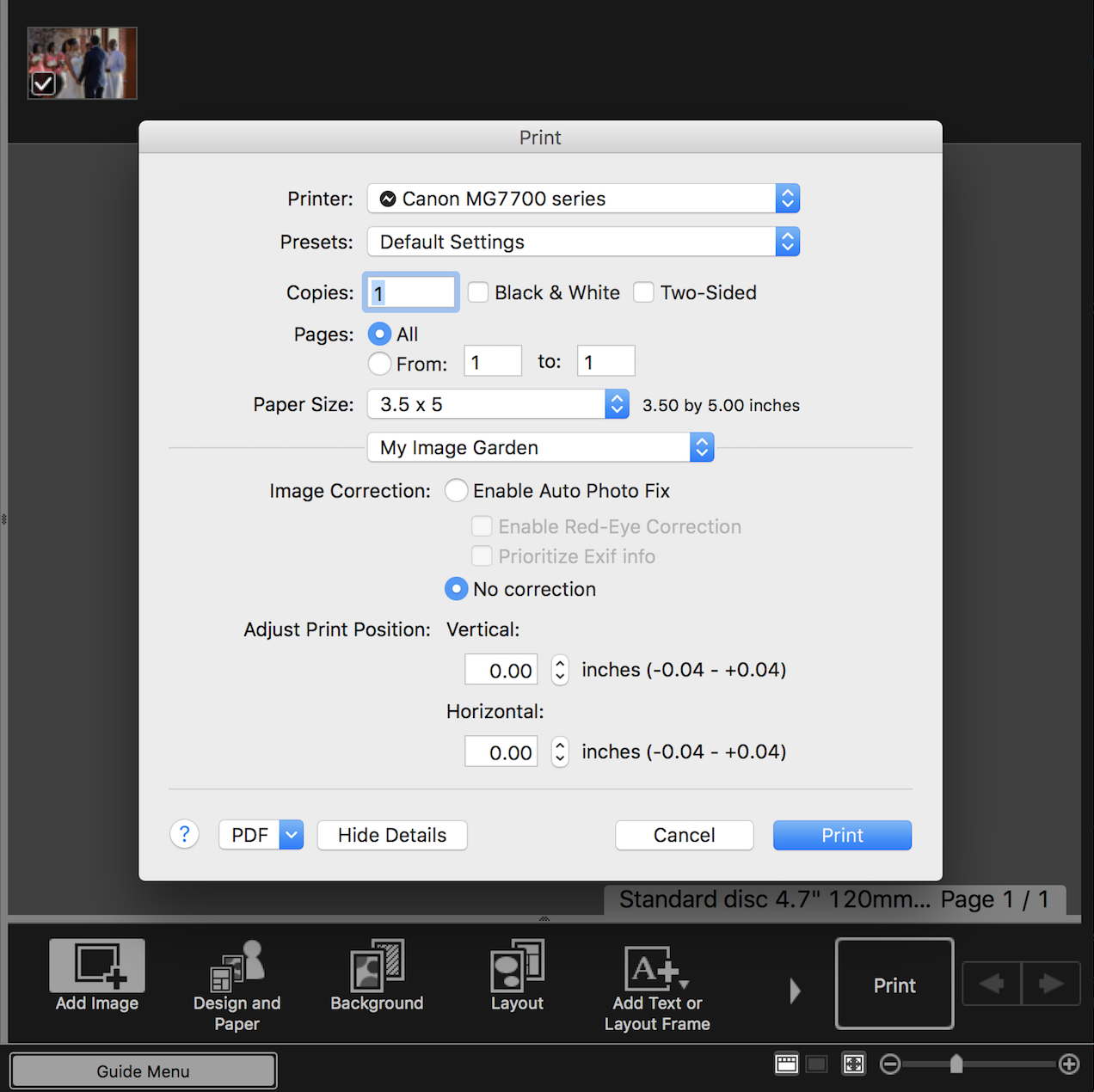
Im using a Imac operating system (OS El Capitan Ver 10.11.6) im also using my WIFI to connect to the printer. It never gives me the option to print from the disc tray feed, it only want to print from tray 1 or 2....
Options
- Mark as New
- Bookmark
- Subscribe
- Mute
- Subscribe to RSS Feed
- Permalink
- Report Inappropriate Content
12-13-2017 10:41 AM
Hi there!
You'll want to make sure you're using the Canon drivers and not AirPrint. AirPrint won't typically allow you to change paper type/tray.
You can get the Canon software and drivers from our site HERE.
If you've installed the Canon drivers and software, and you're still having difficulties, we'd recommend reaching out to our friendly, US-based support team at 1-800-OK-CANON (800-652-2666) weekdays from 10am to 10pm (ET). Support at Canon USA is always free.
If you're outside of the US, click HERE for support options in your country or region.
Options
- Mark as New
- Bookmark
- Subscribe
- Mute
- Subscribe to RSS Feed
- Permalink
- Report Inappropriate Content
12-12-2018 03:27 PM
A critical point was not mentioned by the Canon representative. After you install the drivers as they recommended, you have to go back to the My Image Garden preferences under "General" and uncheck the box that says "Print/Scan using Airprint". Once I did that everything worked as per the instructions
Options
- Mark as New
- Bookmark
- Subscribe
- Mute
- Subscribe to RSS Feed
- Permalink
- Report Inappropriate Content
02-05-2019 06:44 AM
How do I reach the preferences in my image garden?
Options
- Mark as New
- Bookmark
- Subscribe
- Mute
- Subscribe to RSS Feed
- Permalink
- Report Inappropriate Content
02-05-2019 10:31 AM - edited 02-05-2019 10:32 AM
Finally sussed out how it's done, I can now print a DVD on my Pixma ip 7250, thanks for that valuable piece of information.

Options
- Mark as New
- Bookmark
- Subscribe
- Mute
- Subscribe to RSS Feed
- Permalink
- Report Inappropriate Content
08-06-2023 08:00 AM
You are my hero. You brought my frustration to an end. How am I supposed to know this? Its not even in the printers manual. Thank you so much!
Options
- Mark as New
- Bookmark
- Subscribe
- Mute
- Subscribe to RSS Feed
- Permalink
- Report Inappropriate Content
09-24-2023 11:52 AM
Just done that. Then the software does not let me choose L (CD) anymore.

Announcements
07/22/2026: New firmware updates are available.
EOS R6 Mark III - Version 1.1.0
05/13/2026: New firmware updates are available.
EOS R5 Mark II - Version 1.3.0
EOS R6 Mark II - Version 1.7.0
04/28/2026: Service Notice: Caution Concerning use of Lithium Batteries
03/17/2026: New firmware updates are available.
SELPHY CP1500 - Version 1.0.7.0
02/23/2026: New firmware update is available for EOS C50- Version 1.0.3.1
01/23/2026: New firmware update is available for RF 24-105mm F4 IS USM- Version 2.0.7
01/20/2026: New firmware updates are available.
10/21/2025: Service Notice: To Users of the Compact Digital Camera PowerShot V1
10/15/2025: New firmware updates are available.
Speedlite EL-5 - Version 1.2.0
Speedlite EL-1 - Version 1.1.0
Speedlite Transmitter ST-E10 - Version 1.2.0
07/28/2025: Notice of Free Repair Service for the Mirrorless Camera EOS R50 (Black)
05/21/2025: New firmware update available for EOS C500 Mark II - Version 1.1.5.1
Related Content
- PIXMA G3110 Scanner is not connected in Printer Software & Networking
- Connecting wireless router to PIXMA MG7720, unable to select MAC address in Printer Software & Networking
- PIXMA TS5160 How to have scans bypass My Image Garden in Desktop Inkjet Printers
- My Image Garden - Scanned documents are blurry and have added wording in Printer Software & Networking
- PIXMA MG7720 Scan function and MacOS 14 Sonoma in Desktop Inkjet Printers

Ⓒ 2026
Canon U.S.A Inc. All Rights Reserved. Reproduction in whole or part without permission is prohibited.
