Turn on suggestions
Auto-suggest helps you quickly narrow down your search results by suggesting possible matches as you type.
- Canon Community
- Discussions & Help
- Printer
- Printer Software & Networking
- Re: EOS R10 & Digital Photo Professional Software
Options
- Subscribe to RSS Feed
- Mark Topic as New
- Mark Topic as Read
- Float this Topic for Current User
- Bookmark
- Subscribe
- Mute
- Printer Friendly Page
Digital Photo Professional - Colors are Off on Prints

Options
- Mark as New
- Bookmark
- Subscribe
- Mute
- Subscribe to RSS Feed
- Permalink
- Report Inappropriate Content
03-11-2023
04:32 PM
- last edited on
03-14-2023
09:18 AM
by
 Danny
Danny
New to using camera. Printing direct from camera to printer (Pixma ip8720) correct colors. Printing via DPP using windows 10 & usb cable…colors off significantly (same photo, no edits). Any advice why this happens?
7 REPLIES 7


Options
- Mark as New
- Bookmark
- Subscribe
- Mute
- Subscribe to RSS Feed
- Permalink
- Report Inappropriate Content
03-11-2023 05:11 PM
Do you have an example?
There are a number of variables here. Let's start witht he photo that you captured. Does it have accurate colors (e.g. did you use a color chart)?
--
Ricky
Camera: EOS R5 II, RF 50mm f/1.2L, RF 135mm f/1.8L
Lighting: Profoto Lights & Modifiers
Ricky
Camera: EOS R5 II, RF 50mm f/1.2L, RF 135mm f/1.8L
Lighting: Profoto Lights & Modifiers
Options
- Mark as New
- Bookmark
- Subscribe
- Mute
- Subscribe to RSS Feed
- Permalink
- Report Inappropriate Content
03-11-2023 05:36 PM
No I did not use a color chart. Both the camera and printer were new purchases & I was in the return window. So to make sure that hardware was good, I created a collage of 4 photos from iPhone, that had good range of colors (red, blue, yellow, green, orange & purple). Printing direct from camera or iPhone the colors match to what iPhone screen showed. DDP photo did not. I know that there can be competing color mgt with a PC, I’m thinking I didn’t have all the settings correct to use the canon color profile & the DPP program as the manager.

Options
- Mark as New
- Bookmark
- Subscribe
- Mute
- Subscribe to RSS Feed
- Permalink
- Report Inappropriate Content
03-11-2023 07:00 PM
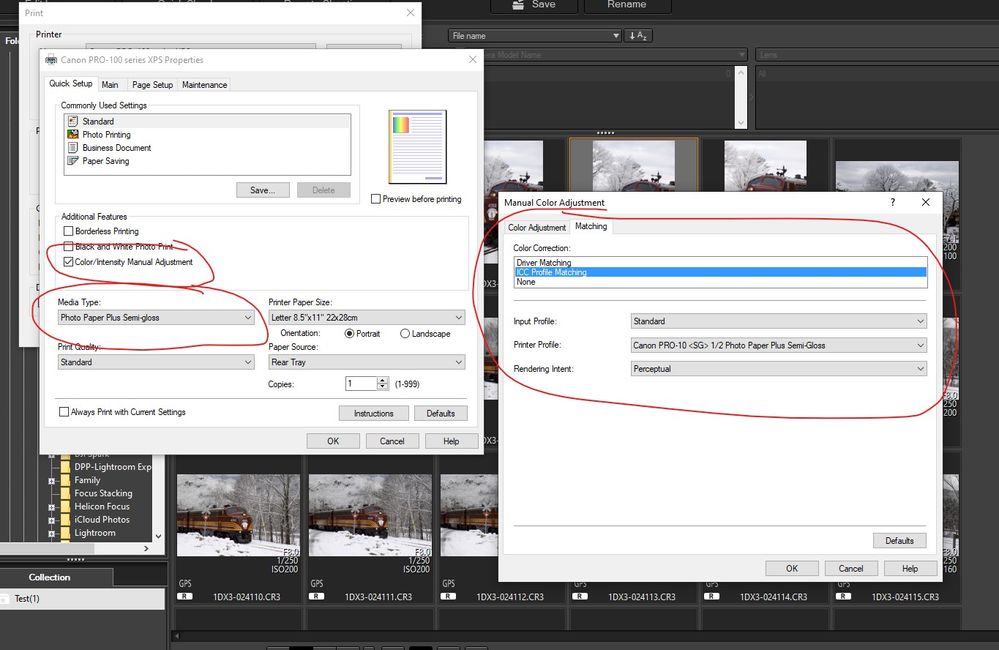
Compare your settings to these (adjusted for your paper type) when you select Print in DPP4:
John Hoffman
Conway, NH
R6 Mark III, M200 (converted to infrared), RF lenses, Pixma PRO-100, Pixma TR8620a, Lr Classic
Conway, NH
R6 Mark III, M200 (converted to infrared), RF lenses, Pixma PRO-100, Pixma TR8620a, Lr Classic
Options
- Mark as New
- Bookmark
- Subscribe
- Mute
- Subscribe to RSS Feed
- Permalink
- Report Inappropriate Content
03-13-2023 05:31 PM
The first panel on the left is same as what I did. The second panel on the right…when I click on ICM, I only have “Input Profile” and “Rendering Intent”. I do not have the middle box of “Printer Profile”. Downloaded latest version of DPP 4.17.20 and still missing that box.
Options
- Mark as New
- Bookmark
- Subscribe
- Mute
- Subscribe to RSS Feed
- Permalink
- Report Inappropriate Content
03-13-2023 05:36 PM
Where my left panel shows Pro-100 exactly what does your say?
Are you using Canon paper? If so, select Driver Matching.
John Hoffman
Conway, NH
R6 Mark III, M200 (converted to infrared), RF lenses, Pixma PRO-100, Pixma TR8620a, Lr Classic
Conway, NH
R6 Mark III, M200 (converted to infrared), RF lenses, Pixma PRO-100, Pixma TR8620a, Lr Classic
Options
- Mark as New
- Bookmark
- Subscribe
- Mute
- Subscribe to RSS Feed
- Permalink
- Report Inappropriate Content
03-13-2023 05:47 PM
Left panel shows Canon iP8700 series & yes using canon glossy II paper
Reprinted with driver matching and getting same off color results.
Options
- Mark as New
- Bookmark
- Subscribe
- Mute
- Subscribe to RSS Feed
- Permalink
- Report Inappropriate Content
03-13-2023 06:38 PM
1. Can you post a sample file to Dropbox or One Drive so I can test?
2. Try selecting “None” and then choose the paper profile in the next window.
John Hoffman
Conway, NH
R6 Mark III, M200 (converted to infrared), RF lenses, Pixma PRO-100, Pixma TR8620a, Lr Classic
Conway, NH
R6 Mark III, M200 (converted to infrared), RF lenses, Pixma PRO-100, Pixma TR8620a, Lr Classic

Announcements
07/22/2026: New firmware updates are available.
EOS R6 Mark III - Version 1.1.0
05/13/2026: New firmware updates are available.
EOS R5 Mark II - Version 1.3.0
EOS R6 Mark II - Version 1.7.0
04/28/2026: Service Notice: Caution Concerning use of Lithium Batteries
03/17/2026: New firmware updates are available.
SELPHY CP1500 - Version 1.0.7.0
02/23/2026: New firmware update is available for EOS C50- Version 1.0.3.1
01/23/2026: New firmware update is available for RF 24-105mm F4 IS USM- Version 2.0.7
01/20/2026: New firmware updates are available.
10/21/2025: Service Notice: To Users of the Compact Digital Camera PowerShot V1
10/15/2025: New firmware updates are available.
Speedlite EL-5 - Version 1.2.0
Speedlite EL-1 - Version 1.1.0
Speedlite Transmitter ST-E10 - Version 1.2.0
07/28/2025: Notice of Free Repair Service for the Mirrorless Camera EOS R50 (Black)
05/21/2025: New firmware update available for EOS C500 Mark II - Version 1.1.5.1
Related Content
- PIXMA PRO-200S How to use ICC profiles in PP&L in Professional Photo Printers
- Professional Print and Layout won't print in Printer Software & Networking
- PRO-300 IP address hardcoded into various files for drivers/apps in Printer Software & Networking
- Canon PRO-100S unusable on Windows 11 — no drivers, no suppor in Professional Photo Printers
- Professional Print and Layout, Canon imagePROGRAF PRO-310, Windows 11 not launching anymore? in Printer Software & Networking

Ⓒ 2026
Canon U.S.A Inc. All Rights Reserved. Reproduction in whole or part without permission is prohibited.
