05-19-2020 07:15 PM - edited 05-19-2020 07:36 PM
I am trying to set up my Canon MX490 on my MacOS so I can print wirelessly, but I get an error that says I need a 64-bit driver instead of 32-bit. I can't find it on the website.
05-19-2020 07:38 PM
The drvers you need are located here: https://Canon.us/3u4kw
Once the page opens, scroll down to the section near the bottom titled "Drivers & Downloads". Make sure it shows "mac OS Catalina v10.15". It should automatically show that, but if not, change it to that. You'll need to select and then download both driver files located there after deleting the old ones. (see below)
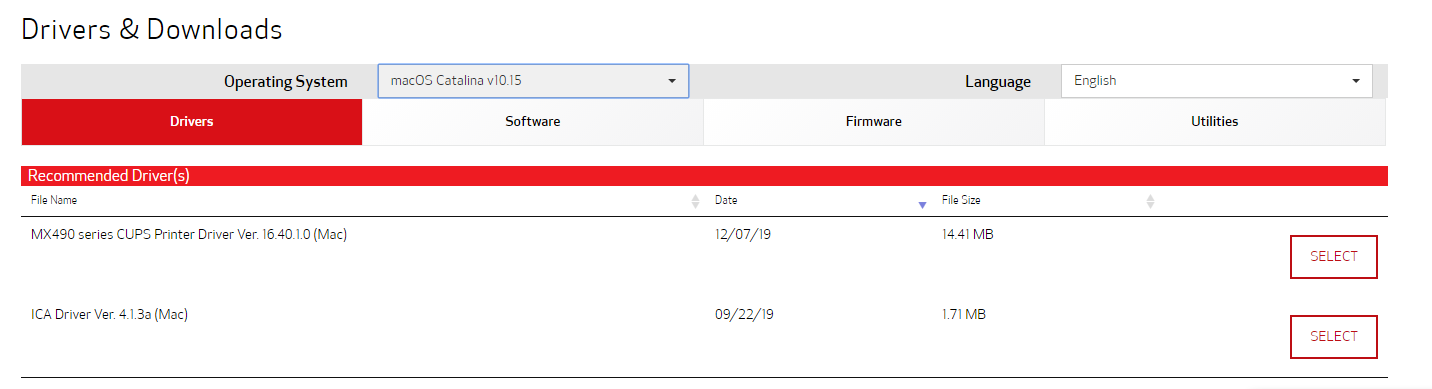
We hope this helps!

11/20/2025: New firmware updates are available.
EOS R6 Mark III - Version 1.0.1
EOS R5 Mark II - Version 1.2.0
PowerShot G7 X Mark III - Version 1.4.0
PowerShot SX740 HS - Version 1.0.2
10/15/2025: New firmware updates are available.
Speedlite EL-5 - Version 1.2.0
Speedlite EL-1 - Version 1.1.0
Speedlite Transmitter ST-E10 - Version 1.2.0
07/24/2025: New firmware updates are available.
07/23/2025: New firmware updates are available.
7/17/2025: New firmware updates are available.
02/20/2025: New firmware updates are available.
RF70-200mm F2.8 L IS USM Z - Version 1.0.6
RF24-105mm F2.8 L IS USM Z - Version 1.0.9
RF100-300mm F2.8 L IS USM - Version 1.0.8
RF50mm F1.4 L VCM - Version 1.0.2
RF24mm F1.4 L VCM - Version 1.0.3
Canon U.S.A Inc. All Rights Reserved. Reproduction in whole or part without permission is prohibited.