Turn on suggestions
Auto-suggest helps you quickly narrow down your search results by suggesting possible matches as you type.
- Canon Community
- Discussions & Help
- Printer
- Desktop Inkjet Printers
- Issues with wireless MG3022
Options
- Subscribe to RSS Feed
- Mark Topic as New
- Mark Topic as Read
- Float this Topic for Current User
- Bookmark
- Subscribe
- Mute
- Printer Friendly Page
Issues with wireless MG3022

Options
- Mark as New
- Bookmark
- Subscribe
- Mute
- Subscribe to RSS Feed
- Permalink
- Report Inappropriate Content
12-22-2018 05:10 PM
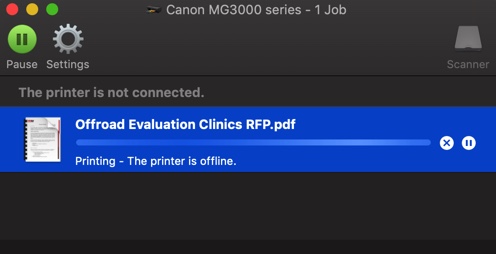
Alright, so I have connected wirelessly with my MG3000 printer while with Xfinity internet, but recently made a change to Centurylink. Since the change, I have not been successful in connecting my wireless iPhones, iPads, or MacBook Pro to my printer. On my mac, I would follow the promptings to discover the wireless Canon printer available on my wireless network, successfully connect to, but when I go to print, it shows that the printer is offline, when in fact it is on. I have unplugged the router, printer and shut off my computer waited 30 minutes, and restarted the router, printer, and MacBook in that order, and as I continued the setup process, I end up with the same results. Please Help!
2 REPLIES 2
Options
- Mark as New
- Bookmark
- Subscribe
- Mute
- Subscribe to RSS Feed
- Permalink
- Report Inappropriate Content
12-22-2018 05:24 PM



Options
- Mark as New
- Bookmark
- Subscribe
- Mute
- Subscribe to RSS Feed
- Permalink
- Report Inappropriate Content
12-24-2018 03:04 PM
Hi Ptue,
Troubleshooting with our support group will be needed to narrow down the cause of your issues. Please contact our support group at 1-800-OK-CANON (1-800-652-2666)/
We look forward to hearing from you.


Announcements
12/18/2025: New firmware updates are available.
12/15/2025: New firmware update available for EOS C50 - Version 1.0.1.1
11/20/2025: New firmware updates are available.
EOS R6 Mark III - Version 1.0.1
EOS R5 Mark II - Version 1.2.0
PowerShot G7 X Mark III - Version 1.4.0
PowerShot SX740 HS - Version 1.0.2
10/21/2025: Service Notice: To Users of the Compact Digital Camera PowerShot V1
10/15/2025: New firmware updates are available.
Speedlite EL-5 - Version 1.2.0
Speedlite EL-1 - Version 1.1.0
Speedlite Transmitter ST-E10 - Version 1.2.0
07/28/2025: Notice of Free Repair Service for the Mirrorless Camera EOS R50 (Black)
7/17/2025: New firmware updates are available.
05/21/2025: New firmware update available for EOS C500 Mark II - Version 1.1.5.1
02/20/2025: New firmware updates are available.
RF70-200mm F2.8 L IS USM Z - Version 1.0.6
RF24-105mm F2.8 L IS USM Z - Version 1.0.9
RF100-300mm F2.8 L IS USM - Version 1.0.8
RF50mm F1.4 L VCM - Version 1.0.2
RF24mm F1.4 L VCM - Version 1.0.3
01/22/2024: Canon Supports Disaster Relief Efforts in California
01/14/2025: Steps to resolve still image problem when using certain SanDisk SD cards with the Canon EOS R5 Mark II
Related Content
- PIXMA TS9521c Printer Won't Print Color in Desktop Inkjet Printers
- Laptop forgets imageCLASS MF273dw after each USB disconnection in Office Printers
- PIXMA PRO-200 lines across image, colors don't match profile in Professional Photo Printers
- G7020 - Unable to Scan Via Wifi in Printer Software & Networking
- PIXMA G6020: Printing Colors from Photoshop not Matching what's on the screen in Desktop Inkjet Printers

Ⓒ 2025
Canon U.S.A Inc. All Rights Reserved. Reproduction in whole or part without permission is prohibited.
