Turn on suggestions
Auto-suggest helps you quickly narrow down your search results by suggesting possible matches as you type.
- Canon Community
- Discussions & Help
- Camera
- Point & Shoot Digital Cameras
- Re: s110 menu button not working
Options
- Subscribe to RSS Feed
- Mark Topic as New
- Mark Topic as Read
- Float this Topic for Current User
- Bookmark
- Subscribe
- Mute
- Printer Friendly Page
s110 menu button not working

Options
- Mark as New
- Bookmark
- Subscribe
- Mute
- Subscribe to RSS Feed
- Permalink
- Report Inappropriate Content
04-08-2014 04:49 AM
Hi,
We're on our honeymoon and been taking good pictures without any problems with Canon S110 until yesterday. The camera suddenly has the following problems:
1. turn on normally but then immediately taking one photo no matter what mode it's on.
2. once the single photo was taken, the camera completely freeze except the display button working and the delete button (working but not be able to select delete)
3. shutter button and zoom in or out is completely useless
3. MENU button is NOT working at all
We have been trying the following:
- new fully charged batterry
- new SD card
- turn off and remove both battery and SD card overnight
It's very frustrated and we only have this camera on this trip. Please help!!!
5 REPLIES 5

Options
- Mark as New
- Bookmark
- Subscribe
- Mute
- Subscribe to RSS Feed
- Permalink
- Report Inappropriate Content
04-08-2014 07:09 AM
Hi,
Before you take any shots can you get to the settings menu and perform a reset? If so try that and see if that helps.
Also you can remove the batery, close the battery compartment then push and hold the power button down for at least 30 seconds...see if that helps.
John

Options
- Mark as New
- Bookmark
- Subscribe
- Mute
- Subscribe to RSS Feed
- Permalink
- Report Inappropriate Content
06-27-2014 05:19 PM
Just registered to report my solution.
I have a similar problem with the PowerShot S110 of my wife's sister.
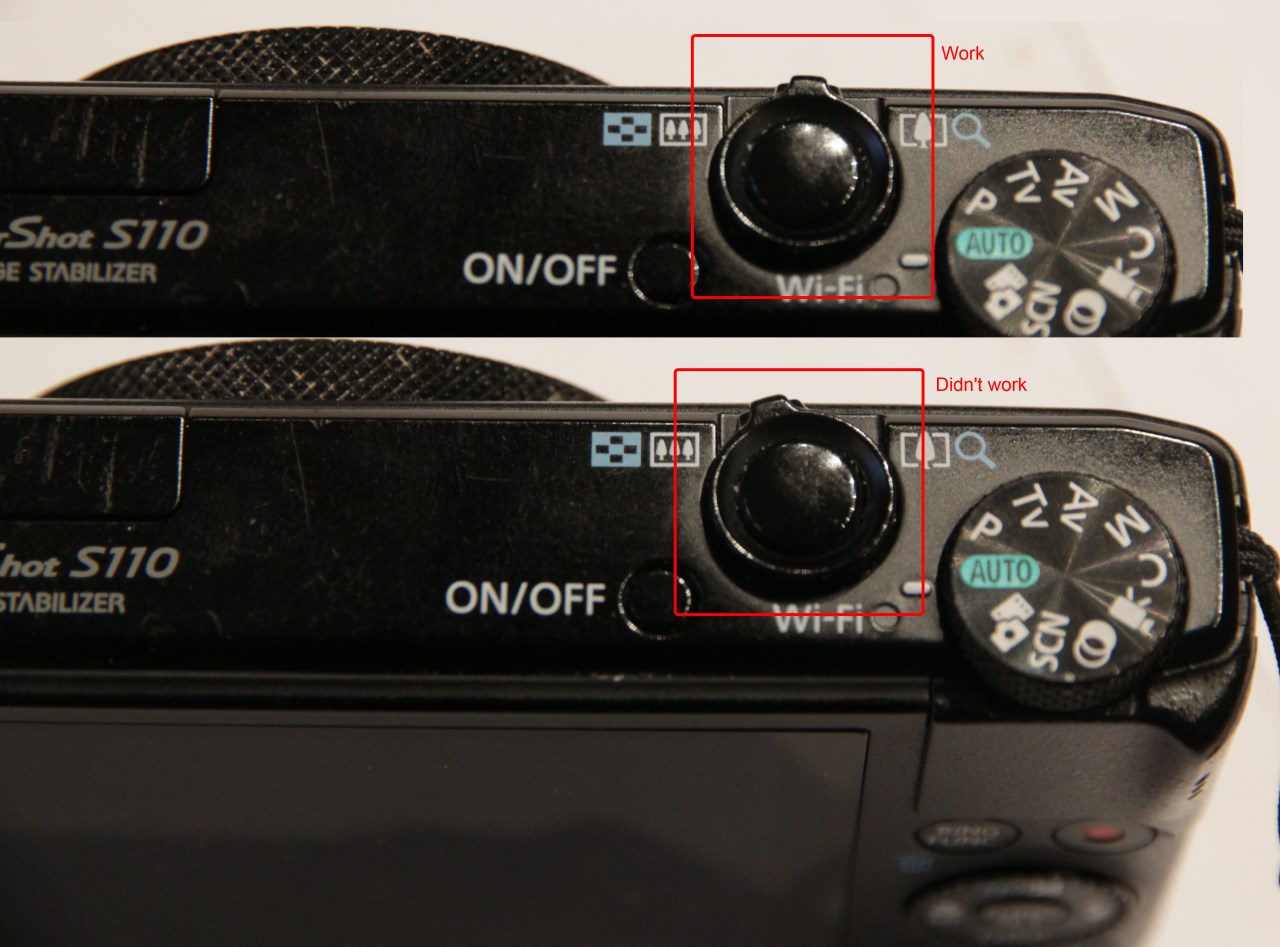
At some time a menu button and all joystick buttons stop working.
The problem was because of sticking zoom control (yeah it's very stupid).
At the normal state zoom control must return to central position!
When zoom control is on the left or right position - some buttons don't work.
I hope this info will be usefull to someone.
Options
- Mark as New
- Bookmark
- Subscribe
- Mute
- Subscribe to RSS Feed
- Permalink
- Report Inappropriate Content
06-27-2014 09:43 PM
Thats very interesting, thank you for sharing that. When the zoom lever is off center will it still take a picture? Also theres a product called Deoxit 5 with will clean things llike that whick stick and will not harm any plastic or rubber. I've used it for years...you just dont want to saturate it
Options
- Mark as New
- Bookmark
- Subscribe
- Mute
- Subscribe to RSS Feed
- Permalink
- Report Inappropriate Content
06-28-2014 12:34 AM
When the zoom lever is off center it can take a picture, and play button and video rec button still works, and the wheel also work.
Options
- Mark as New
- Bookmark
- Subscribe
- Mute
- Subscribe to RSS Feed
- Permalink
- Report Inappropriate Content
06-28-2014 11:43 PM
Interesting..thanks for the reply and information


Announcements
07/22/2026: New firmware updates are available.
EOS R6 Mark III - Version 1.1.0
05/13/2026: New firmware updates are available.
EOS R5 Mark II - Version 1.3.0
EOS R6 Mark II - Version 1.7.0
04/28/2026: Service Notice: Caution Concerning use of Lithium Batteries
03/17/2026: New firmware updates are available.
SELPHY CP1500 - Version 1.0.7.0
02/23/2026: New firmware update is available for EOS C50- Version 1.0.3.1
01/23/2026: New firmware update is available for RF 24-105mm F4 IS USM- Version 2.0.7
01/20/2026: New firmware updates are available.
10/21/2025: Service Notice: To Users of the Compact Digital Camera PowerShot V1
10/15/2025: New firmware updates are available.
Speedlite EL-5 - Version 1.2.0
Speedlite EL-1 - Version 1.1.0
Speedlite Transmitter ST-E10 - Version 1.2.0
07/28/2025: Notice of Free Repair Service for the Mirrorless Camera EOS R50 (Black)
05/21/2025: New firmware update available for EOS C500 Mark II - Version 1.1.5.1
Related Content
- EOS Canon R6 mkIII Image write failure in EOS DSLR & Mirrorless Cameras
- EOS Rebel G Shutter Button not Working in EOS DSLR & Mirrorless Cameras
- EOS Rebel XTi still usable with broken pin in card slot? in EOS DSLR & Mirrorless Cameras
- Cannot register new lens in EF & RF Lenses
- EOS R5 Mark II minor Firmware Update, Version 1.3.1 in Camera Software

Ⓒ 2026
Canon U.S.A Inc. All Rights Reserved. Reproduction in whole or part without permission is prohibited.
