Turn on suggestions
Auto-suggest helps you quickly narrow down your search results by suggesting possible matches as you type.
- Canon Community
- Discussions & Help
- Camera
- Point & Shoot Digital Cameras
- Re: connect elph 360 wifi to mac
Options
- Subscribe to RSS Feed
- Mark Topic as New
- Mark Topic as Read
- Float this Topic for Current User
- Bookmark
- Subscribe
- Mute
- Printer Friendly Page
connect elph 360 wifi to mac

Options
- Mark as New
- Bookmark
- Subscribe
- Mute
- Subscribe to RSS Feed
- Permalink
- Report Inappropriate Content
08-14-2016 03:15 PM
I can't seem to connect my new ELPH360HS to MAC. I can download photos to the Canon Gateway cloud site but not to my Mac. Followed instructions in manual but there must be some simple setting I'm missing.
29 REPLIES 29
Options
- Mark as New
- Bookmark
- Subscribe
- Mute
- Subscribe to RSS Feed
- Permalink
- Report Inappropriate Content
02-06-2017 08:37 PM
Hold the door ...
I am able to download a bunch at a time. Yeah, this'll work. Frankly, USB is faster, but this will work great when I'm on the road.
Okay, Canon. I'll stay with you.
Cheers.
Options
- Mark as New
- Bookmark
- Subscribe
- Mute
- Subscribe to RSS Feed
- Permalink
- Report Inappropriate Content
02-07-2017 03:11 PM
Just to be clear:
• I cannot connect my Elph 360 to my Mac -- or my Windows laptop running Windows 10 -- via WiFi.
• I can, however, connect to the cloud via WiFi and upload to Canon Image Gateway, Facebook, Twitter, and even Canon's Image Sync.
• The Image Transfer Utility software will not work on my Mac (didn't try it on my Windows laptop) so I can't automatically download to my computer. But I can go to the Canon Image Gateway website and download from the photo gallery. In some ways this might even be better since I can cherry pick the ones I want.
Unless I'm on the road, I'm inclined to upload via USB, but the ability to post to Facebook and Twitter from the camera is very cool.
Cheers,
Mike


Options
- Mark as New
- Bookmark
- Subscribe
- Mute
- Subscribe to RSS Feed
- Permalink
- Report Inappropriate Content
02-07-2017 04:53 PM
Hi Austincameraguy,
You should be able to connect to your Windows 10 machine. What happens when you try this connection (errors, etc)?
Did this answer your question? Please click the Accept as Solution button so that others may find the answer as well.
Options
- Mark as New
- Bookmark
- Subscribe
- Mute
- Subscribe to RSS Feed
- Permalink
- Report Inappropriate Content
02-09-2017 03:07 PM
Richard -- Give me a couple of days and I'll try again and take notes.
Mike
Mike
Options
- Mark as New
- Bookmark
- Subscribe
- Mute
- Subscribe to RSS Feed
- Permalink
- Report Inappropriate Content
03-08-2017 12:54 PM
Ahhh. Thanks for letting me know that. Saves me some time.
Options
- Mark as New
- Bookmark
- Subscribe
- Mute
- Subscribe to RSS Feed
- Permalink
- Report Inappropriate Content
10-30-2017 12:42 PM
this has been nothing short of a gong show trying to connect the cannon elph 360 to wifi to download pics on my computer,
had i known this was the issue i would NOT have purchased, why is there no option to hard connect to a macbook pro, i have followed all the directions and suggestioins, nothting works, and often i am on holidays in areas with NO wifi, so whats the point, im not going to carry around dozens of scan disk things to save my photos, there needs to be some solution
Options
- Mark as New
- Bookmark
- Subscribe
- Mute
- Subscribe to RSS Feed
- Permalink
- Report Inappropriate Content
03-04-2018 05:18 PM - edited 03-04-2018 05:31 PM
Just bought the ELPH 360 HS. No luck connecting to a mac. I can join the network fine, and I can see my mac, but when I run the the CameraWindow app on the mac, it just says no camera found.
How can they release software that just doesn't work? Do they not test it at all?
Running macOS 10.13.3
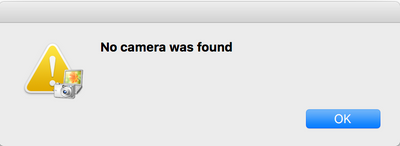
If you look at how it's launching the actual app in terminal, there are errors:
/Applications/Canon\ Utilities/CameraWindow/CameraWindow.app/Contents/MacOS/CameraWindow ; exit;
/BuildRoot/Library/Caches/com.apple.xbs/Sources/AppleFSCompression/AppleFSCompression-96.30.2/Common/ChunkCompression.cpp:50: Error: unsupported compressor 8
/BuildRoot/Library/Caches/com.apple.xbs/Sources/AppleFSCompression/AppleFSCompression-96.30.2/Libraries/CompressData/CompressData.c:353: Error: Unknown compression scheme encountered for file '/System/Library/CoreServices/CoreTypes.bundle/Contents/Resources/Exceptions.plist'
/BuildRoot/Library/Caches/com.apple.xbs/Sources/AppleFSCompression/AppleFSCompression-96.30.2/Common/ChunkCompression.cpp:50: Error: unsupported compressor 8
/BuildRoot/Library/Caches/com.apple.xbs/Sources/AppleFSCompression/AppleFSCompression-96.30.2/Libraries/CompressData/CompressData.c:353: Error: Unknown compression scheme encountered for file '/System/Library/CoreServices/CoreTypes.bundle/Contents/Library/AppExceptions.bundle/Exceptions.plist'
Common Cannon. Get with it. How are you releasing software that fails on launch. Very unimpressed. 😞
Options
- Mark as New
- Bookmark
- Subscribe
- Mute
- Subscribe to RSS Feed
- Permalink
- Report Inappropriate Content
03-06-2018 12:34 PM
Get this, canon support replies with
"Your Canon camera wifi function is not compatible with latest versions of the MAC OS 10.11 10.12 and 10.13."
Basically, you have to be running an outdated old useless version of macOS. Nice job canon. How about releasing software that works with recent versions of operating systems.
Options
- Mark as New
- Bookmark
- Subscribe
- Mute
- Subscribe to RSS Feed
- Permalink
- Report Inappropriate Content
03-07-2018 08:59 AM
" but when I run the the CameraWindow app on the mac, it just says no camera found. " by shamusom
The canon camera window app in the -add a device folder- of your computer maybe not be a complete software ( needs driver ) thats why when you open it - it will not work - and it says " no camera found "
Search how to download manually the camera window app. Compatibility issues is rarely the cause.
Options
- Mark as New
- Bookmark
- Subscribe
- Mute
- Subscribe to RSS Feed
- Permalink
- Report Inappropriate Content
03-07-2018 09:37 AM
I've tried running every version I can find. Simply does not work. Dissapointing for sure.

Announcements
07/22/2026: New firmware updates are available.
EOS R6 Mark III - Version 1.1.0
05/13/2026: New firmware updates are available.
EOS R5 Mark II - Version 1.3.0
EOS R6 Mark II - Version 1.7.0
04/28/2026: Service Notice: Caution Concerning use of Lithium Batteries
03/17/2026: New firmware updates are available.
SELPHY CP1500 - Version 1.0.7.0
02/23/2026: New firmware update is available for EOS C50- Version 1.0.3.1
01/23/2026: New firmware update is available for RF 24-105mm F4 IS USM- Version 2.0.7
01/20/2026: New firmware updates are available.
10/21/2025: Service Notice: To Users of the Compact Digital Camera PowerShot V1
10/15/2025: New firmware updates are available.
Speedlite EL-5 - Version 1.2.0
Speedlite EL-1 - Version 1.1.0
Speedlite Transmitter ST-E10 - Version 1.2.0
07/28/2025: Notice of Free Repair Service for the Mirrorless Camera EOS R50 (Black)
05/21/2025: New firmware update available for EOS C500 Mark II - Version 1.1.5.1
Related Content
- EOS R50 Failed Bluetooth Connection in EOS DSLR & Mirrorless Cameras
- Where to download Canon Camera Connect v3 for Windows 11 in Camera Software
- R6 Mark II WiFi Connectivity Issues when pushing to SFTP in EOS DSLR & Mirrorless Cameras
- Camera Connect won't connect to PowerShot SX720 HS after app update in Camera Software
- Just bought Canon R100- questions about using bluetooth to transfer images to smartphone in EOS DSLR & Mirrorless Cameras

Ⓒ 2026
Canon U.S.A Inc. All Rights Reserved. Reproduction in whole or part without permission is prohibited.
