Turn on suggestions
Auto-suggest helps you quickly narrow down your search results by suggesting possible matches as you type.
- Canon Community
- Discussions & Help
- Camera
- Point & Shoot Digital Cameras
- Re: Where is manual exposure/backlight control ?
Options
- Subscribe to RSS Feed
- Mark Topic as New
- Mark Topic as Read
- Float this Topic for Current User
- Bookmark
- Subscribe
- Mute
- Printer Friendly Page

Options
- Mark as New
- Bookmark
- Subscribe
- Mute
- Subscribe to RSS Feed
- Permalink
- Report Inappropriate Content
03-03-2015 12:11 PM
On my new Canon SX520, I can't find any way to do exposure compensation or even a simple backlight control. As I do much photography at the beach, backlight compensation is necessary.
Solved! Go to Solution.
2 ACCEPTED SOLUTIONS
Accepted Solutions

Options
- Mark as New
- Bookmark
- Subscribe
- Mute
- Subscribe to RSS Feed
- Permalink
- Report Inappropriate Content
03-03-2015 01:30 PM
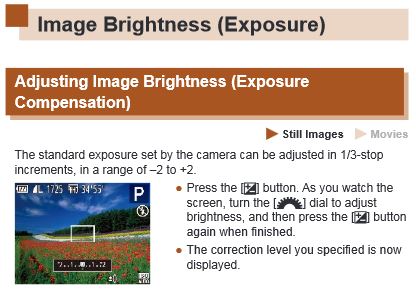
Acccording to the manual you just need to press the +/- button on the back of the camera while in the P mode (works in Av, Tv, and M modes to) and then turn the dial to adjust in 1/3 increments.
Steve M.
Options
- Mark as New
- Bookmark
- Subscribe
- Mute
- Subscribe to RSS Feed
- Permalink
- Report Inappropriate Content
03-11-2015 07:14 AM
Thanks. The manual exposure control indeed only appears in those modes you mentioned.
2 REPLIES 2
Options
- Mark as New
- Bookmark
- Subscribe
- Mute
- Subscribe to RSS Feed
- Permalink
- Report Inappropriate Content
03-03-2015 01:30 PM
Acccording to the manual you just need to press the +/- button on the back of the camera while in the P mode (works in Av, Tv, and M modes to) and then turn the dial to adjust in 1/3 increments.
Steve M.
Options
- Mark as New
- Bookmark
- Subscribe
- Mute
- Subscribe to RSS Feed
- Permalink
- Report Inappropriate Content
03-11-2015 07:14 AM
Thanks. The manual exposure control indeed only appears in those modes you mentioned.

Announcements
07/22/2026: New firmware updates are available.
EOS R6 Mark III - Version 1.1.0
05/13/2026: New firmware updates are available.
EOS R5 Mark II - Version 1.3.0
EOS R6 Mark II - Version 1.7.0
04/28/2026: Service Notice: Caution Concerning use of Lithium Batteries
03/17/2026: New firmware updates are available.
SELPHY CP1500 - Version 1.0.7.0
02/23/2026: New firmware update is available for EOS C50- Version 1.0.3.1
01/23/2026: New firmware update is available for RF 24-105mm F4 IS USM- Version 2.0.7
01/20/2026: New firmware updates are available.
10/21/2025: Service Notice: To Users of the Compact Digital Camera PowerShot V1
10/15/2025: New firmware updates are available.
Speedlite EL-5 - Version 1.2.0
Speedlite EL-1 - Version 1.1.0
Speedlite Transmitter ST-E10 - Version 1.2.0
07/28/2025: Notice of Free Repair Service for the Mirrorless Camera EOS R50 (Black)
05/21/2025: New firmware update available for EOS C500 Mark II - Version 1.1.5.1
Related Content
- Canon AF35M II/Autoboy 2 flash not working in Point & Shoot Digital Cameras
- Canon 24-70mm F2.8 II stopped focusing in EF & RF Lenses
- EOS R6 Mark III How to retain video settings like on EOS R6 in EOS DSLR & Mirrorless Cameras
- EOS R highest jpg resolution isn't in EOS DSLR & Mirrorless Cameras
- EOS R5 hot pixels lower iso in video mode in EOS DSLR & Mirrorless Cameras

Ⓒ 2026
Canon U.S.A Inc. All Rights Reserved. Reproduction in whole or part without permission is prohibited.
