Turn on suggestions
Auto-suggest helps you quickly narrow down your search results by suggesting possible matches as you type.
- Canon Community
- Discussions & Help
- Camera
- EOS DSLR & Mirrorless Cameras
- EOS R5 hot pixels lower iso in video mode
Options
- Subscribe to RSS Feed
- Mark Topic as New
- Mark Topic as Read
- Float this Topic for Current User
- Bookmark
- Subscribe
- Mute
- Printer Friendly Page
EOS R5 hot pixels lower iso in video mode

Options
- Mark as New
- Bookmark
- Subscribe
- Mute
- Subscribe to RSS Feed
- Permalink
- Report Inappropriate Content
08-22-2026
04:30 AM
- last edited on
08-23-2026
04:14 PM
by
 James_C
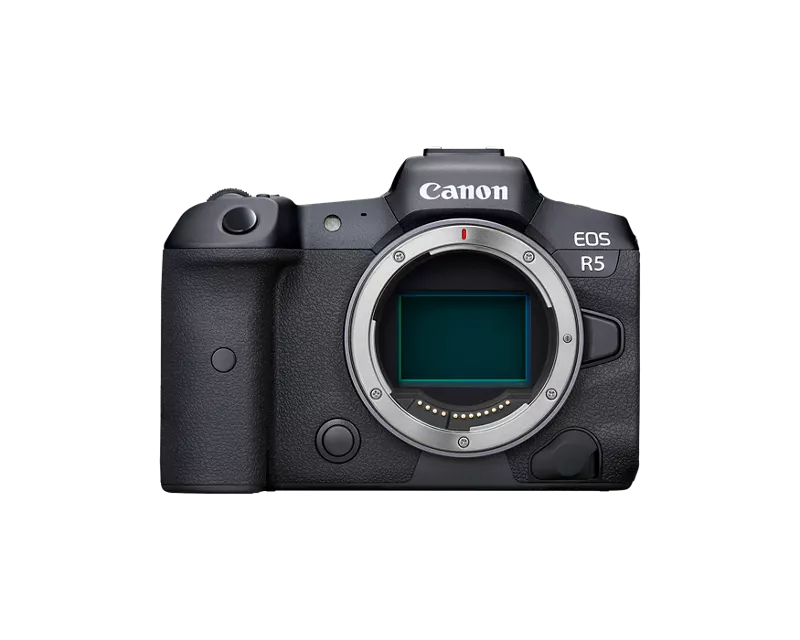
i recently acquired a Canon R5 and immediately after turning it on i saw some hot pixels in video mode, in photo mode they dont appear until high iso and longer shutter speeds BUT in video mode they are apparent at much much lower exposure settings
i assume they are hot pixels, they are red and blue
right now i have it set up as a webcam and my iso is either at 1600 or 3200 depending on my shutter speed, at these iso's there are 3-4 hot pixels that are very noticeable, they show up IMMEDIATELY after turning on the camera cold, one right in the middle of my face, two in the bottom right, and after the camera gets a bit warm one in the top left, raising the iso to something absurd also reveals about 2 dozen more of these pixels
in 8k mode i dont notice them and in 4kHQ they arent there, they dont show up in raw photos that i can tell, they DO show up in standard video (when not in 8k or 4kHQ)
i have read that the "clean now" and "manual clean" options help with hot/stuck pixels but it hasnt done anything in my case, i've tried it with the camera cold, i've heated up the camera by recording video and then using each setting, i've left the "manual clean" option active for an extended period of time and still nothing
this is actually my 2nd canon r5 i've bought, the first one i sent back because it had the same issue but infinitely worse, hundreds of hot pixels that showed up no matter what the settings were or what mode i was in, this one atleast is usable for photos and in 4kHQ, but not any mode that allows 60fps or 120fps
i understand why they might not show up in 8k, why they dont show up in 4kHQ, and why they dont show up in raw files, i also understand that there are A LOT of pixels so having a few bad ones is "normal" but these hot pixels makes my camera nearly unusable in most of the video modes and im worried about them if i get into long exposure photography
is there ANYTHING i can do to fix it or do i chalk it up as a thing that is going to happen with every r5, maybe send it back and try a 3rd time, i've researched on these forums and in several other places about this issue and the "fixes" i found dont work but also the hot pixels im experiencing seems way more rare than the simple hot pixels during long exposure photos i see everyone talk about, they show up during much lower exposure settings when the camera is room temp, even the video related posts i read are mostly because the camera gets hot DURING recording when im not recording at all (its just hdmi output using a capture card) and have a 90mm computer fan strapped to the back of it
1 REPLY 1
Options
- Mark as New
- Bookmark
- Subscribe
- Mute
- Subscribe to RSS Feed
- Permalink
- Report Inappropriate Content
08-22-2026 06:57 AM
update: after a night of testing things the hot pixels do show up in raws but of course i have to zoom in SUPER far but still abnormal as im only at 1/60 and 3200iso, also as the camera gets hotter more pixels show up as expected
also while the camera was just sitting here with no sd card and just hdmi output as a webcam in 4kHQ 30fps (1080p hdmi output) the camera overheated in about an an hour - an hour and a half, seems very odd as i see tests of people going 45+ minutes of straight RECORDING before the overheating icon pops up, i have a fan on it and im not recording at all, tested in 1080p 60fps (the settings i would use if it DIDNT have hot pixels) and it got incredibly hot and after about 2 hours the temperature warning came on, again with a fan blowing air on the back with the screen flipped out and no sd card in the camera, just hdmi outputting 1080p to a capture card
surely i received yet another dud camera and this isnt normal right?


Announcements
07/22/2026: New firmware updates are available.
EOS R6 Mark III - Version 1.1.0
05/13/2026: New firmware updates are available.
EOS R5 Mark II - Version 1.3.0
EOS R6 Mark II - Version 1.7.0
04/28/2026: Service Notice: Caution Concerning use of Lithium Batteries
03/17/2026: New firmware updates are available.
SELPHY CP1500 - Version 1.0.7.0
02/23/2026: New firmware update is available for EOS C50- Version 1.0.3.1
01/23/2026: New firmware update is available for RF 24-105mm F4 IS USM- Version 2.0.7
01/20/2026: New firmware updates are available.
10/21/2025: Service Notice: To Users of the Compact Digital Camera PowerShot V1
10/15/2025: New firmware updates are available.
Speedlite EL-5 - Version 1.2.0
Speedlite EL-1 - Version 1.1.0
Speedlite Transmitter ST-E10 - Version 1.2.0
07/28/2025: Notice of Free Repair Service for the Mirrorless Camera EOS R50 (Black)
05/21/2025: New firmware update available for EOS C500 Mark II - Version 1.1.5.1
Related Content
- EOS R5 Mark II - 4K60 “Fine” upgrade request in EOS DSLR & Mirrorless Cameras
- EOS R5 Mark II firmware 1.30 notes in Camera Software
- EOS R6 II won't capture photos in Lightroom Classic's tether capture or EOS utilites in Camera Software
- Canon R5 M2 Fast ISO Rolling Shadow Effect in EOS DSLR & Mirrorless Cameras

Ⓒ 2026
Canon U.S.A Inc. All Rights Reserved. Reproduction in whole or part without permission is prohibited.
