Turn on suggestions
Auto-suggest helps you quickly narrow down your search results by suggesting possible matches as you type.
- Canon Community
- Discussions & Help
- Camera
- Point & Shoot Digital Cameras
- Re: G9x Mark ii Firmware Update - how?
Options
- Subscribe to RSS Feed
- Mark Topic as New
- Mark Topic as Read
- Float this Topic for Current User
- Bookmark
- Subscribe
- Mute
- Printer Friendly Page
G9x Mark ii Firmware Update - how?

Options
- Mark as New
- Bookmark
- Subscribe
- Mute
- Subscribe to RSS Feed
- Permalink
- Report Inappropriate Content
11-05-2023 08:34 PM
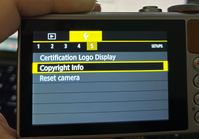
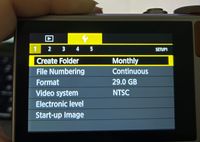
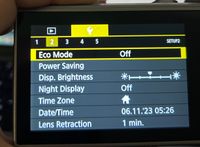
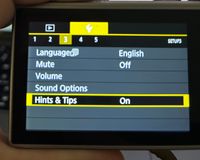
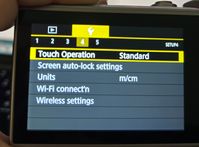
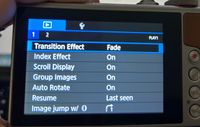
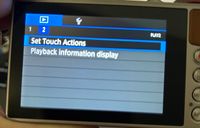
I have tried to figure out how to upload the firmware update, but there is nowhere on the various screens that says firmware. I've googled youtube and followed the firmware instructions here for the G9x Mark ii, and unable to find the screen I need?? I am on a Mac, tried with a cord to Mac and tried with a card in camera with the download, still can't find the firmware screen. Attached Photos. On instructions it says it is under the Play section. Any ideas?
9 REPLIES 9


Options
- Mark as New
- Bookmark
- Subscribe
- Mute
- Subscribe to RSS Feed
- Permalink
- Report Inappropriate Content
11-05-2023 08:36 PM
What mode do you have the camera in? You usually have to be in something like Program (P) mode or perhaps Manual (M). If in Auto mode, some menus will not show up.
--
Ricky
Camera: EOS R5 II, RF 50mm f/1.2L, RF 135mm f/1.8L
Lighting: Profoto Lights & Modifiers
Ricky
Camera: EOS R5 II, RF 50mm f/1.2L, RF 135mm f/1.8L
Lighting: Profoto Lights & Modifiers

Options
- Mark as New
- Bookmark
- Subscribe
- Mute
- Subscribe to RSS Feed
- Permalink
- Report Inappropriate Content
11-06-2023 01:05 AM - edited 11-06-2023 01:08 AM
Greetings,
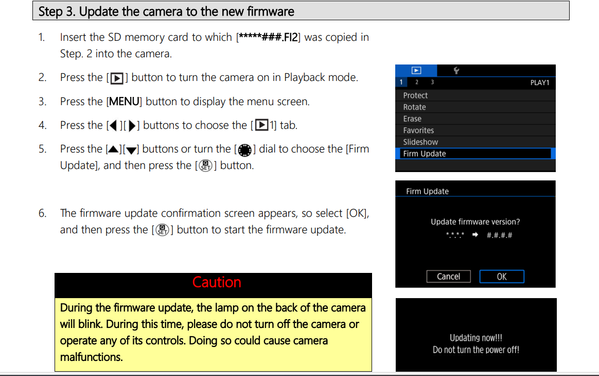
Ricky's points are correct, and ... For the G9x mkII, you have to press the playback button to turn the camera on in playback mode in order to see the firmware update menu. If you turn the camera on first and press the button, the firmware menu will not display.
~Rick
Bay Area - CA
~R5 C (1.1.3.1), ~RF Trinity, ~RF 100 Macro, ~RF 100~400, ~RF 100~500, ~RF 200-800, ~RF 1.4x TC, BG-R10, 430EX III-RT ~DxO PhotoLab Elite ~DaVinci Resolve Studio ~ImageClass MF644Cdw MF656Cdw ~Pixel 10 ~CarePaks Are Worth It
Options
- Mark as New
- Bookmark
- Subscribe
- Mute
- Subscribe to RSS Feed
- Permalink
- Report Inappropriate Content
01-20-2026 06:41 PM
Hi Were Do Get The Firewall f12 to downloed to copy into the sd card
Options
- Mark as New
- Bookmark
- Subscribe
- Mute
- Subscribe to RSS Feed
- Permalink
- Report Inappropriate Content
01-20-2026 06:43 PM
plaese send link
Options
- Mark as New
- Bookmark
- Subscribe
- Mute
- Subscribe to RSS Feed
- Permalink
- Report Inappropriate Content
01-20-2026
07:07 PM
- last edited on
03-08-2026
04:15 PM
by
 Stephen
Greetings ,
I noted that the firmware download is missing from the Canon USA website.
You can download it from Canon, Japan. Note, you can use the translate page option if it displays in Japanese. 😉
PowerShot G9 X Mark II Firmware Version 1.1.0.0 | Support | Canon [Removed Link - Against TOS]
~Rick
Bay Area - CA
~R5 C (1.1.3.1), ~RF Trinity, ~RF 100 Macro, ~RF 100~400, ~RF 100~500, ~RF 200-800, ~RF 1.4x TC, BG-R10, 430EX III-RT ~DxO PhotoLab Elite ~DaVinci Resolve Studio ~ImageClass MF644Cdw MF656Cdw ~Pixel 10 ~CarePaks Are Worth It
Options
- Mark as New
- Bookmark
- Subscribe
- Mute
- Subscribe to RSS Feed
- Permalink
- Report Inappropriate Content
03-08-2026 02:38 PM
Hi about previous conversation I tried to progress the update can't do the update because has error I tried to fully charge


Options
- Mark as New
- Bookmark
- Subscribe
- Mute
- Subscribe to RSS Feed
- Permalink
- Report Inappropriate Content
03-08-2026 04:44 PM
Hey there! This sounds so frustrating and confusing.
To fix that "Update File Error," we just need to make sure the right file is in the right place.
Think of the downloaded .dmg file like a sealed box; the camera can’t see what’s inside until you open it.
Step 1: Open the "Box" on your Mac
-
Double-click the
psg9xmk2-v110-mac.dmgfile you downloaded. -
A new icon (the "Disk Image") will appear on your desktop. Open that icon.
-
Inside, you will see several files. Find the one named
G9XM2110.FI2. This is the only file the camera needs.
Step 2: Move the file to the SD Card
-
Plug your SD card into your Mac.
-
Drag just the
G9XM2110.FI2file out of that box and drop it onto your SD card icon. -
Important: Do not put it inside any folders on the SD card (like DCIM). It must sit "loose" on the card so the camera can find it.
Step 3: Run the Update
-
Put the card in the camera.
-
Turn the camera on by pressing the Playback (triangle) button.
-
Press MENU, go to the Setup (wrench) tab, and select Firmware Ver. to start.
Note: This camera does not support updates through the smartphone app, so using the SD card is the only way to go.

Options
- Mark as New
- Bookmark
- Subscribe
- Mute
- Subscribe to RSS Feed
- Permalink
- Report Inappropriate Content
03-08-2026 04:47 PM
I have windows 11 home
Options
- Mark as New
- Bookmark
- Subscribe
- Mute
- Subscribe to RSS Feed
- Permalink
- Report Inappropriate Content
03-09-2026 09:06 AM
Please call support. 1-800-OK-CANON (800-652-2666). They're open Monday-Friday from 9am to 6pm, Eastern TIme.

Announcements
07/22/2026: New firmware updates are available.
EOS R6 Mark III - Version 1.1.0
05/13/2026: New firmware updates are available.
EOS R5 Mark II - Version 1.3.0
EOS R6 Mark II - Version 1.7.0
04/28/2026: Service Notice: Caution Concerning use of Lithium Batteries
03/17/2026: New firmware updates are available.
SELPHY CP1500 - Version 1.0.7.0
02/23/2026: New firmware update is available for EOS C50- Version 1.0.3.1
01/23/2026: New firmware update is available for RF 24-105mm F4 IS USM- Version 2.0.7
01/20/2026: New firmware updates are available.
10/21/2025: Service Notice: To Users of the Compact Digital Camera PowerShot V1
10/15/2025: New firmware updates are available.
Speedlite EL-5 - Version 1.2.0
Speedlite EL-1 - Version 1.1.0
Speedlite Transmitter ST-E10 - Version 1.2.0
07/28/2025: Notice of Free Repair Service for the Mirrorless Camera EOS R50 (Black)
05/21/2025: New firmware update available for EOS C500 Mark II - Version 1.1.5.1
Related Content
- EOS R5 Mark II firmware won't update in EOS DSLR & Mirrorless Cameras
- EOS R highest jpg resolution isn't in EOS DSLR & Mirrorless Cameras
- Color vertical linea in visor R8 in EOS DSLR & Mirrorless Cameras
- EOS Rebel T3 No option to check firmware version in menu in Camera Software
- EOS R6 Mark III Firmware Request: Allow Manual (M) Exposure in PHOTO Mode When S&F Is Selected in EOS DSLR & Mirrorless Cameras

Ⓒ 2026
Canon U.S.A Inc. All Rights Reserved. Reproduction in whole or part without permission is prohibited.
