Turn on suggestions
Auto-suggest helps you quickly narrow down your search results by suggesting possible matches as you type.
- Canon Community
- Discussions & Help
- Camera
- Point & Shoot Digital Cameras
- Re: Canon G7X Mark 2 video auto darkening problem
Options
- Subscribe to RSS Feed
- Mark Topic as New
- Mark Topic as Read
- Float this Topic for Current User
- Bookmark
- Subscribe
- Mute
- Printer Friendly Page
Canon G7X Mark 2 video auto darkening problem

Options
- Mark as New
- Bookmark
- Subscribe
- Mute
- Subscribe to RSS Feed
- Permalink
- Report Inappropriate Content
12-22-2022 01:19 PM
So I use the camera almost exclusively for underwater photos. When I try to shoot video with the Canon it automatically darkens. I use LED video lights and the brighter I turn them the camera viewscreen seems to automatically darken after a second or two. I tend to "force" exposures to bring out colors so I want the screen a bit brighter than the camera "thinks" it should be. I have changed the settings and turned off the ND filter and auto lightening functions. What am i missing? not that it matters, but the video lights are Light and Motion Gobe lights.
4 REPLIES 4


Options
- Mark as New
- Bookmark
- Subscribe
- Mute
- Subscribe to RSS Feed
- Permalink
- Report Inappropriate Content
12-22-2022 01:57 PM
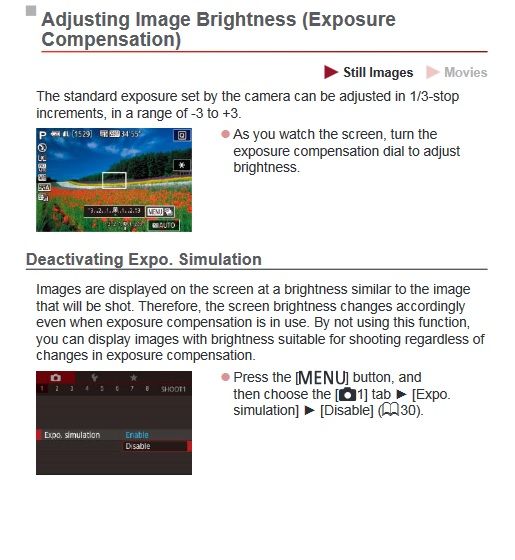
What settings have you changed? Have you tried adjusting exposure compensation? If it is viewscreen only have you tried to turn off Exp. Sim?
Options
- Mark as New
- Bookmark
- Subscribe
- Mute
- Subscribe to RSS Feed
- Permalink
- Report Inappropriate Content
12-22-2022 02:44 PM
Thanks for reply. I have no issues at all with still photos. Its only with video.
The only settings that seemed relevant to what Im seeing were the ND (neutral density) filter which i turned off with no effect.
I also turned off the Auto Lightening Optimizer.
Options
- Mark as New
- Bookmark
- Subscribe
- Mute
- Subscribe to RSS Feed
- Permalink
- Report Inappropriate Content
12-22-2022 02:54 PM
The function table at the back of the manual says that Expo Sim applies to video, too.
Options
- Mark as New
- Bookmark
- Subscribe
- Mute
- Subscribe to RSS Feed
- Permalink
- Report Inappropriate Content
12-22-2022 03:08 PM
well it wasn't exactly the solution to the problem, but you pointed me in the right direction and it now appears to do what i wanted, so THANKS! I will have to wait until the next scuba trip to find if it works


Announcements
05/13/2026: New firmware updates are available.
EOS R5 Mark II - Version 1.3.0
EOS R6 Mark II - Version 1.7.0
04/28/2026: Service Notice: Caution Concerning use of Lithium Batteries
03/17/2026: New firmware updates are available.
SELPHY CP1500 - Version 1.0.7.0
02/23/2026: New firmware update is available for EOS C50- Version 1.0.3.1
01/23/2026: New firmware update is available for RF 24-105mm F4 IS USM- Version 2.0.7
01/20/2026: New firmware updates are available.
12/22/2025: New firmware update is available for EOS R6 Mark III- Version 1.0.2
10/21/2025: Service Notice: To Users of the Compact Digital Camera PowerShot V1
10/15/2025: New firmware updates are available.
Speedlite EL-5 - Version 1.2.0
Speedlite EL-1 - Version 1.1.0
Speedlite Transmitter ST-E10 - Version 1.2.0
07/28/2025: Notice of Free Repair Service for the Mirrorless Camera EOS R50 (Black)
05/21/2025: New firmware update available for EOS C500 Mark II - Version 1.1.5.1
Related Content
- Canon 70d lens contact error in EOS DSLR & Mirrorless Cameras
- R5 Mark II Shutter Continuously Firing in EOS DSLR & Mirrorless Cameras
- Powershot SX530 HS video stops randomly in Point & Shoot Digital Cameras
- Update Firmware on Powershot V1 with a blank screen? in Point & Shoot Digital Cameras
- EOS R6 II corrupt files in EOS DSLR & Mirrorless Cameras

Ⓒ 2026
Canon U.S.A Inc. All Rights Reserved. Reproduction in whole or part without permission is prohibited.
