11-01-2018 02:30 PM - edited 11-02-2018 03:02 PM
Set up my fax which sends but the will not print out fax confirmation and i cannot find it in the menu settings. how to fix this to where it will print out confirmation fax? i have looked through all the settings there is no tx confirmation setting that i can see.
11-14-2018 06:26 PM
Hi onekevin!
I will be glad to assist you.
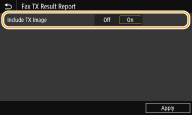
You can set the machine to print a TX confirmation report by following the steps below directly at the printer:
<Output Report>
<Report Settings>
<Fax TX Result Report>
Select <On> or <Only When Error Occurs>
Select <Off> or <On>
<Apply>


01/20/2026: New firmware updates are available.
11/20/2025: New firmware updates are available.
EOS R5 Mark II - Version 1.2.0
PowerShot G7 X Mark III - Version 1.4.0
PowerShot SX740 HS - Version 1.0.2
10/15/2025: New firmware updates are available.
Speedlite EL-5 - Version 1.2.0
Speedlite EL-1 - Version 1.1.0
Speedlite Transmitter ST-E10 - Version 1.2.0
7/17/2025: New firmware updates are available.
02/20/2025: New firmware updates are available.
RF70-200mm F2.8 L IS USM Z - Version 1.0.6
RF24-105mm F2.8 L IS USM Z - Version 1.0.9
RF100-300mm F2.8 L IS USM - Version 1.0.8
Canon U.S.A Inc. All Rights Reserved. Reproduction in whole or part without permission is prohibited.