Turn on suggestions
Auto-suggest helps you quickly narrow down your search results by suggesting possible matches as you type.
- Canon Community
- Discussions & Help
- Printer
- Office Printers
- Re: MF741Cdw - Scanning to Gmail account using App...
Options
- Subscribe to RSS Feed
- Mark Topic as New
- Mark Topic as Read
- Float this Topic for Current User
- Bookmark
- Subscribe
- Mute
- Printer Friendly Page
MF741Cdw - Scanning to Gmail account using App Password not working

Options
- Mark as New
- Bookmark
- Subscribe
- Mute
- Subscribe to RSS Feed
- Permalink
- Report Inappropriate Content
07-27-2022 03:05 PM
I'm attempting to scan documents to my gmail account using. I created a new gmail account solely for my Canon MFD. I setup an App Password solely for the Canon MFD. I've tried various settings in various configurations, and I keep getting error messages (753, 841, 806) and I've taken each action as directed by the error message displayed on the Canon MFD.
Can anyone please point me to a single set of directions that will allow for the scanning of documents to a gmail account? I'm on hold with Canon Support now w/ an estimated wait time of no less than 30 minutes.
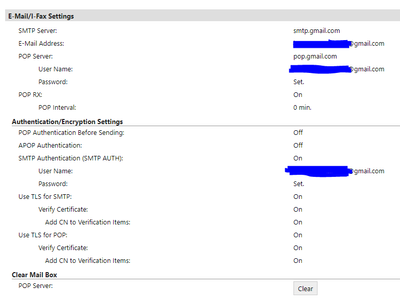
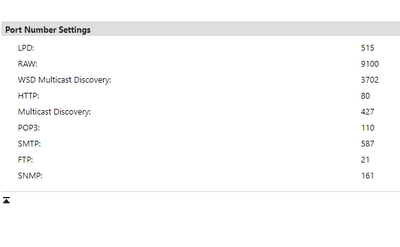
Below are my Remote UI settings. Current SMTP port setting is 587 but I believe I tried 456 or something similar earlier based on different instructions. I'm at a complete loss on how to get set this up. Any help appreciated.
2 REPLIES 2


Options
- Mark as New
- Bookmark
- Subscribe
- Mute
- Subscribe to RSS Feed
- Permalink
- Report Inappropriate Content
08-22-2022 03:31 PM
Hello KruiserIV,
The set of error codes that you are getting point to the scanner being denied access when attempting to connect to your mail server. In this situation, I would suggest speaking with support over the phone at 1-800-652-2666. Our agents would be happy to check what security setting or configuration issues are causing those errors.
Options
- Mark as New
- Bookmark
- Subscribe
- Mute
- Subscribe to RSS Feed
- Permalink
- Report Inappropriate Content
08-25-2022 10:55 AM
Check to make sure that your Gmail account has "less secure apps" enabled. https://support.google.com/a/answer/6260879?hl=en#:~:text=How%20to%20Enable%20less%20Secure%20Apps%2....

Announcements
07/22/2026: New firmware updates are available.
EOS R6 Mark III - Version 1.1.0
05/13/2026: New firmware updates are available.
EOS R5 Mark II - Version 1.3.0
EOS R6 Mark II - Version 1.7.0
04/28/2026: Service Notice: Caution Concerning use of Lithium Batteries
03/17/2026: New firmware updates are available.
SELPHY CP1500 - Version 1.0.7.0
02/23/2026: New firmware update is available for EOS C50- Version 1.0.3.1
01/23/2026: New firmware update is available for RF 24-105mm F4 IS USM- Version 2.0.7
01/20/2026: New firmware updates are available.
10/21/2025: Service Notice: To Users of the Compact Digital Camera PowerShot V1
10/15/2025: New firmware updates are available.
Speedlite EL-5 - Version 1.2.0
Speedlite EL-1 - Version 1.1.0
Speedlite Transmitter ST-E10 - Version 1.2.0
07/28/2025: Notice of Free Repair Service for the Mirrorless Camera EOS R50 (Black)
05/21/2025: New firmware update available for EOS C500 Mark II - Version 1.1.5.1
Related Content
- imageCLASS MF741Cdw, Scan to Preset Destination limited to 5 entries in Office Printers
- imageCLASS MF741Cdw - Retrieving unknown system manager codes in Office Printers
- I can't get my Mac mini (Sequoia 15.1.1) to scan. It can't detect my MF741cdw Printer / Scanner in Office Printers
- imageCLASS MF753Cdw Scan to email says username/password is incorrect in Office Printers
- Canon iR ADV 525 III, scan option "confirm before sending" only works with glass, not feeder in Production Printing

Ⓒ 2026
Canon U.S.A Inc. All Rights Reserved. Reproduction in whole or part without permission is prohibited.
