Turn on suggestions
Auto-suggest helps you quickly narrow down your search results by suggesting possible matches as you type.
- Canon Community
- Discussions & Help
- Printer
- Office Printers
- Re: ImageClass MF632Cdw - No Application Library i...
Options
- Subscribe to RSS Feed
- Mark Topic as New
- Mark Topic as Read
- Float this Topic for Current User
- Bookmark
- Subscribe
- Mute
- Printer Friendly Page
ImageClass MF632Cdw - No Application Library in Remote GUI for System Manager or User

Options
- Mark as New
- Bookmark
- Subscribe
- Mute
- Subscribe to RSS Feed
- Permalink
- Report Inappropriate Content
01-19-2020 11:21 AM
I have an ImageClass MF632Cdw, serial #WUG78573. Device versions:
Main Controller: 7.05, Boot ROM: 1.20, DCON: 1.18, Language: 2.20.
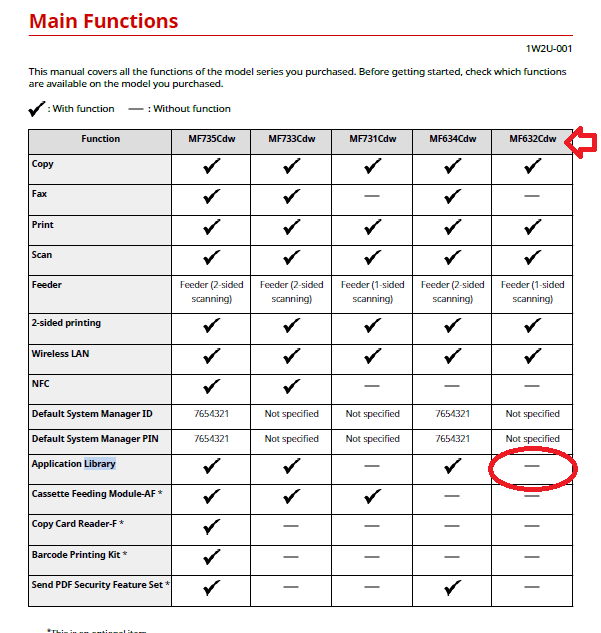
My question is about the Application Library functionality. When opening the web GUI, it has no option for the Application Library button as shown in the documentation. However, the "Standby Slide" and "Print Template" options are available on the Home screen of the device menu. How can I configure the Standby Slide or Print Template when the Application Library is not accessible in the GUI?
I have tried as a logged in user (not timed out), and as System Manager. No Application Library option exists.
Thanks.
5 REPLIES 5


Options
- Mark as New
- Bookmark
- Subscribe
- Mute
- Subscribe to RSS Feed
- Permalink
- Report Inappropriate Content
01-19-2020 11:39 AM
Greetings,
The applications library is a feature and part of the printers ebbedded web server. It has to be enabled to function and to be customized. Some of its services are likely free others may provide basic functionality with enhanced features being available by subscription. This depends on the developer. If Canon (free), if a 3rd party, you may have to subscribe.
I'll post again after I research the feature.
~Rick
Bay Area - CA
~R5 C (1.1.3.1), ~RF Trinity, ~RF 100 Macro, ~RF 100~400, ~RF 100~500, ~RF 200-800, ~RF 1.4x TC, BG-R10, 430EX III-RT ~DxO PhotoLab Elite ~DaVinci Resolve Studio ~ImageClass MF644Cdw MF656Cdw ~Pixel 10 ~CarePaks Are Worth It
Options
- Mark as New
- Bookmark
- Subscribe
- Mute
- Subscribe to RSS Feed
- Permalink
- Report Inappropriate Content
01-19-2020 11:41 AM
It is a Canon product. It is in their documentation.
Thanks.
Options
- Mark as New
- Bookmark
- Subscribe
- Mute
- Subscribe to RSS Feed
- Permalink
- Report Inappropriate Content
01-19-2020 11:44 AM - edited 01-19-2020 11:52 AM
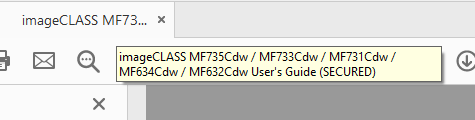
You sure its supported on the 632? I'm thinking no. The manual is for 5 models.
~Rick
Bay Area - CA
~R5 C (1.1.3.1), ~RF Trinity, ~RF 100 Macro, ~RF 100~400, ~RF 100~500, ~RF 200-800, ~RF 1.4x TC, BG-R10, 430EX III-RT ~DxO PhotoLab Elite ~DaVinci Resolve Studio ~ImageClass MF644Cdw MF656Cdw ~Pixel 10 ~CarePaks Are Worth It
Options
- Mark as New
- Bookmark
- Subscribe
- Mute
- Subscribe to RSS Feed
- Permalink
- Report Inappropriate Content
01-19-2020 11:51 AM
Thanks for this.
I don't believe I said it was supported, but I assumed it was since the options show up on the device Home screen. Otherwise, why have them there if you can't use them?
Anyways, that sucks if not.
Thanks again.
Options
- Mark as New
- Bookmark
- Subscribe
- Mute
- Subscribe to RSS Feed
- Permalink
- Report Inappropriate Content
01-19-2020 11:53 AM
Sorry I don't have better news. 
~Rick
Bay Area - CA
~R5 C (1.1.3.1), ~RF Trinity, ~RF 100 Macro, ~RF 100~400, ~RF 100~500, ~RF 200-800, ~RF 1.4x TC, BG-R10, 430EX III-RT ~DxO PhotoLab Elite ~DaVinci Resolve Studio ~ImageClass MF644Cdw MF656Cdw ~Pixel 10 ~CarePaks Are Worth It


Announcements
07/22/2026: New firmware updates are available.
EOS R6 Mark III - Version 1.1.0
05/13/2026: New firmware updates are available.
EOS R5 Mark II - Version 1.3.0
EOS R6 Mark II - Version 1.7.0
04/28/2026: Service Notice: Caution Concerning use of Lithium Batteries
03/17/2026: New firmware updates are available.
SELPHY CP1500 - Version 1.0.7.0
02/23/2026: New firmware update is available for EOS C50- Version 1.0.3.1
01/23/2026: New firmware update is available for RF 24-105mm F4 IS USM- Version 2.0.7
01/20/2026: New firmware updates are available.
10/21/2025: Service Notice: To Users of the Compact Digital Camera PowerShot V1
10/15/2025: New firmware updates are available.
Speedlite EL-5 - Version 1.2.0
Speedlite EL-1 - Version 1.1.0
Speedlite Transmitter ST-E10 - Version 1.2.0
07/28/2025: Notice of Free Repair Service for the Mirrorless Camera EOS R50 (Black)
05/21/2025: New firmware update available for EOS C500 Mark II - Version 1.1.5.1
Related Content
- ImageClass MF753Cdw II – Error 853 on PCL6 & PS3 Test Pages After Firmware Reinstall (UFR II OK) in Office Printers
- imageCLASS MF632Cdw toner leaking on page even with official toner in Office Printers
- imageCLASS MF632Cdw Scanned documents have gaps in Office Printers
- imageCLASS MF753Cdw Help on Rearranging Home Screen Buttons in Office Printers
- imageCLASS MF632Cdw - won't connect via Wi-Fi anymore in Printer Software & Networking

Ⓒ 2026
Canon U.S.A Inc. All Rights Reserved. Reproduction in whole or part without permission is prohibited.
