Turn on suggestions
Auto-suggest helps you quickly narrow down your search results by suggesting possible matches as you type.
- Canon Community
- Discussions & Help
- Printer
- Office Printers
- Cannot define "User Defined Size" printing in pref...
Options
- Subscribe to RSS Feed
- Mark Topic as New
- Mark Topic as Read
- Float this Topic for Current User
- Bookmark
- Subscribe
- Mute
- Printer Friendly Page
Cannot define "User Defined Size" printing in preferences for LBP6230dw

Options
- Mark as New
- Bookmark
- Subscribe
- Mute
- Subscribe to RSS Feed
- Permalink
- Report Inappropriate Content
12-01-2022 01:54 AM
Hello,
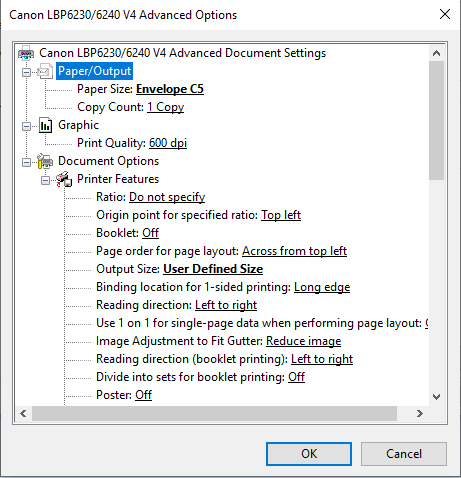
I am a small business that is trying to print my shipping labels on A2 Envelopes with my LBP6230dw printer. No matter how I try to access printing preferences, I cannot set a User Defined Size for my printer, even if I select the "User Defined Size" option in advanced settings or via an external applications such as office or firefox.
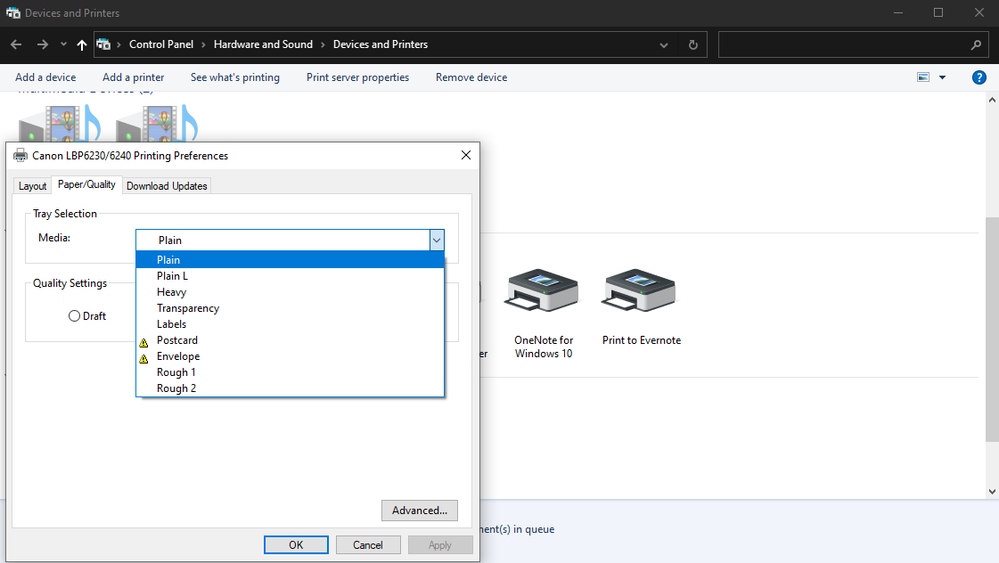
Can this printer even do custom sizes? Its preference interface is maddeningly unintuitive, and I can simply cannot find a way to adjust the paper size outside of very generic media labels such as "Plain, Heavy, Transparency, Envelope, Rough 1, Rough 2, etc."
2 REPLIES 2
Options
- Mark as New
- Bookmark
- Subscribe
- Mute
- Subscribe to RSS Feed
- Permalink
- Report Inappropriate Content
12-01-2022 01:58 AM
Here are some included images showing what I'm seeing in preferences:


Options
- Mark as New
- Bookmark
- Subscribe
- Mute
- Subscribe to RSS Feed
- Permalink
- Report Inappropriate Content
12-13-2022 06:18 PM
Hello Wcclark.
The screen shots taken look like a generic Windows printer connection. The generic Windows printer driver will not give you all of you available paper settings. In this situation, you can try installing the recommended drivers for the LBP6230 using the link HERE. Once installed, you can try printing again to see if the printing preferences look any different. If you have any problems with the installation, you can contact our support team over the phone at 1-800-652-2666. They would would be happy to assist with installing the drivers on your version of Windows.

Announcements
07/22/2026: New firmware updates are available.
EOS R6 Mark III - Version 1.1.0
05/13/2026: New firmware updates are available.
EOS R5 Mark II - Version 1.3.0
EOS R6 Mark II - Version 1.7.0
04/28/2026: Service Notice: Caution Concerning use of Lithium Batteries
03/17/2026: New firmware updates are available.
SELPHY CP1500 - Version 1.0.7.0
02/23/2026: New firmware update is available for EOS C50- Version 1.0.3.1
01/23/2026: New firmware update is available for RF 24-105mm F4 IS USM- Version 2.0.7
01/20/2026: New firmware updates are available.
10/21/2025: Service Notice: To Users of the Compact Digital Camera PowerShot V1
10/15/2025: New firmware updates are available.
Speedlite EL-5 - Version 1.2.0
Speedlite EL-1 - Version 1.1.0
Speedlite Transmitter ST-E10 - Version 1.2.0
07/28/2025: Notice of Free Repair Service for the Mirrorless Camera EOS R50 (Black)
05/21/2025: New firmware update available for EOS C500 Mark II - Version 1.1.5.1
Related Content
- MF650C Printer Preference does not have a Page set up option in Office Printers
- Cannot print long documents on my canon PIXMA TR7120 in Desktop Inkjet Printers
- Imageclass LBP6230dw Prints Blank Only From Mac in Printer Software & Networking
- Unable to print duplex on PIXMA TS3720 in Desktop Inkjet Printers
- MF448dw will not print from paper tray despite default settings in Office Printers

Ⓒ 2026
Canon U.S.A Inc. All Rights Reserved. Reproduction in whole or part without permission is prohibited.
