Turn on suggestions
Auto-suggest helps you quickly narrow down your search results by suggesting possible matches as you type.
- Canon Community
- Discussions & Help
- General Discussion
- General Discussion
- Re: Transferring videos to and from memory card.
Options
- Subscribe to RSS Feed
- Mark Topic as New
- Mark Topic as Read
- Float this Topic for Current User
- Bookmark
- Subscribe
- Mute
- Printer Friendly Page
Transferring videos to and from memory card.

Options
- Mark as New
- Bookmark
- Subscribe
- Mute
- Subscribe to RSS Feed
- Permalink
- Report Inappropriate Content
03-12-2018 12:16 PM
So I have formed the habit of recording my conversations when dealing with government offices or customer service etc. I put my phone on speaker and record with just my point and shoot Canon. This has finally paid off.
I have a court hearing in which I need to bring a couple of those conversations, but my problem is that I can't transfer the videos back to the memory card. I need to bring these to help my case. I assume when transferred from card to my PC that the format of the video must change. Anyone know a solution to this? What format do the videos need to be, to be transferred back to the card?
4 REPLIES 4

Options
- Mark as New
- Bookmark
- Subscribe
- Mute
- Subscribe to RSS Feed
- Permalink
- Report Inappropriate Content
03-12-2018 01:17 PM
What sort of "transfer" are you contemplating? If the videos are in a computer, you should be able to copy them back to a card using a USB card reader.
Bob
Philadelphia, Pennsylvania USA
Philadelphia, Pennsylvania USA


Options
- Mark as New
- Bookmark
- Subscribe
- Mute
- Subscribe to RSS Feed
- Permalink
- Report Inappropriate Content
03-12-2018 02:38 PM
And for those following along note that 12 of the states require the consent of ALL parties when recording phone calls, these states go beyond the Federal single party consent requirement.
In general laws lag technology and as an example shortly after I bought my Corvette there was a required software recall. It has a built in performance data recorder which records vehicle performance parameters along with HD video from a front facing camera AND audio from inside the car. The audio part caused the problem because when the car is put into Valet mode the PDR is turned on to record what is done by parking attendants, dealer service personnel, etc. and the system is code locked so only the owner can turn it back off. GM had to update the software so that in Valet mode it doesn't record audio to avoid violating privacy laws.
Rodger
EOS 1DX M3, 1DX M2, 1DX, 5DS R, M6 Mark II, 1D M2, EOS 650 (film), many lenses, XF400 video

Options
- Mark as New
- Bookmark
- Subscribe
- Mute
- Subscribe to RSS Feed
- Permalink
- Report Inappropriate Content
03-12-2018 04:47 PM
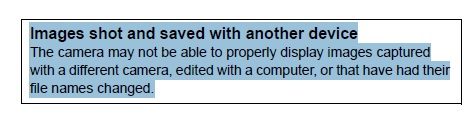
Which camera?
From my T6S manual - and I suppose *every* Canon manual:
Options
- Mark as New
- Bookmark
- Subscribe
- Mute
- Subscribe to RSS Feed
- Permalink
- Report Inappropriate Content
03-12-2018 04:49 PM
Figured it out, it was as I said, the format needs to changed to put the vids back on the memory card. Once tranferred to the PC they are in AVI format which the card won't accept. Just need to change format.

Announcements
07/22/2026: New firmware updates are available.
EOS R6 Mark III - Version 1.1.0
05/13/2026: New firmware updates are available.
EOS R5 Mark II - Version 1.3.0
EOS R6 Mark II - Version 1.7.0
04/28/2026: Service Notice: Caution Concerning use of Lithium Batteries
03/17/2026: New firmware updates are available.
SELPHY CP1500 - Version 1.0.7.0
02/23/2026: New firmware update is available for EOS C50- Version 1.0.3.1
01/23/2026: New firmware update is available for RF 24-105mm F4 IS USM- Version 2.0.7
01/20/2026: New firmware updates are available.
10/21/2025: Service Notice: To Users of the Compact Digital Camera PowerShot V1
10/15/2025: New firmware updates are available.
Speedlite EL-5 - Version 1.2.0
Speedlite EL-1 - Version 1.1.0
Speedlite Transmitter ST-E10 - Version 1.2.0
07/28/2025: Notice of Free Repair Service for the Mirrorless Camera EOS R50 (Black)
05/21/2025: New firmware update available for EOS C500 Mark II - Version 1.1.5.1
Related Content
- Problem Transferring Video in General Discussion
- Transferring videos to and from memory card. in General Discussion
- Camera memory card was accidentally formatted? in General Discussion
- Transfer pictures and video wirelessly as they are taken to a PC. Wireless USB or Bluetooth or WiFi. in General Discussion

Ⓒ 2026
Canon U.S.A Inc. All Rights Reserved. Reproduction in whole or part without permission is prohibited.
