Turn on suggestions
Auto-suggest helps you quickly narrow down your search results by suggesting possible matches as you type.
- Canon Community
- Discussions & Help
- Camera
- EOS DSLR & Mirrorless Cameras
- Blue dot on my videos?
Options
- Subscribe to RSS Feed
- Mark Topic as New
- Mark Topic as Read
- Float this Topic for Current User
- Bookmark
- Subscribe
- Mute
- Printer Friendly Page

Options
- Mark as New
- Bookmark
- Subscribe
- Mute
- Subscribe to RSS Feed
- Permalink
- Report Inappropriate Content
06-17-2016 01:58 PM
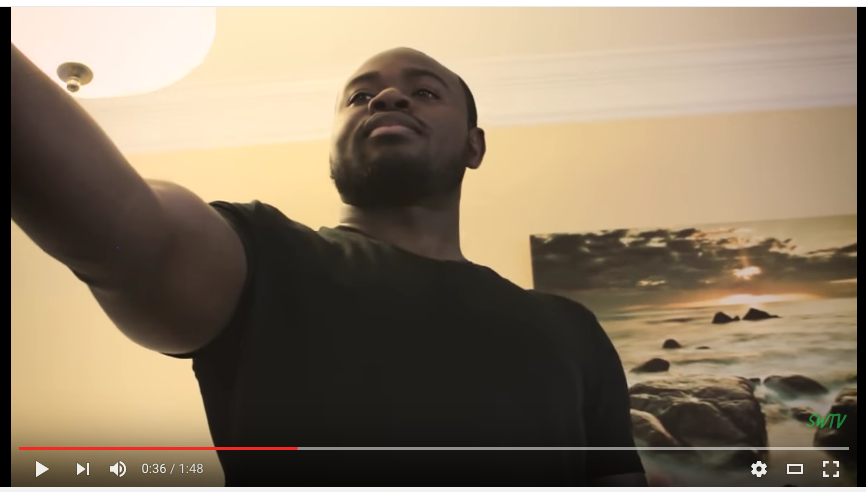
For a while now, there's this little blue dot on the left half of the screen whenever I'm in video mode, and it also shows up in video playback. I already confirmed that it isn't the lens, since it shows up no matter which lens I use. How can I get my camera back to normal?
(In this image, the blue dot is right near this man's elbow.)
Solved! Go to Solution.
1 ACCEPTED SOLUTION
Accepted Solutions


Options
- Mark as New
- Bookmark
- Subscribe
- Mute
- Subscribe to RSS Feed
- Permalink
- Report Inappropriate Content
06-17-2016 02:33 PM
Try this:
Remove lens and put lens cover on the camera. Cover the viewfinder and in Canon menu, do a manual sensor cleaning and let the camera be active för at least one minute. Repeat until the blue spot disappear.
The step after that is Canon service center.
Remove lens and put lens cover on the camera. Cover the viewfinder and in Canon menu, do a manual sensor cleaning and let the camera be active för at least one minute. Repeat until the blue spot disappear.
The step after that is Canon service center.
3 REPLIES 3


Options
- Mark as New
- Bookmark
- Subscribe
- Mute
- Subscribe to RSS Feed
- Permalink
- Report Inappropriate Content
06-17-2016 02:14 PM
Hi stuartwpetty!
Welcome to the Canon Community and thank you for your post!
So that the Community can help you better, we will need to know exactly what Canon equipment you're using, the Computer Operating System you're using (Windows Vista/7/8/10 or Mac OS), and the way you download your footage to your computer - USB or over WiFi. It's also helpful to know if the blue dot is in video before its edited, and the editing software you use (if any).
Any other details you'd like to give will only help the Community better understand your issue!
If this is an urgent support need, please CLICK HERE to reach our friendly Technical Support Team by phone or email.
Thanks and have a great day!
Options
- Mark as New
- Bookmark
- Subscribe
- Mute
- Subscribe to RSS Feed
- Permalink
- Report Inappropriate Content
06-17-2016 02:33 PM
Try this:
Remove lens and put lens cover on the camera. Cover the viewfinder and in Canon menu, do a manual sensor cleaning and let the camera be active för at least one minute. Repeat until the blue spot disappear.
The step after that is Canon service center.
Remove lens and put lens cover on the camera. Cover the viewfinder and in Canon menu, do a manual sensor cleaning and let the camera be active för at least one minute. Repeat until the blue spot disappear.
The step after that is Canon service center.
Options
- Mark as New
- Bookmark
- Subscribe
- Mute
- Subscribe to RSS Feed
- Permalink
- Report Inappropriate Content
06-17-2016 02:40 PM
Thank you! That did the trick!

Announcements
01/23/2026: New firmware update is available for RF 24-105mm F4 IS USM- Version 2.0.7
12/22/2025: New firmware update is available for EOS R6 Mark III- Version 1.0.2
10/21/2025: Service Notice: To Users of the Compact Digital Camera PowerShot V1
07/28/2025: Notice of Free Repair Service for the Mirrorless Camera EOS R50 (Black)
05/21/2025: New firmware update available for EOS C500 Mark II - Version 1.1.5.1
01/20/2026: New firmware updates are available.
12/22/2025: New firmware update is available for EOS R6 Mark III- Version 1.0.2
11/20/2025: New firmware updates are available.
EOS R5 Mark II - Version 1.2.0
PowerShot G7 X Mark III - Version 1.4.0
PowerShot SX740 HS - Version 1.0.2
10/21/2025: Service Notice: To Users of the Compact Digital Camera PowerShot V1
10/15/2025: New firmware updates are available.
Speedlite EL-5 - Version 1.2.0
Speedlite EL-1 - Version 1.1.0
Speedlite Transmitter ST-E10 - Version 1.2.0
07/28/2025: Notice of Free Repair Service for the Mirrorless Camera EOS R50 (Black)
7/17/2025: New firmware updates are available.
05/21/2025: New firmware update available for EOS C500 Mark II - Version 1.1.5.1
02/20/2025: New firmware updates are available.
RF70-200mm F2.8 L IS USM Z - Version 1.0.6
RF24-105mm F2.8 L IS USM Z - Version 1.0.9
RF100-300mm F2.8 L IS USM - Version 1.0.8
Related Content
- EOS R8 freezes and fails video recording after 1.5.0 firmware upgrade in EOS DSLR & Mirrorless Cameras
- EOS R6 Mark III Video wobble issue in EOS DSLR & Mirrorless Cameras
- EOS 5D MK IV - Show Focus Point in View Finder? in EOS DSLR & Mirrorless Cameras
- DM-E100 Mic: Video has loud static — Please help! in Camera Accessories
- Canon EOS 60D photos will not save to the camera SD card in EOS DSLR & Mirrorless Cameras

Ⓒ 2026
Canon U.S.A Inc. All Rights Reserved. Reproduction in whole or part without permission is prohibited.
