Turn on suggestions
Auto-suggest helps you quickly narrow down your search results by suggesting possible matches as you type.
- Canon Community
- Discussions & Help
- Camera
- EOS DSLR & Mirrorless Cameras
- Re: T5I Easy Wireless Flash problems
Options
- Subscribe to RSS Feed
- Mark Topic as New
- Mark Topic as Read
- Float this Topic for Current User
- Bookmark
- Subscribe
- Mute
- Printer Friendly Page
T5I Easy Wireless Flash problems

Options
- Mark as New
- Bookmark
- Subscribe
- Mute
- Subscribe to RSS Feed
- Permalink
- Report Inappropriate Content
11-06-2017 05:19 PM
I have an EOS T5I and a 430EX-IIIRT Flash but cannot get the Flash to fire remotely.
I have selected Easywireless Flash on the camera, put the flash into Slave mode, and made sure they are on the same channel, but cannot get the Flash to fire remotely.
Wondering if anyone else has had these issues and if a solution was found?
14 REPLIES 14

Options
- Mark as New
- Bookmark
- Subscribe
- Mute
- Subscribe to RSS Feed
- Permalink
- Report Inappropriate Content
11-06-2017 06:02 PM
@Charliemora2 wrote:I have an EOS T5I and a 430EX-IIIRT Flash but cannot get the Flash to fire remotely.
I have selected Easywireless Flash on the camera, put the flash into Slave mode, and made sure they are on the same channel, but cannot get the Flash to fire remotely.
Wondering if anyone else has had these issues and if a solution was found?
1. This works only with the creative modes (Av, Tv, M).
2. You need to pop the built-in flash up
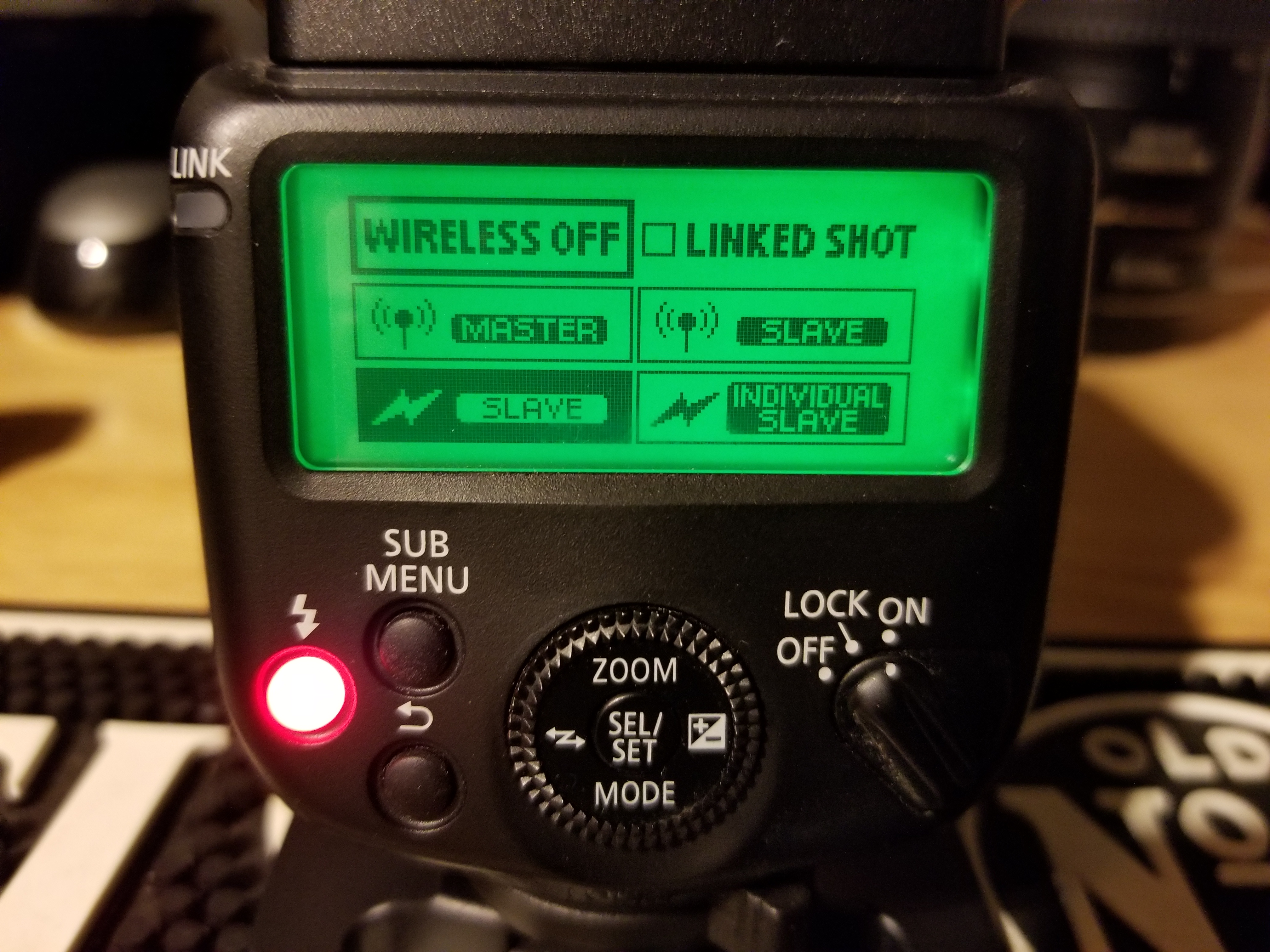
3. Your 430EX-III supports two slave modes - one optical and the other Radio. The T5i can only do optical, so make sure the slave mode on the flash has the lightning bolt symbol and not the antenna symbol with the circles.
================================================
Diverhank's photos on Flickr
Diverhank's photos on Flickr


Options
- Mark as New
- Bookmark
- Subscribe
- Mute
- Subscribe to RSS Feed
- Permalink
- Report Inappropriate Content
11-06-2017 06:40 PM
You forgot "P" 8^)
Options
- Mark as New
- Bookmark
- Subscribe
- Mute
- Subscribe to RSS Feed
- Permalink
- Report Inappropriate Content
11-06-2017 06:45 PM
@diverhank wrote:
@Charliemora2 wrote:I have an EOS T5I and a 430EX-IIIRT Flash but cannot get the Flash to fire remotely.
I have selected Easywireless Flash on the camera, put the flash into Slave mode, and made sure they are on the same channel, but cannot get the Flash to fire remotely.
Wondering if anyone else has had these issues and if a solution was found?1. This works only with the creative modes (Av, Tv, M).
2. You need to pop the built-in flash up
3. Your 430EX-III supports two slave modes - one optical and the other Radio. The T5i can only do optical, so make sure the slave mode on the flash has the lightning bolt symbol and not the antenna symbol with the circles.
That is a Yes for all 3 questions, but still cannot get the Remote Flash to fire

Options
- Mark as New
- Bookmark
- Subscribe
- Mute
- Subscribe to RSS Feed
- Permalink
- Report Inappropriate Content
11-06-2017 06:53 PM
@Charliemora2 wrote:
@diverhank wrote:
@Charliemora2 wrote:I have an EOS T5I and a 430EX-IIIRT Flash but cannot get the Flash to fire remotely.
I have selected Easywireless Flash on the camera, put the flash into Slave mode, and made sure they are on the same channel, but cannot get the Flash to fire remotely.
Wondering if anyone else has had these issues and if a solution was found?1. This works only with the creative modes (Av, Tv, M).
2. You need to pop the built-in flash up
3. Your 430EX-III supports two slave modes - one optical and the other Radio. The T5i can only do optical, so make sure the slave mode on the flash has the lightning bolt symbol and not the antenna symbol with the circles.
That is a Yes for all 3 questions, but still cannot get the Remote Flash to fire
Optical means that the camera and remote flash need to have a line of sight.
How far away is the remote, relative to the camera?
--------------------------------------------------------
"Enjoying photography since 1972."
"Enjoying photography since 1972."
Options
- Mark as New
- Bookmark
- Subscribe
- Mute
- Subscribe to RSS Feed
- Permalink
- Report Inappropriate Content
11-06-2017 06:58 PM
@Waddizzle wrote:
@Charliemora2 wrote:
@diverhank wrote:
@Charliemora2 wrote:I have an EOS T5I and a 430EX-IIIRT Flash but cannot get the Flash to fire remotely.
I have selected Easywireless Flash on the camera, put the flash into Slave mode, and made sure they are on the same channel, but cannot get the Flash to fire remotely.
Wondering if anyone else has had these issues and if a solution was found?1. This works only with the creative modes (Av, Tv, M).
2. You need to pop the built-in flash up
3. Your 430EX-III supports two slave modes - one optical and the other Radio. The T5i can only do optical, so make sure the slave mode on the flash has the lightning bolt symbol and not the antenna symbol with the circles.
That is a Yes for all 3 questions, but still cannot get the Remote Flash to fire
Optical means that the camera and remote flash need to have a line of sight.
How far away is the remote, relative to the camera?
I tried different distances from 2 to 6 feet, while I was trying to get it to work, and I had the front sensor od the Flash facing the camera with the pop up flash up. The Pop up flash would always fire, but the Speedlight would not trigger.
Options
- Mark as New
- Bookmark
- Subscribe
- Mute
- Subscribe to RSS Feed
- Permalink
- Report Inappropriate Content
11-06-2017 07:31 PM
I’ll assume that you have it configured properly. Sounds like you know what to do to make it work. From what you have described, it sounds like the remote should fire. If the flash does not work when mounted on the camera, then there could be problem with the flash.
--------------------------------------------------------
"Enjoying photography since 1972."
"Enjoying photography since 1972."
Options
- Mark as New
- Bookmark
- Subscribe
- Mute
- Subscribe to RSS Feed
- Permalink
- Report Inappropriate Content
11-06-2017 11:50 PM
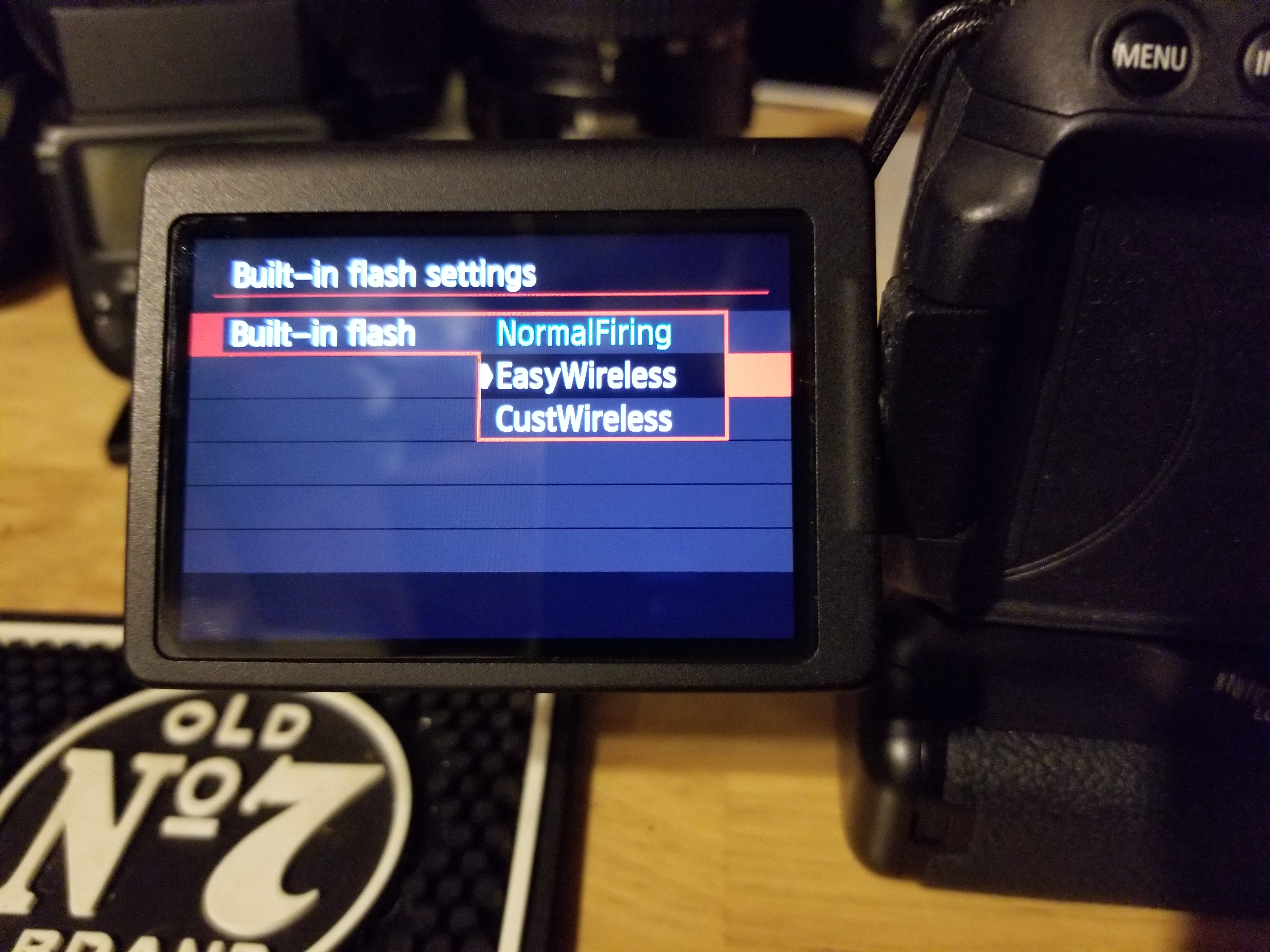
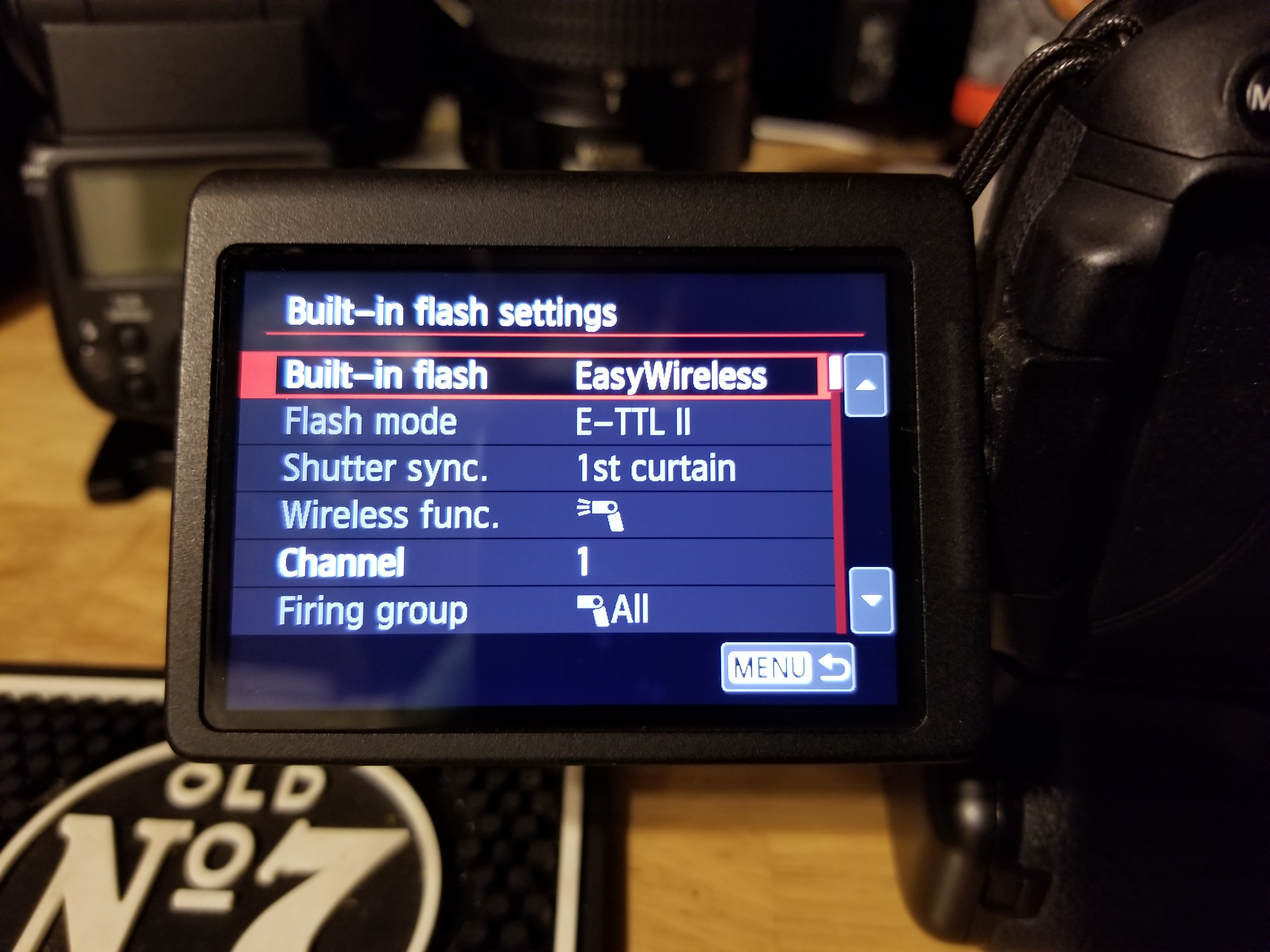
Can you take a picture of the camera flash menu and the flash menu and post them here. We can then can tell if something is amiss...
If you have set everything correctly it should work unless the flash is broken which I doubt is the case.
================================================
Diverhank's photos on Flickr
Diverhank's photos on Flickr
Options
- Mark as New
- Bookmark
- Subscribe
- Mute
- Subscribe to RSS Feed
- Permalink
- Report Inappropriate Content
11-07-2017 08:13 AM
The pop up flash works when taking photos and the Speedlight works when mounted in the hotshoe.
I have read the manuals for the Camera and the Flash and watched several youtube videos trying to get this to work, the settings seem simple enough, as to why I am not sure why it's not working, and wondering if there is something simple I am overlooking.
I will take some pictures of the menus and post them shortly.
Thank you for all your feedback and help guys.
I have read the manuals for the Camera and the Flash and watched several youtube videos trying to get this to work, the settings seem simple enough, as to why I am not sure why it's not working, and wondering if there is something simple I am overlooking.
I will take some pictures of the menus and post them shortly.
Thank you for all your feedback and help guys.
Options
- Mark as New
- Bookmark
- Subscribe
- Mute
- Subscribe to RSS Feed
- Permalink
- Report Inappropriate Content
11-07-2017 08:56 AM


Announcements
07/22/2026: New firmware updates are available.
EOS R6 Mark III - Version 1.1.0
05/13/2026: New firmware updates are available.
EOS R5 Mark II - Version 1.3.0
EOS R6 Mark II - Version 1.7.0
04/28/2026: Service Notice: Caution Concerning use of Lithium Batteries
03/17/2026: New firmware updates are available.
SELPHY CP1500 - Version 1.0.7.0
02/23/2026: New firmware update is available for EOS C50- Version 1.0.3.1
01/23/2026: New firmware update is available for RF 24-105mm F4 IS USM- Version 2.0.7
01/20/2026: New firmware updates are available.
10/21/2025: Service Notice: To Users of the Compact Digital Camera PowerShot V1
10/15/2025: New firmware updates are available.
Speedlite EL-5 - Version 1.2.0
Speedlite EL-1 - Version 1.1.0
Speedlite Transmitter ST-E10 - Version 1.2.0
07/28/2025: Notice of Free Repair Service for the Mirrorless Camera EOS R50 (Black)
05/21/2025: New firmware update available for EOS C500 Mark II - Version 1.1.5.1
Related Content
- Loading metadata using EOS Utility 3 is a nightmare! in Camera Software
- Flash NOT working on my Canon SX740 HS in Point & Shoot Digital Cameras
- Canon EL-5 Not Linking in Radio Receiver Mode (Channel & ID Match) in Speedlite Flashes
- PowerShot G7 X Mark III freezing in Point & Shoot Digital Cameras
- EOS R5 awb white Priority problems with flash in EOS DSLR & Mirrorless Cameras

Ⓒ 2026
Canon U.S.A Inc. All Rights Reserved. Reproduction in whole or part without permission is prohibited.
