Turn on suggestions
Auto-suggest helps you quickly narrow down your search results by suggesting possible matches as you type.
- Canon Community
- Discussions & Help
- Camera
- EOS DSLR & Mirrorless Cameras
- Re: Pairing a canon EOS 1300D to a laptop computer
Options
- Subscribe to RSS Feed
- Mark Topic as New
- Mark Topic as Read
- Float this Topic for Current User
- Bookmark
- Subscribe
- Mute
- Printer Friendly Page
Pairing a canon EOS 1300D to a laptop computer

Options
- Mark as New
- Bookmark
- Subscribe
- Mute
- Subscribe to RSS Feed
- Permalink
- Report Inappropriate Content
01-14-2019 11:28 AM
Hi, I am attempting to conect my dslr EOS 1300d to my laptop. I have pluged the camera into the comp., gone into EOS utility, clicked on utility launcher, the conect box comes up, I then click on pairing and when the next box comes up, with camera model, mac, IP address, the conect botton is greyed out. Can any one advise please?
13 REPLIES 13


Options
- Mark as New
- Bookmark
- Subscribe
- Mute
- Subscribe to RSS Feed
- Permalink
- Report Inappropriate Content
01-14-2019 12:26 PM
Are you making a USB connection or a WIFI connection? You don't need to "pair" with a usb connected camera.
Options
- Mark as New
- Bookmark
- Subscribe
- Mute
- Subscribe to RSS Feed
- Permalink
- Report Inappropriate Content
01-14-2019 04:25 PM
Hi KV Barkley, I am gtrying to connect my camera with a usb cable, with not much success, any info you may have as to how to do this would be greatly appreciated. The camera is conected to my windows 10 64b laptop. Should I disable the wi fi? I do have all the Canon software installed and my ultimate aim is to use the camera as a web cam. As you may have guessed by now I am very new to all this thech. Any information will be much appreciated.
KInd regards
Trev B
Options
- Mark as New
- Bookmark
- Subscribe
- Mute
- Subscribe to RSS Feed
- Permalink
- Report Inappropriate Content
01-14-2019 06:09 PM
Turn off Wifi on the camera.
A Canon DSLR does not make a good web cam. You cannot stream video from it.
Options
- Mark as New
- Bookmark
- Subscribe
- Mute
- Subscribe to RSS Feed
- Permalink
- Report Inappropriate Content
01-15-2019 10:47 AM
Hi, KVBarkley, I do not intend streaming, from the camerea, I just want to use it as a webcam for recording through OBS. If you think this is not a good idea, I would be pleased to receive your thoughts on the matter. Thank you once again nfor your input.
Kind regards
Trev B
Options
- Mark as New
- Bookmark
- Subscribe
- Mute
- Subscribe to RSS Feed
- Permalink
- Report Inappropriate Content
01-15-2019 01:53 PM
What is OBS?
Options
- Mark as New
- Bookmark
- Subscribe
- Mute
- Subscribe to RSS Feed
- Permalink
- Report Inappropriate Content
01-15-2019 04:22 PM
OBS is Open Broadcast Service. Which is a streaming and recording app., which is a fantastic program for recording, giving access to several video capture devices, screen captures, images etc: all in the same video. The only reason I want to use my camera is; I am informed, that it records in HD, which hopefully will give a better result than a bog standard webcam. I have studied several tutorial video's on UTube, showing canon items used but none showing the EOS 1300D. Even if I can't use it as a webcam I would still like to know how to connect it to my computer.
Kind regards
Trev B
Options
- Mark as New
- Bookmark
- Subscribe
- Mute
- Subscribe to RSS Feed
- Permalink
- Report Inappropriate Content
01-15-2019 04:30 PM
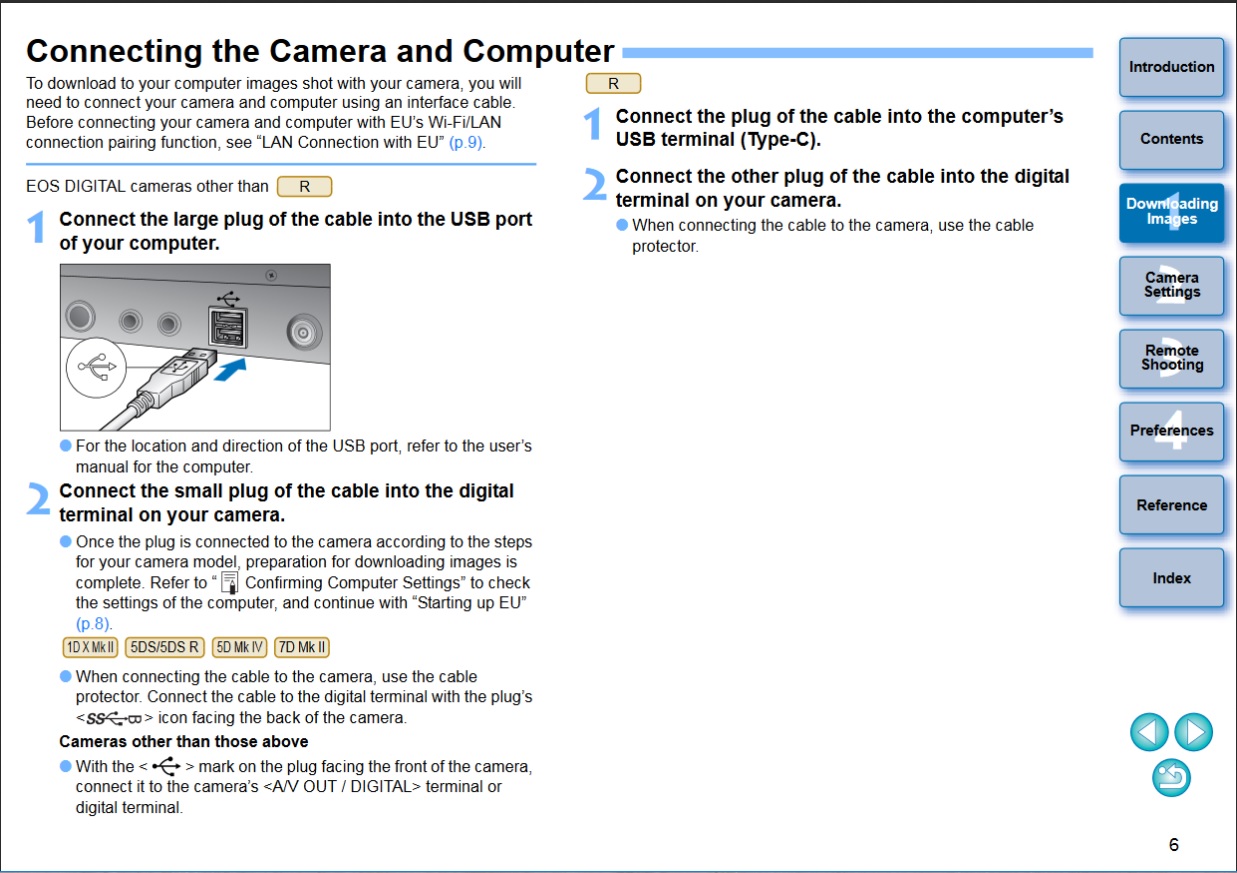
Are you sure you are using a standard USB cable and not a charging cable?
Options
- Mark as New
- Bookmark
- Subscribe
- Mute
- Subscribe to RSS Feed
- Permalink
- Report Inappropriate Content
01-15-2019 04:36 PM

Options
- Mark as New
- Bookmark
- Subscribe
- Mute
- Subscribe to RSS Feed
- Permalink
- Report Inappropriate Content
01-16-2019 11:15 AM
Hi KV, I am still having problems, I am using the usb cable that was provided with the camera, I have attempted to follow the instructions you kindly sent me but I didn't get off first base. The computer is not recognising the camera. it is not showing either in devices or printers or devices in the settings menu. I have tried the cable in all of my USB ports all to no avail. Could the camera be faulty or could it be something to do with my computer?
Kind regards
Trev B

Announcements
04/28/2026: Service Notice: Caution Concerning use of Lithium Batteries
02/23/2026: New firmware update is available for EOS C50- Version 1.0.3.1
01/23/2026: New firmware update is available for RF 24-105mm F4 IS USM- Version 2.0.7
12/22/2025: New firmware update is available for EOS R6 Mark III- Version 1.0.2
10/21/2025: Service Notice: To Users of the Compact Digital Camera PowerShot V1
07/28/2025: Notice of Free Repair Service for the Mirrorless Camera EOS R50 (Black)
05/21/2025: New firmware update available for EOS C500 Mark II - Version 1.1.5.1
03/17/2026: New firmware updates are available.
SELPHY CP1500 - Version 1.0.7.0
02/23/2026: New firmware update is available for EOS C50- Version 1.0.3.1
01/23/2026: New firmware update is available for RF 24-105mm F4 IS USM- Version 2.0.7
01/20/2026: New firmware updates are available.
12/22/2025: New firmware update is available for EOS R6 Mark III- Version 1.0.2
11/20/2025: New firmware updates are available.
EOS R5 Mark II - Version 1.2.0
PowerShot G7 X Mark III - Version 1.4.0
PowerShot SX740 HS - Version 1.0.2
10/21/2025: Service Notice: To Users of the Compact Digital Camera PowerShot V1
10/15/2025: New firmware updates are available.
Speedlite EL-5 - Version 1.2.0
Speedlite EL-1 - Version 1.1.0
Speedlite Transmitter ST-E10 - Version 1.2.0
07/28/2025: Notice of Free Repair Service for the Mirrorless Camera EOS R50 (Black)
7/17/2025: New firmware updates are available.
05/21/2025: New firmware update available for EOS C500 Mark II - Version 1.1.5.1
Related Content
- Driver needed for 20-year-old EOS Digital Rebel in Camera Software
- Audio crackle/scratch only when using clean HDMI out with a long cable from mic to 90D in EOS DSLR & Mirrorless Cameras
- EOS R6 Mark II - camera was disconnected during downloading in EOS Utility in Camera Software
- EOS 100D USB connection not recognised anymore (Win11) in EOS DSLR & Mirrorless Cameras
- EOS Utility not starting on my Mac in Camera Software

Ⓒ 2026
Canon U.S.A Inc. All Rights Reserved. Reproduction in whole or part without permission is prohibited.
