Turn on suggestions
Auto-suggest helps you quickly narrow down your search results by suggesting possible matches as you type.
- Canon Community
- Discussions & Help
- Camera
- EOS DSLR & Mirrorless Cameras
- Re: Odd filename creation...
Options
- Subscribe to RSS Feed
- Mark Topic as New
- Mark Topic as Read
- Float this Topic for Current User
- Bookmark
- Subscribe
- Mute
- Printer Friendly Page
Odd filename creation...

Options
- Mark as New
- Bookmark
- Subscribe
- Mute
- Subscribe to RSS Feed
- Permalink
- Report Inappropriate Content
03-05-2019 01:24 PM
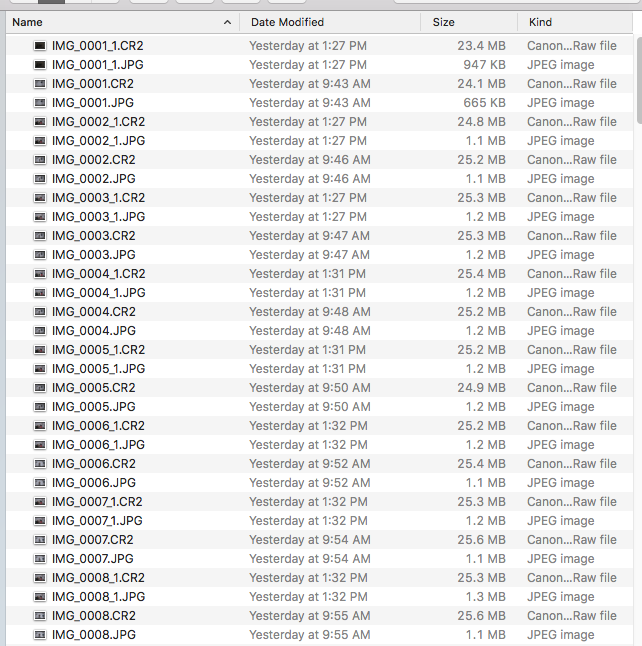
My 5DMKIII has been creating these odd filenames which makes ordering & viewing files a real pain in the arse. I don't recall changing any filename related settings in the camera, although I don't see how there would be an option for this mess.
Thanks for any help.
6 REPLIES 6


Options
- Mark as New
- Bookmark
- Subscribe
- Mute
- Subscribe to RSS Feed
- Permalink
- Report Inappropriate Content
03-05-2019 01:40 PM
I had a problem like this on my T6S. I have no idea what happened. I reformatted the card and it went away.
Options
- Mark as New
- Bookmark
- Subscribe
- Mute
- Subscribe to RSS Feed
- Permalink
- Report Inappropriate Content
03-05-2019 02:57 PM
Hmmmm, I format my cards all the time. I will try erasing free space on a computer & then format in camera, thanks.
Options
- Mark as New
- Bookmark
- Subscribe
- Mute
- Subscribe to RSS Feed
- Permalink
- Report Inappropriate Content
03-05-2019 03:01 PM - edited 03-05-2019 03:02 PM
If that doesn't work, you might try resetting the camera. I feel your pain. I imported a few hundred duplicates before I figured it out. 8^(
Options
- Mark as New
- Bookmark
- Subscribe
- Mute
- Subscribe to RSS Feed
- Permalink
- Report Inappropriate Content
03-05-2019 03:31 PM
I just realized this only hapens when I use EOS Utility for "Quick Preview" mode. When I record to media in-camera, the file naming is normal.
Unfortunately, Canon seems to have eliminated the option to record to camera media while sending only the jpg files to the computer for preview.
Options
- Mark as New
- Bookmark
- Subscribe
- Mute
- Subscribe to RSS Feed
- Permalink
- Report Inappropriate Content
03-05-2019 03:54 PM
Interesting. I have never used EOS_Utility - though I suppose Image Capture on the Mac could be using this "Quick Preview" mode.
Options
- Mark as New
- Bookmark
- Subscribe
- Mute
- Subscribe to RSS Feed
- Permalink
- Report Inappropriate Content
03-05-2019 04:11 PM
That's gotta be it. I've had issues with Macs and file names before.

Announcements
07/22/2026: New firmware updates are available.
EOS R6 Mark III - Version 1.1.0
05/13/2026: New firmware updates are available.
EOS R5 Mark II - Version 1.3.0
EOS R6 Mark II - Version 1.7.0
04/28/2026: Service Notice: Caution Concerning use of Lithium Batteries
03/17/2026: New firmware updates are available.
SELPHY CP1500 - Version 1.0.7.0
02/23/2026: New firmware update is available for EOS C50- Version 1.0.3.1
01/23/2026: New firmware update is available for RF 24-105mm F4 IS USM- Version 2.0.7
01/20/2026: New firmware updates are available.
10/21/2025: Service Notice: To Users of the Compact Digital Camera PowerShot V1
10/15/2025: New firmware updates are available.
Speedlite EL-5 - Version 1.2.0
Speedlite EL-1 - Version 1.1.0
Speedlite Transmitter ST-E10 - Version 1.2.0
07/28/2025: Notice of Free Repair Service for the Mirrorless Camera EOS R50 (Black)
05/21/2025: New firmware update available for EOS C500 Mark II - Version 1.1.5.1
Related Content
- After a wedding shoot, R5ii did not record images to memory card for a span of about 200 pictures in EOS DSLR & Mirrorless Cameras
- EOS R8 Change timestamp -1 hour in EOS DSLR & Mirrorless Cameras
- EOS Utility : Sequential number vs image number in the filename in Camera Software
- New version 4.21.10.0 of Canon DPP software is available in Camera Software
- EOS R6 Mark II Wrong file name prefix since upgrade to firmware 1.6.0 in EOS DSLR & Mirrorless Cameras

Ⓒ 2026
Canon U.S.A Inc. All Rights Reserved. Reproduction in whole or part without permission is prohibited.
