Turn on suggestions
Auto-suggest helps you quickly narrow down your search results by suggesting possible matches as you type.
- Canon Community
- Discussions & Help
- Camera
- EOS DSLR & Mirrorless Cameras
- Re: Image appears to be bluish
Options
- Subscribe to RSS Feed
- Mark Topic as New
- Mark Topic as Read
- Float this Topic for Current User
- Bookmark
- Subscribe
- Mute
- Printer Friendly Page

Options
- Mark as New
- Bookmark
- Subscribe
- Mute
- Subscribe to RSS Feed
- Permalink
- Report Inappropriate Content
12-18-2018 10:17 PM
Canon Rebel T6s
Raw file
I am a newbie in DSLR world.
Only recently, I have tried a few times of snap shots in the streets and parks. Have found out serious bluish tune in the images shot in sun light. And what troubles is that it can not be ajusted in Photoshop and/or Camera Raw.
I have tried to find the colour settings in T6s but failed to find it.
Is it because of the settings in the camera? Please help.
Thanks.
Solved! Go to Solution.
1 ACCEPTED SOLUTION
Accepted Solutions


Options
- Mark as New
- Bookmark
- Subscribe
- Mute
- Subscribe to RSS Feed
- Permalink
- Report Inappropriate Content
12-21-2018 11:10 AM
Of course it doesn't, because you are not in AWB mode. See the little sun? that says you are in daylight WB. Press Q, hit the sun and select AWB.
9 REPLIES 9

Options
- Mark as New
- Bookmark
- Subscribe
- Mute
- Subscribe to RSS Feed
- Permalink
- Report Inappropriate Content
12-18-2018 11:37 PM
It's a White Balance setting problem. Set the camera to Auto WB and / or if processing RAW images (I don't use DPP very often so not sure just where) try the different WB options.
"A skill is developed through constant practice with a passion to improve, not bought."
Options
- Mark as New
- Bookmark
- Subscribe
- Mute
- Subscribe to RSS Feed
- Permalink
- Report Inappropriate Content
12-19-2018 08:45 AM
Post a sample. There is no way that it cannot be adjusted in Photoshop!
Do JPEGS from the camera show the same issue?
Options
- Mark as New
- Bookmark
- Subscribe
- Mute
- Subscribe to RSS Feed
- Permalink
- Report Inappropriate Content
12-21-2018 12:12 AM
Thank you. Yes, I think the problem is of the wrong WB setting. But I can not reset it. "Custom White Balance" in the Menu is selected but I can not reset it. An image appears after Custom White Balance is selected and Ok is tapped. I can not find the page for resetting the WB.
Options
- Mark as New
- Bookmark
- Subscribe
- Mute
- Subscribe to RSS Feed
- Permalink
- Report Inappropriate Content
12-21-2018 12:17 AM
Thank for trying to help me. Sorry, I ought not post the image. I am on a trour. The pictures I shot are of people I do not know. I took some snap shots, something similar to street shooting. I have no right to expose their images.
Options
- Mark as New
- Bookmark
- Subscribe
- Mute
- Subscribe to RSS Feed
- Permalink
- Report Inappropriate Content
12-21-2018 12:22 AM
Do Jpegs show the same issue? Yes, they do.
I believe the problem is in the WB setting.
Options
- Mark as New
- Bookmark
- Subscribe
- Mute
- Subscribe to RSS Feed
- Permalink
- Report Inappropriate Content
12-21-2018 09:02 AM
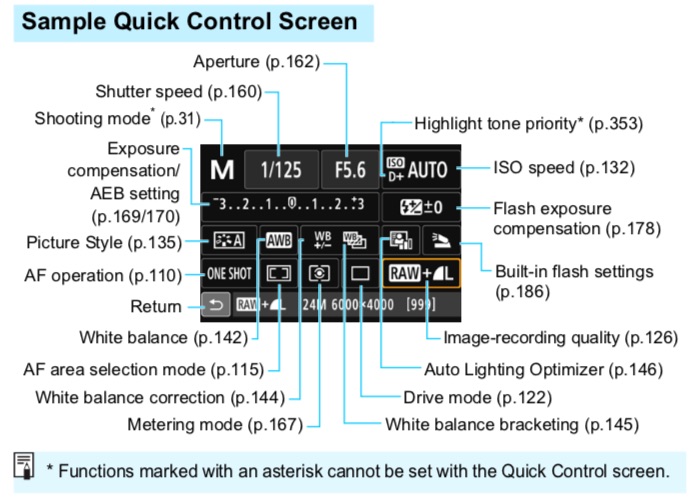
Hit the "Q" button and tap the white balance button - "AWB" in this image, not the one that says WB!
Options
- Mark as New
- Bookmark
- Subscribe
- Mute
- Subscribe to RSS Feed
- Permalink
- Report Inappropriate Content
12-21-2018 10:39 AM
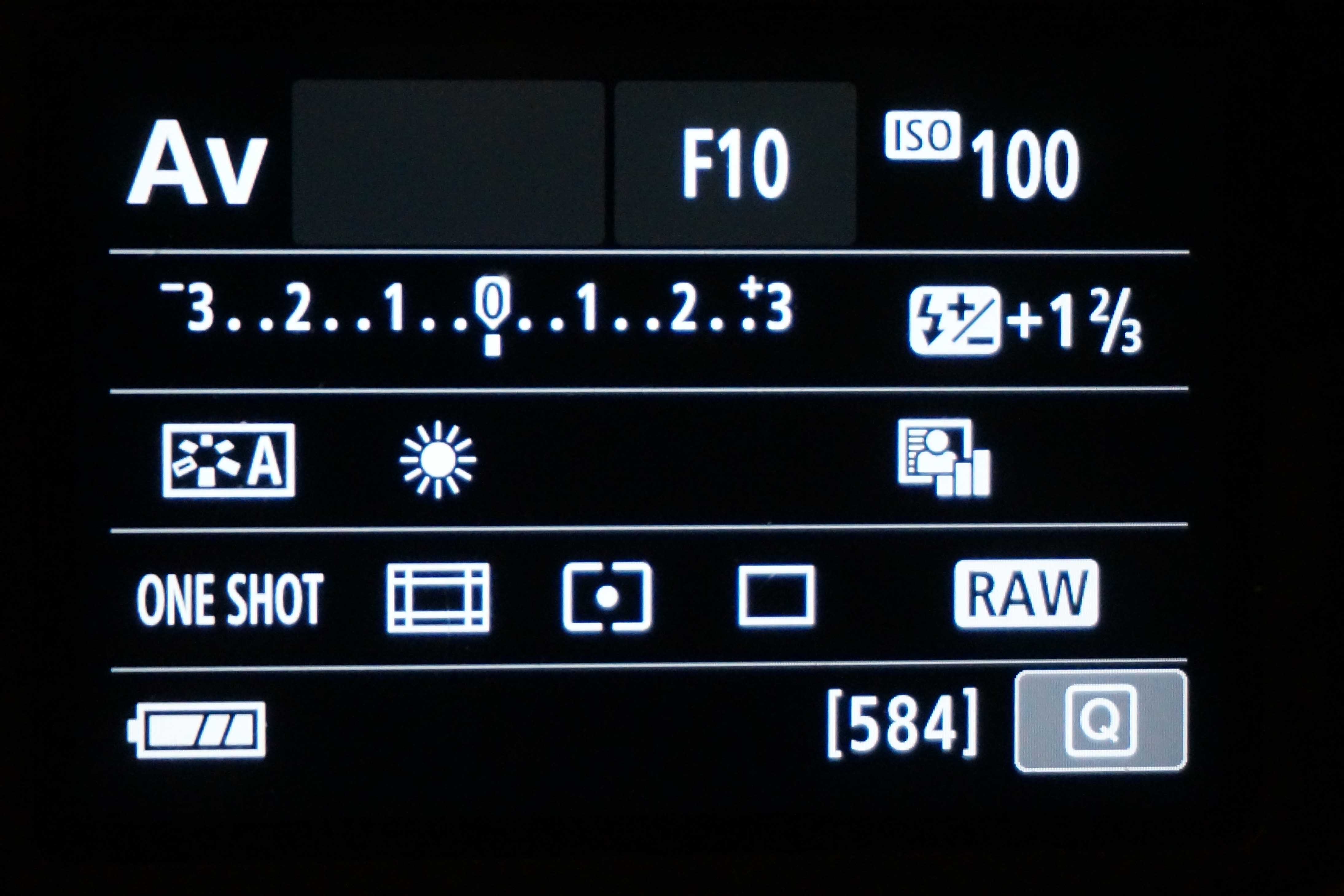
Thank you!
My Quick Control Screen shows shows different contents.
It does not show AWB either in AV or M mode.
Options
- Mark as New
- Bookmark
- Subscribe
- Mute
- Subscribe to RSS Feed
- Permalink
- Report Inappropriate Content
12-21-2018 11:10 AM
Of course it doesn't, because you are not in AWB mode. See the little sun? that says you are in daylight WB. Press Q, hit the sun and select AWB.
Options
- Mark as New
- Bookmark
- Subscribe
- Mute
- Subscribe to RSS Feed
- Permalink
- Report Inappropriate Content
12-21-2018 11:27 AM
Thank you. It is done. Great.

Announcements
07/22/2026: New firmware updates are available.
EOS R6 Mark III - Version 1.1.0
05/13/2026: New firmware updates are available.
EOS R5 Mark II - Version 1.3.0
EOS R6 Mark II - Version 1.7.0
04/28/2026: Service Notice: Caution Concerning use of Lithium Batteries
03/17/2026: New firmware updates are available.
SELPHY CP1500 - Version 1.0.7.0
02/23/2026: New firmware update is available for EOS C50- Version 1.0.3.1
01/23/2026: New firmware update is available for RF 24-105mm F4 IS USM- Version 2.0.7
01/20/2026: New firmware updates are available.
10/21/2025: Service Notice: To Users of the Compact Digital Camera PowerShot V1
10/15/2025: New firmware updates are available.
Speedlite EL-5 - Version 1.2.0
Speedlite EL-1 - Version 1.1.0
Speedlite Transmitter ST-E10 - Version 1.2.0
07/28/2025: Notice of Free Repair Service for the Mirrorless Camera EOS R50 (Black)
05/21/2025: New firmware update available for EOS C500 Mark II - Version 1.1.5.1
Related Content
- EF 100-400 IS II dust gasket detached in EF & RF Lenses
- vertical line on my canon ixus 145 in Point & Shoot Digital Cameras
- Canon R5 Mk II EVF is giving me problems as it isn;t accurate and natural in EOS DSLR & Mirrorless Cameras
- Canon 500D/T1i Viewfinder/Autofocus Doesn’t Match Live View or Final Image in EOS DSLR & Mirrorless Cameras
- R5 Mark II Playback bug (2nd last image) in EOS DSLR & Mirrorless Cameras

Ⓒ 2026
Canon U.S.A Inc. All Rights Reserved. Reproduction in whole or part without permission is prohibited.
