Turn on suggestions
Auto-suggest helps you quickly narrow down your search results by suggesting possible matches as you type.
- Canon Community
- Discussions & Help
- Camera
- EOS DSLR & Mirrorless Cameras
- Re: EOS Rebel T7 Images Saving to Card in MF, Not ...
Options
- Subscribe to RSS Feed
- Mark Topic as New
- Mark Topic as Read
- Float this Topic for Current User
- Bookmark
- Subscribe
- Mute
- Printer Friendly Page
EOS Rebel T7 Images Saving to Card in MF, Not in AF

Options
- Mark as New
- Bookmark
- Subscribe
- Mute
- Subscribe to RSS Feed
- Permalink
- Report Inappropriate Content
12-31-2022
11:58 AM
- last edited on
12-31-2022
12:16 PM
by
 Danny
Danny
Hello everybody, my wife just gift me a canon rebel t7 and to be honest I'm new in the world of cameras but is something that I'd like to learn, the camera ask for a SD card and we bought a scandisk adapter with a memory of 128 gb on it .. when I shoot a picture in a AF mode (autofocus) the picture doesn't save in the sd card (I don't understand why) but when I change the mode to MF the pictures save in the memory card ... Is there a problem with the SD card? or I need to go to settings and try another feature ? Please help me with this =D
4 REPLIES 4


Options
- Mark as New
- Bookmark
- Subscribe
- Mute
- Subscribe to RSS Feed
- Permalink
- Report Inappropriate Content
12-31-2022 12:00 PM
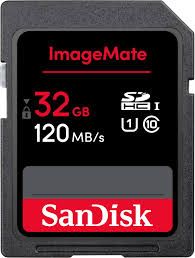
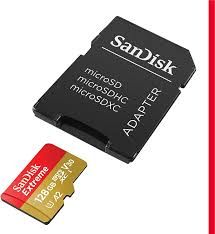
What do you mean by a "scan disk adapter" if you mean a micro card with an adapter, get a full size SD card. Canon cameras don't like the micro cards with adapters. But I have never heard of a camera saving an image in one mode, but not the other.

Options
- Mark as New
- Bookmark
- Subscribe
- Mute
- Subscribe to RSS Feed
- Permalink
- Report Inappropriate Content
12-31-2022 12:07 PM - edited 01-02-2023 10:05 AM
As mentioned above don't, never ever, use a micro-SD card with adapter. They are notorious for problems. Always use the SD card recommended in your manual. If you did not get a manual or you lost it, another one can be d/l from Canon website.
EB
EOS 1DX and many lenses.
EOS 1DX and many lenses.

Options
- Mark as New
- Bookmark
- Subscribe
- Mute
- Subscribe to RSS Feed
- Permalink
- Report Inappropriate Content
01-01-2023 12:39 PM
I have the manual as a shortcut on my laptop and on my Android phone for quick reference. I'll get the camera and load the PDF on my laptop and browse to learn more about the T7.
John
Canon EOS T7; EF-S 18-55mm IS; EF 28-135mm IS; EF 75-300mm; Sigma 150-600mm DG
Canon EOS T7; EF-S 18-55mm IS; EF 28-135mm IS; EF 75-300mm; Sigma 150-600mm DG

Options
- Mark as New
- Bookmark
- Subscribe
- Mute
- Subscribe to RSS Feed
- Permalink
- Report Inappropriate Content
01-01-2023 01:27 PM
This is good
This is bad
~Rick
Bay Area - CA
~R5 C (1.1.2.1), ~R50v (1.1.1) ~RF Trinity, ~RF 100 Macro, ~RF 100~400, ~RF 100~500, ~RF 200-800 +RF 1.4x TC, BG-R10, 430EX III-RT ~DxO PhotoLab Elite ~DaVinci Resolve Studio ~ImageClass MF644Cdw/MF656Cdw ~Pixel 10 ~CarePaks Are Worth It


Announcements
05/13/2026: New firmware updates are available.
EOS R5 Mark II - Version 1.3.0
EOS R6 Mark II - Version 1.7.0
04/28/2026: Service Notice: Caution Concerning use of Lithium Batteries
03/17/2026: New firmware updates are available.
SELPHY CP1500 - Version 1.0.7.0
02/23/2026: New firmware update is available for EOS C50- Version 1.0.3.1
01/23/2026: New firmware update is available for RF 24-105mm F4 IS USM- Version 2.0.7
01/20/2026: New firmware updates are available.
12/22/2025: New firmware update is available for EOS R6 Mark III- Version 1.0.2
10/21/2025: Service Notice: To Users of the Compact Digital Camera PowerShot V1
10/15/2025: New firmware updates are available.
Speedlite EL-5 - Version 1.2.0
Speedlite EL-1 - Version 1.1.0
Speedlite Transmitter ST-E10 - Version 1.2.0
07/28/2025: Notice of Free Repair Service for the Mirrorless Camera EOS R50 (Black)
05/21/2025: New firmware update available for EOS C500 Mark II - Version 1.1.5.1
Related Content
- Images Being Truncated in Photo Viewers: Only Happens to EOS T1i images on my Win10 Computer in EOS DSLR & Mirrorless Cameras
- DPP4 : Unable to save CR2 images after processing. in Camera Software
- Convert and Save on DPP 4.21.11 and 4.19.x does not work on Mac M2 with Sonoma in Camera Software
- EOS Rebel T3 How to save pics as JPG instead of RAW; duplicate files when downloading in EOS DSLR & Mirrorless Cameras
- EOS Rebel T6 Photos look fine on camera but blurry on computer in EOS DSLR & Mirrorless Cameras

Ⓒ 2026
Canon U.S.A Inc. All Rights Reserved. Reproduction in whole or part without permission is prohibited.
