Turn on suggestions
Auto-suggest helps you quickly narrow down your search results by suggesting possible matches as you type.
- Canon Community
- Discussions & Help
- Camera
- EOS DSLR & Mirrorless Cameras
- Re: EOS R5 USB C / USB A connectivity problem
Options
- Subscribe to RSS Feed
- Mark Topic as New
- Mark Topic as Read
- Float this Topic for Current User
- Bookmark
- Subscribe
- Mute
- Printer Friendly Page
EOS R5 USB C / USB A connectivity problem

Options
- Mark as New
- Bookmark
- Subscribe
- Mute
- Subscribe to RSS Feed
- Permalink
- Report Inappropriate Content
06-04-2026
07:13 AM
- last edited on
06-04-2026
08:15 AM
by
 Danny
Danny
Hi,
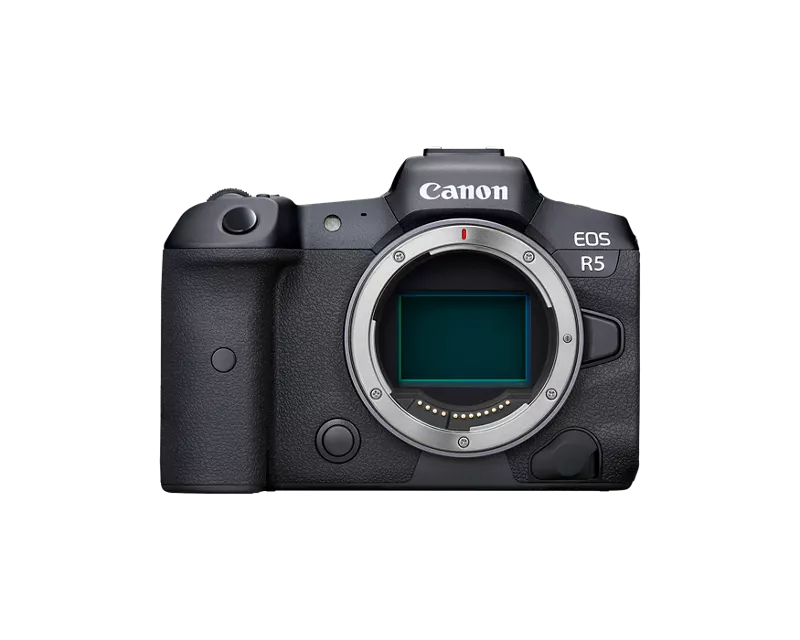
I’m experiencing a strange USB connectivity issue with two Canon EOS R5 cameras.
What works:
- The camera is detected correctly when connected directly to a MAC using a USB-C cable that supports USB 3.0 / SuperSpeed.
- Data transfer and camera communication work normally in this configuration.
What does NOT work:
- The camera is not detected at all when using the original Canon IFC-400U cable (USB-C to USB-C, USB 2.0).
- The camera is not detected through an i-tec USB 3.0 hub (in USB C connector with 3.0 and also 2.0 USB cable).
- The camera is not detected when connected to USB-A 2.0 ports.
- The issue is identical on Windows, Linux, and embedded systems.
I communicated with Canon Support, but it was ended quite quickly becuase I was told that the EOS R5 requires a full USB 3.x / SuperSpeed connection and that older USB 2.0 ports may not provide sufficient power or the required communication protocol. But not sure, the battery was fully charged (or external power via DC cupler) and the USB should have a back compatibilty.
Has anyone successfully connected an EOS R5 through:
- a USB-A 2.0 port,
- a USB 2.0 cable (such as the IFC-400U),
- or a USB hub?
I would appreciate hearing about your experience, especially if you have tested USB 2.0 connectivity with the EOS R5.
7 REPLIES 7
Options
- Mark as New
- Bookmark
- Subscribe
- Mute
- Subscribe to RSS Feed
- Permalink
- Report Inappropriate Content
06-04-2026 07:53 AM - edited 06-04-2026 07:54 AM
What are you connecting the camera directly to the computer for, file transfer or controlling the camera? If it is just for file transfer you are better off using a card reader. You can get a reader that will take the CF express B and SD card using the USB C interface for about $45.00.
Personal testing just to see what happens I have found that USB 2 will not work period. Hubs are not recommended and a high end USC c to c will work.
Karl


Options
- Mark as New
- Bookmark
- Subscribe
- Mute
- Subscribe to RSS Feed
- Permalink
- Report Inappropriate Content
06-04-2026 08:31 AM
I have never successfully connected my more recent Canon EOS cameras via anything that involves USB-A or even lower quality USB-C cables. I have 13-port Lionwei triple monitor 100watt USB 3.x hub that connects to my Windows laptop via USB-C that I've used successfully for transfer and charging for about two years now. It also support dual monitors successfully. That said, I currently have no Mac and have never had an R5. My experience with a current generation iPad was that it was more particular than Windows. I didn't personally enjoy the limitations of the Apple ecosystem and exited, but I have no idea if your problems are Mac related or perhaps just related to your hub. All that I can state equivocally is that my R6 Mark II and R50V communicate with my Windows laptop and charge from my hub.
I suppose that it is possible that a full 100w/10Gbps hub might possibly work for you on your Mac as it does for me on Windows. Hopefully someone here has a hub working successfully for them on a Mac to answer more definitively.
>> Owns/Owned both Canon EOS mirrorless full-frame and APS-C cameras and associated RF, RF-S and EF adapted lenses - inventory tends to change on short notice. Same for flashes, tripods, bags, straps, etc.
Plus>> Canon imagePROGRAF PRO-1100 Printer. My photos are edited using no Adobe products.
>>The opinions and assistance are my own. Please don't blame Canon for any mistakes on my part.
Options
- Mark as New
- Bookmark
- Subscribe
- Mute
- Subscribe to RSS Feed
- Permalink
- Report Inappropriate Content
06-04-2026 09:06 AM
Thank you Karl,
In our case, we are not using the camera for file transfer. We use USB communication to control and monitor the camera from an embedded system.
We have multiple EOS R5 cameras, and most of them work correctly even when connected through USB-A 2.0 ports. That’s why I was interested in hearing about other users’ experiences.
At the moment, we are testing two specific EOS R5 bodies that do not communicate over USB 2.0 at all. They are not detected through USB-A 2.0, USB-C 2.0 (Canon IFC-400U), or through a USB hub. In fact, they do not even appear on the USB bus (I see, that USB HUB is not supported).
For testing, we also connected them directly to a Mac using Canon EOS Utility. The result is the same: they are detected only when connected through a direct USB 3.x / SuperSpeed connection.
The interesting part is that the same cables, hosts, hubs, software, and test procedures work perfectly with our other EOS R5 cameras.
Only these two bodies exhibit this behaviour. After reading the comments here, I’m starting to wonder whether we’ve simply been lucky that all of our other EOS R5 cameras have been working over USB 2.0 without any issues.
Options
- Mark as New
- Bookmark
- Subscribe
- Mute
- Subscribe to RSS Feed
- Permalink
- Report Inappropriate Content
06-04-2026 09:35 AM
What is the firmware version on the cameras?
Karl
Options
- Mark as New
- Bookmark
- Subscribe
- Mute
- Subscribe to RSS Feed
- Permalink
- Report Inappropriate Content
06-04-2026 09:53 AM
The cameras were running firmware 2.2.0. As part of troubleshooting, I updated one of the non-working bodies to the latest 2.2.1 firmware, but the behaviour remained exactly the same.
That makes me think it is less likely to be a firmware issue and perhaps more likely to be a hardware-related problem. On the other hand, the USB interface is not completely dead, since the camera still works when connected directly through a USB 3.x / SuperSpeed connection.
So at this point I’m not sure whether this could be a partial hardware failure of the USB subsystem, the USB-C interface, or something else entirely. Or perhaps, as you mentioned earlier, USB 2.0 is not working well and while it may work in some cases, it could be much more sensitive to signal integrity, or minor hardware variations than a direct USB C 3.x connection.

Options
- Mark as New
- Bookmark
- Subscribe
- Mute
- Subscribe to RSS Feed
- Permalink
- Report Inappropriate Content
06-04-2026 11:45 AM
I use the cable that came with my EOS R5 and connect it to the fastest USB C port on my 2019 iMac.
I have a "Belkin 4-Port USB-C Hub" that works with high speed connections, but I do not remember trying it with the camera. I have used Apple ImageCapture app and Canon EOS utility.
The cable that came with the camera seems to work well for me.
Apple computers seem to me to have a wide variety of USB port types.

Options
- Mark as New
- Bookmark
- Subscribe
- Mute
- Subscribe to RSS Feed
- Permalink
- Report Inappropriate Content
06-05-2026 01:06 PM - edited 06-05-2026 01:13 PM
“
Personal testing just to see what happens I have found that USB 2 will not work period. Hubs are not recommended and a high end USC c to c will work.
Karl “
Karl is 100% correct! Hubs are not recommended. Some active hubs seem to work. Nearly all passive hubs fail.
Many DIY towers use internal hubs. It’s best to connect directly to a port on the motherboard. Speaking of which, motherboards with AMD chipsets have had a lot of issues with USB ports reported here.
Lastly, how many cameras are you connecting to one platform? One to one is best.
--------------------------------------------------------
"Enjoying photography since 1972."
"Enjoying photography since 1972."

Announcements
07/22/2026: New firmware updates are available.
EOS R6 Mark III - Version 1.1.0
05/13/2026: New firmware updates are available.
EOS R5 Mark II - Version 1.3.0
EOS R6 Mark II - Version 1.7.0
04/28/2026: Service Notice: Caution Concerning use of Lithium Batteries
03/17/2026: New firmware updates are available.
SELPHY CP1500 - Version 1.0.7.0
02/23/2026: New firmware update is available for EOS C50- Version 1.0.3.1
01/23/2026: New firmware update is available for RF 24-105mm F4 IS USM- Version 2.0.7
01/20/2026: New firmware updates are available.
10/21/2025: Service Notice: To Users of the Compact Digital Camera PowerShot V1
10/15/2025: New firmware updates are available.
Speedlite EL-5 - Version 1.2.0
Speedlite EL-1 - Version 1.1.0
Speedlite Transmitter ST-E10 - Version 1.2.0
07/28/2025: Notice of Free Repair Service for the Mirrorless Camera EOS R50 (Black)
05/21/2025: New firmware update available for EOS C500 Mark II - Version 1.1.5.1
Related Content
- Where to download Canon Camera Connect v3 for Windows 11 in Camera Software
- Canon AF35M II/Autoboy 2 flash not working in Point & Shoot Digital Cameras
- USB-C not charging my EOS R50 V in EOS DSLR & Mirrorless Cameras
- Cannot batch-select / select all photos by date in Camera Connect App (IXUS 255 HS & iPhone 12) in Camera Software
- Canon PowerShot V1 and Hot and Stuck pixels issue in Point & Shoot Digital Cameras

Ⓒ 2026
Canon U.S.A Inc. All Rights Reserved. Reproduction in whole or part without permission is prohibited.
