Turn on suggestions
Auto-suggest helps you quickly narrow down your search results by suggesting possible matches as you type.
- Canon Community
- Discussions & Help
- Camera
- EOS DSLR & Mirrorless Cameras
- Will Canon release a firmware update for the R6 mk...
Options
- Subscribe to RSS Feed
- Mark Topic as New
- Mark Topic as Read
- Float this Topic for Current User
- Bookmark
- Subscribe
- Mute
- Printer Friendly Page
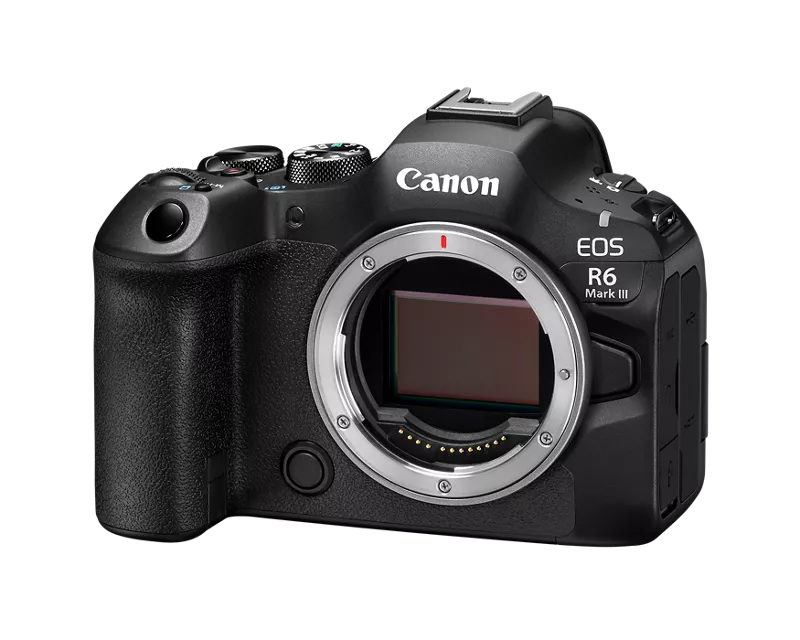
Will Canon release a firmware update for the R6 mkiii that allows us to turn off IBIS and use IS?

Options
- Mark as New
- Bookmark
- Subscribe
- Mute
- Subscribe to RSS Feed
- Permalink
- Report Inappropriate Content
08-05-2026 09:19 AM - edited 08-05-2026 09:20 AM
I’m a little frustrated at this as a professional videographer. The ibis wobbles on my stabilized wide lenses and the jerkiness of the ibis on longer lenses essentially means that if I want usable shots, I have to remove any stabilization completely and rig up the camera. I’m fine with that generally for locked off shots but for quick shooting and event work, it can be a bit of a problem as I am using this camera as a smaller B-cam to my C70. When rigged up it doesn’t offer that same level of versatility that I expected out of this and essentially it’s about as bulky as my C70. The ibis is generally useful beyond 28mm for static shots only, but I would love the option to be able to choose which type of stabilization I’m using.
Does Canon ever plan to fix this in a firmware update?
9 REPLIES 9


Options
- Mark as New
- Bookmark
- Subscribe
- Mute
- Subscribe to RSS Feed
- Permalink
- Report Inappropriate Content
08-05-2026 12:43 PM
Are you using a tripod? If so, then you probably want to disable any and all Image Stabilization.
As for your wobble, what are you filming? It usually happens when you’re panning with mainly distant objects in the view. Both IS and Subject are enabled. That causes wobble.
--------------------------------------------------------
"Enjoying photography since 1972."
"Enjoying photography since 1972."

Options
- Mark as New
- Bookmark
- Subscribe
- Mute
- Subscribe to RSS Feed
- Permalink
- Report Inappropriate Content
08-05-2026 02:00 PM
We don't know, we have no insight into what may be in any future firmware updates. To have Canon hear your voice, go to the Canon USA website and find the little (+)feedback button. That is the place for suggestions like this.
Options
- Mark as New
- Bookmark
- Subscribe
- Mute
- Subscribe to RSS Feed
- Permalink
- Report Inappropriate Content
08-05-2026 02:12 PM
This was the answer I was looking for, thank you! Going to submit this.

Options
- Mark as New
- Bookmark
- Subscribe
- Mute
- Subscribe to RSS Feed
- Permalink
- Report Inappropriate Content
08-07-2026 10:45 AM
I think, if you use a lens without IS you can turn it off in camera. No, yes? You just can't turn it off if the lens itself has IS and it is switched on. I don't own an R series but a few friends are now buying them. And personally on my EF gear I never turn IS off. Tripod or no tripod.
EB
EOS 1DX and many lenses.
EOS 1DX and many lenses.

Options
- Mark as New
- Bookmark
- Subscribe
- Mute
- Subscribe to RSS Feed
- Permalink
- Report Inappropriate Content
08-07-2026 11:37 AM
@ebiggs1 wrote:
I think, if you use a lens without IS you can turn it off in camera. No, yes? You just can't turn it off if the lens itself has IS and it is switched on. I don't own an R series but a few friends are now buying them. And personally on my EF gear I never turn IS off. Tripod or no tripod.
The current software for the R series activates both the lens IS and camera IS (IBIS) together; they can't be separated.
In video use the motion of the sensor during IS causes a distortion at the outer edges of the frame due to that motion. Some refer to it as "jello" effect.
Being able to select lens IS only would eliminate that issue.
John Hoffman
Conway, NH
R6 Mark III, M200 (converted to infrared), RF lenses, Pixma PRO-100, Pixma TR8620a, Lr Classic
Conway, NH
R6 Mark III, M200 (converted to infrared), RF lenses, Pixma PRO-100, Pixma TR8620a, Lr Classic
Options
- Mark as New
- Bookmark
- Subscribe
- Mute
- Subscribe to RSS Feed
- Permalink
- Report Inappropriate Content
08-07-2026 12:50 PM - edited 08-07-2026 12:56 PM
“Are you using a tripod? If so, then you probably want to disable any and all Image Stabilization.
As for your wobble, what are you filming? It usually happens when you’re panning with mainly distant objects in the view. Both IS and Subject are enabled. That causes wobble.”
I think you’re making false assumptions sbout the cause of the wobble.
--------------------------------------------------------
"Enjoying photography since 1972."
"Enjoying photography since 1972."

Options
- Mark as New
- Bookmark
- Subscribe
- Mute
- Subscribe to RSS Feed
- Permalink
- Report Inappropriate Content
08-07-2026 01:01 PM
Maybe this will help.
You can make a request by leaving [+]Feedback for Canon, as suggested by my colleague. My honest opinion. I think the probability is about 1%. Why? Because Canon already has a provision for disabling lens IS and IBIS. (Read on).
To clarify. If your lens has an IS switch and you turn it off it will turn off lens IS and IBIS in the camera.
If a Canon lens has IS, but does not have a physical switch, a menu option to disable IS will be present on the camera's menu when it is mounted. If you turn this off in the camera's Red menu, It will disable lens IS and IBIS in the body.
Recommendation: Regardless of the Canon lens you have attached, turn off lens IS or disable in camera menus (which disables lens IS and IBIS).
Now enable Digital IS in the camera's IS menus. Digital IS is less susceptible to jiggle or wobble. Standard mode does this by cropping the frame slightly. Enhanced mode crops a little further. You can experiment and see which one suits your needs.
See this for more detail.
Canon : Product Manual : EOS R6 Mark III : Image Stabilizer (IS Mode) https://share.google/k2Hz3VYY4ZUyiwhSc
~Rick
Bay Area - CA
~R5 C (1.1.3.1), ~RF Trinity, ~RF 100 Macro, ~RF 100~400, ~RF 100~500, ~RF 200-800, ~RF 1.4x TC, BG-R10, 430EX III-RT ~DxO PhotoLab Elite ~DaVinci Resolve Studio ~ImageClass MF644Cdw MF656Cdw ~Pixel 10 ~CarePaks Are Worth It
Options
- Mark as New
- Bookmark
- Subscribe
- Mute
- Subscribe to RSS Feed
- Permalink
- Report Inappropriate Content
08-08-2026 12:05 PM
"The current software for the R series activates both the lens IS and camera IS (IBIS) together; they can't be separated"
I have very limited use of a R Series but what I thought I noticed if you switched IS off on the lens it also switched IBIS off in the camera. Yes, no? Perhaps it can't be separated but at least you eliminate the IS issues the OP is seeing. There again probably best to shut up when you have so little experience so I will.
EB
EOS 1DX and many lenses.
EOS 1DX and many lenses.
Options
- Mark as New
- Bookmark
- Subscribe
- Mute
- Subscribe to RSS Feed
- Permalink
- Report Inappropriate Content
08-08-2026 07:18 PM
Have you tried turning off all IS, both physical and digital, to see if the wobble issue goes away?
There have been numerous posts about this exact issue. The solution has usually been to turn off IS. AF tracking can cause it too under the right conditions. Why?
The primary purpose of IS is to stabilize the image for the AF system. Many users also run into issues when they think IS ican be used as a substitute for a mechanical gimbal stabilizer.
--------------------------------------------------------
"Enjoying photography since 1972."
"Enjoying photography since 1972."

Announcements
07/22/2026: New firmware updates are available.
EOS R6 Mark III - Version 1.1.0
05/13/2026: New firmware updates are available.
EOS R5 Mark II - Version 1.3.0
EOS R6 Mark II - Version 1.7.0
04/28/2026: Service Notice: Caution Concerning use of Lithium Batteries
03/17/2026: New firmware updates are available.
SELPHY CP1500 - Version 1.0.7.0
02/23/2026: New firmware update is available for EOS C50- Version 1.0.3.1
01/23/2026: New firmware update is available for RF 24-105mm F4 IS USM- Version 2.0.7
01/20/2026: New firmware updates are available.
10/21/2025: Service Notice: To Users of the Compact Digital Camera PowerShot V1
10/15/2025: New firmware updates are available.
Speedlite EL-5 - Version 1.2.0
Speedlite EL-1 - Version 1.1.0
Speedlite Transmitter ST-E10 - Version 1.2.0
07/28/2025: Notice of Free Repair Service for the Mirrorless Camera EOS R50 (Black)
05/21/2025: New firmware update available for EOS C500 Mark II - Version 1.1.5.1
Related Content
- Trying to estimate the Manufacture Date for the Canon R5 Mark II camera in EOS DSLR & Mirrorless Cameras
- EOS Canon R6 mkIII Image write failure in EOS DSLR & Mirrorless Cameras
- R6II slot 1 won’t read card in EOS DSLR & Mirrorless Cameras
- Aperture communication issues between Canon EOS R8 and sigma 150-600mm f/5-6.3 DG OS HSM C in EOS DSLR & Mirrorless Cameras
- Trouble using hot shoe on EOS R6 V in EOS DSLR & Mirrorless Cameras

Ⓒ 2026
Canon U.S.A Inc. All Rights Reserved. Reproduction in whole or part without permission is prohibited.
