Turn on suggestions
Auto-suggest helps you quickly narrow down your search results by suggesting possible matches as you type.
- Canon Community
- Discussions & Help
- Camera
- EOS DSLR & Mirrorless Cameras
- EOS R1 w/CF Express Card says "Number of Clips at ...
Options
- Subscribe to RSS Feed
- Mark Topic as New
- Mark Topic as Read
- Float this Topic for Current User
- Bookmark
- Subscribe
- Mute
- Printer Friendly Page
EOS R1 w/CF Express Card says "Number of Clips at Maximum"

Options
- Mark as New
- Bookmark
- Subscribe
- Mute
- Subscribe to RSS Feed
- Permalink
- Report Inappropriate Content
01-13-2026
07:47 PM
- last edited on
01-14-2026
08:48 AM
by
 Danny
Danny
I shoot still and video all day long every day. I went to the r1 from an r3 in which I never once had this issue. I use 512gb CF Express cards and less than 200 gb used I get a message in my viewfinder stating "number of clips in card 1 and card 2 already at maximum"....and will NOT allow me to video any more. It will however allow stills. My camera is set up to record both the stills and video to each card so I have an exact back up. It's very frustrating to not be able to use the entire 512 gb. No one has been able to help with this issue. Hopefully someone on here can. Thanks in advance..

10 REPLIES 10


Options
- Mark as New
- Bookmark
- Subscribe
- Mute
- Subscribe to RSS Feed
- Permalink
- Report Inappropriate Content
01-14-2026 12:21 PM
If the message says that the maximum number of files is at the maximum, then storage space probably isn’t the problem. How many video clip files do you have in the current folder. You could be limited to 99.
--------------------------------------------------------
"Enjoying photography since 1972."
"Enjoying photography since 1972."
Options
- Mark as New
- Bookmark
- Subscribe
- Mute
- Subscribe to RSS Feed
- Permalink
- Report Inappropriate Content
01-14-2026 01:14 PM
Waddizzle is correct. The total number of clips is actually 999.
Canon : Product Manual : EOS R1 : Movie Clip Numbering https://share.google/5YVfCfZcCdQBkU8i4
~Rick
Bay Area - CA
~R5 C (1.1.3.1), ~RF Trinity, ~RF 100 Macro, ~RF 100~400, ~RF 100~500, ~RF 200-800, ~RF 1.4x TC, BG-R10, 430EX III-RT ~DxO PhotoLab Elite ~DaVinci Resolve Studio ~ImageClass MF644Cdw MF656Cdw ~Pixel 10 ~CarePaks Are Worth It
Options
- Mark as New
- Bookmark
- Subscribe
- Mute
- Subscribe to RSS Feed
- Permalink
- Report Inappropriate Content
01-25-2026 11:21 AM
So my remedy to this is what? I read all the information on the link but do I have to manually reset back to 001 every time? Do I need to be set on continuous or auto reset? I never had this issue at all with my r3....has me totally baffled and confused. Wish I was smarter....lol
Options
- Mark as New
- Bookmark
- Subscribe
- Mute
- Subscribe to RSS Feed
- Permalink
- Report Inappropriate Content
01-25-2026 11:27 AM
@JBradlley wrote:
So my remedy to this is what? I read all the information on the link but do I have to manually reset back to 001 every time? Do I need to be set on continuous or auto reset? I never had this issue at all with my r3....has me totally baffled and confused. Wish I was smarter....lol
“How many video clip files do you have in the current folder?’
How many files? I am guessing that you should create a new folder.
--------------------------------------------------------
"Enjoying photography since 1972."
"Enjoying photography since 1972."

Options
- Mark as New
- Bookmark
- Subscribe
- Mute
- Subscribe to RSS Feed
- Permalink
- Report Inappropriate Content
01-25-2026 12:14 PM
I can see how that would be a frustrating block in your workflow, especially when your CFexpress cards show plenty of available capacity.
This behavior usually indicates that the camera has reached its maximum file indexing limit. Even on a flagship like the EOS R1, the system typically follows the DCF (Design rule for Camera File system) standard, which caps folders at 9,999 items. If you are shooting high-speed bursts or numerous short video clips, you can hit this "Number of Clips" ceiling even if the card is only half full.
Best-effort steps to clear the block:
-
Create a New Folder: In the Wrench menu, select [Select folder] and create a new one to reset the 9,999 count for that directory.
-
Low-Level Format: If you have already backed up your data, perform a low-level format in-camera to refresh the card's file allocation table.
Support: If you get stuck, support is available weekdays at 1-800-OK-CANON (1-800-652-2666).
-
Canon Professional Services (CPS): If you are a CPS member, you have access to 24/7 priority support. Please log into your account at http://canon.us/cps to access your dedicated hotline and ensure your R1 workflow is restored as quickly as possible.

Options
- Mark as New
- Bookmark
- Subscribe
- Mute
- Subscribe to RSS Feed
- Permalink
- Report Inappropriate Content
01-25-2026 12:44 PM
I'd like to have clarification too. 🤔 In the link I provided the R1 manual states that the clip limit is 999 per folder. I searched the manual for 9,999 but nothing came up. So does this mean the clip limit per folder is 999 and the OS limit is 9,999?
Thanks
~Rick
Bay Area - CA
~R5 C (1.1.3.1), ~RF Trinity, ~RF 100 Macro, ~RF 100~400, ~RF 100~500, ~RF 200-800, ~RF 1.4x TC, BG-R10, 430EX III-RT ~DxO PhotoLab Elite ~DaVinci Resolve Studio ~ImageClass MF644Cdw MF656Cdw ~Pixel 10 ~CarePaks Are Worth It
Options
- Mark as New
- Bookmark
- Subscribe
- Mute
- Subscribe to RSS Feed
- Permalink
- Report Inappropriate Content
01-25-2026 01:36 PM
Best-effort steps to clear the block:
-
Create a New Folder: In the Wrench menu, select [Select folder] and create a new one to reset the 9,999 count for that directory.
-
Low-Level Format: If you have already backed up your data, perform a low-level format in-camera to refresh the card's file allocation table.
—————————————-
If the file count has reached the folder limit, I would expect it to automatically create a new folder so it can keep going. That should be the default behavior, unless it’s been disabled.
--------------------------------------------------------
"Enjoying photography since 1972."
"Enjoying photography since 1972."
Options
- Mark as New
- Bookmark
- Subscribe
- Mute
- Subscribe to RSS Feed
- Permalink
- Report Inappropriate Content
01-25-2026 01:52 PM
Hello,
It isn't completely obvious, so let me try to break it down. To address shadowsports' point regarding the 9,999 limit: while it isn't always listed directly next to the error code in the manual, the specific behavior is documented in the EOS R1 Advanced User Guide under the "File Numbering" (Set-up Menu) section. It explicitly states: "When the file number in a folder reaches 9999, the next file number will be 0001 in a new folder."
The "Maximum" error message triggers when the camera is unable to perform that "new folder" handoff. This can happen for a few reasons:
-
Folder 999: If the card has reached folder number 999, the DCIM specification is effectively "maxed out" and a format is required. To resolve this, try creating a new folder manually in the Setup (Wrench) Menu by selecting Folder settings. If this works, it confirms the previous folder was just at its limit.
-
Indexing Conflict: If you are recording to two slots and one card has a conflicting folder structure, the R1 may stop recording to prevent a file-naming collision. To resolve indexing conflicts, offload your clips and perform a low-level format in-camera. This is the "gold standard" fix for any indexing errors.
-
File Numbering Settings: If numbering is set in a way that prevents automatic folder creation, the camera will hard-stop at 9,999. To fix this, ensure your file numbering is set to [Continuous] in the Setup (Wrench) Menu under Numbering. This allows the camera to roll over into new folders seamlessly instead of stopping at 9,999.
Step-by-Step:
-
Select

 File numbering.
 -
Set the item.

- Select [Numbering].
- Select [Continuous] or [Auto reset].

- If you want to reset the file numbering, select [Manual reset] ().
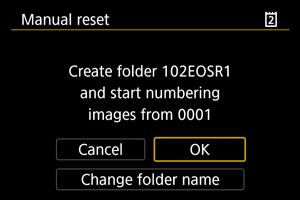
- Select [OK] to create a new folder, and the file number will start with 0001.
Caution
- If the file number in folder 999 reaches 9999, shooting will not be possible even if the card still has free space. After a message requesting you to replace the card is displayed, switch to a new card.
If you've tried these steps and the R1 is still throwing the error prematurely, we definitely want to hear about it at 1-800-OK-CANON (1-800-652-2666). Our technical team can then document the behavior and see if it requires a deeper look.
https://cam.start.canon/en/C018/manual/html/UG-07_Set-up_0050.html
Options
- Mark as New
- Bookmark
- Subscribe
- Mute
- Subscribe to RSS Feed
- Permalink
- Report Inappropriate Content
01-25-2026 05:23 PM
Thanks, Stephen. Some great stuff to know.
--------------------------------------------------------
"Enjoying photography since 1972."
"Enjoying photography since 1972."

Announcements
07/22/2026: New firmware updates are available.
EOS R6 Mark III - Version 1.1.0
05/13/2026: New firmware updates are available.
EOS R5 Mark II - Version 1.3.0
EOS R6 Mark II - Version 1.7.0
04/28/2026: Service Notice: Caution Concerning use of Lithium Batteries
03/17/2026: New firmware updates are available.
SELPHY CP1500 - Version 1.0.7.0
02/23/2026: New firmware update is available for EOS C50- Version 1.0.3.1
01/23/2026: New firmware update is available for RF 24-105mm F4 IS USM- Version 2.0.7
01/20/2026: New firmware updates are available.
10/21/2025: Service Notice: To Users of the Compact Digital Camera PowerShot V1
10/15/2025: New firmware updates are available.
Speedlite EL-5 - Version 1.2.0
Speedlite EL-1 - Version 1.1.0
Speedlite Transmitter ST-E10 - Version 1.2.0
07/28/2025: Notice of Free Repair Service for the Mirrorless Camera EOS R50 (Black)
05/21/2025: New firmware update available for EOS C500 Mark II - Version 1.1.5.1
Related Content
- Can not find a screen for my ixus canon camera (UK) in Point & Shoot Digital Cameras
- EOS R5 Mark II, How to export edited photos using Lightroom back into the CF express card in Camera Software
- R5 Mark II Buffer shows 86 shots but I get 153 in EOS DSLR & Mirrorless Cameras
- EOS 90D + EOS Utility 3 — Connection lost during long intervalometer session (~12–15 hrs) in Camera Software

Ⓒ 2026
Canon U.S.A Inc. All Rights Reserved. Reproduction in whole or part without permission is prohibited.
