Turn on suggestions
Auto-suggest helps you quickly narrow down your search results by suggesting possible matches as you type.
- Canon Community
- Discussions & Help
- Camera
- EOS DSLR & Mirrorless Cameras
- Re: Weird vertical lines
Options
- Subscribe to RSS Feed
- Mark Topic as New
- Mark Topic as Read
- Float this Topic for Current User
- Bookmark
- Subscribe
- Mute
- Printer Friendly Page
EOS 6D Mark II Weird vertical lines

Options
- Mark as New
- Bookmark
- Subscribe
- Mute
- Subscribe to RSS Feed
- Permalink
- Report Inappropriate Content
01-23-2020
09:35 PM
- last edited on
09-28-2022
01:43 PM
by
 Danny
Danny
I'm hoping someone can help me! I just received my 6d mark ii for Christmas in 2019. I went out for a shoot last week and noticed these dark black vertical lines in all my images. I changed memory cards thinking it was a bad card, but it kept happening! I turned the camera off and on, took out the battery, everything! Finally I changed it to video then back to camera and the lines were gone. Until I went to use it again a few days ago and the lines are on all my images again. HELP! I've attached a close up of one of the images where you can see all the lines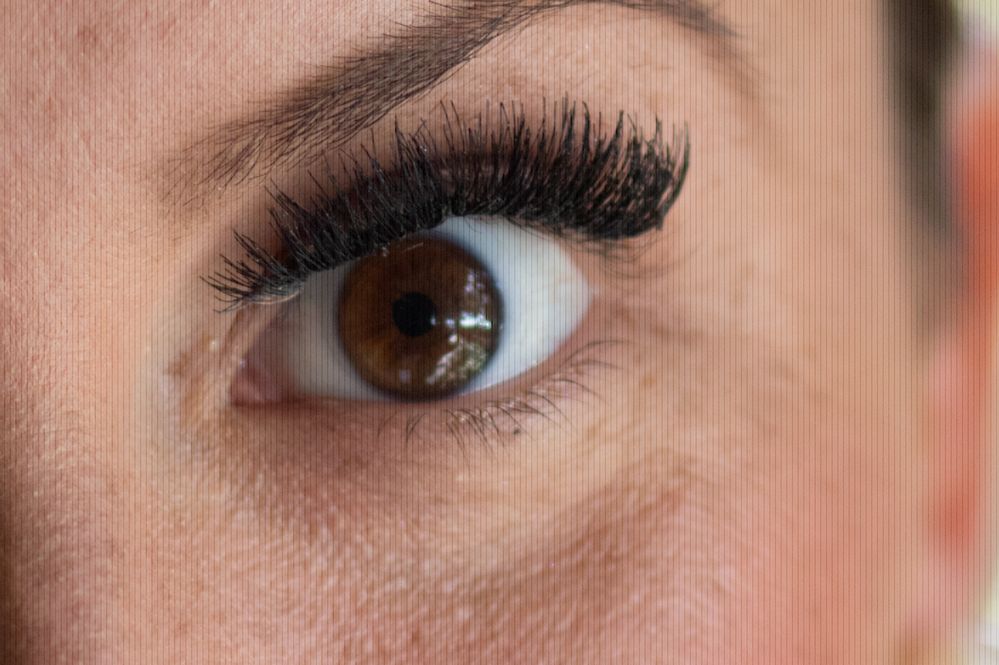
19 REPLIES 19
Options
- Mark as New
- Bookmark
- Subscribe
- Mute
- Subscribe to RSS Feed
- Permalink
- Report Inappropriate Content
12-28-2020 08:50 AM
not cropped uploaded directly from the card


Options
- Mark as New
- Bookmark
- Subscribe
- Mute
- Subscribe to RSS Feed
- Permalink
- Report Inappropriate Content
12-28-2020 09:08 AM
@xlnyc wrote:not cropped uploaded directly from the card
I asked because the image has Full HD resolution.

Do you normally take photos in Full HD resolution?
--------------------------------------------------------
"Enjoying photography since 1972."
"Enjoying photography since 1972."
Options
- Mark as New
- Bookmark
- Subscribe
- Mute
- Subscribe to RSS Feed
- Permalink
- Report Inappropriate Content
12-28-2020 04:55 PM
Must've been after a "factory reset" where I hadn't had a chance to meddle with the settings, but yeah it was full resolution. I don't think the 2000d has RAW (If it does, I haven't found it).
Options
- Mark as New
- Bookmark
- Subscribe
- Mute
- Subscribe to RSS Feed
- Permalink
- Report Inappropriate Content
01-13-2021 02:44 PM
An update for me
https://drive.google.com/file/d/1Dt2SfcJzK_4_ujynh2vrzJtWTtgLMrTi/view?usp=sharing
I sent the camera in for factory service. They received it on Jan 5th. It was found "that the image sensor and main circuit board did not operate properly causing noise to occur."
Both were replaced setting me back just short of $200. I just got the camera back today and all is well. I'm satisfied for the most part.

Options
- Mark as New
- Bookmark
- Subscribe
- Mute
- Subscribe to RSS Feed
- Permalink
- Report Inappropriate Content
01-13-2021 03:32 PM
@xlnyc wrote:Must've been after a "factory reset" where I hadn't had a chance to meddle with the settings, but yeah it was full resolution. I don't think the 2000d has RAW (If it does, I haven't found it).

John Hoffman
Conway, NH
R6 Mark III, M200 (converted to infrared), RF lenses, Pixma PRO-100, Pixma TR8620a, Lr Classic
Conway, NH
R6 Mark III, M200 (converted to infrared), RF lenses, Pixma PRO-100, Pixma TR8620a, Lr Classic
Options
- Mark as New
- Bookmark
- Subscribe
- Mute
- Subscribe to RSS Feed
- Permalink
- Report Inappropriate Content
01-14-2021 12:52 AM
thanks, I'm a newbie here
Options
- Mark as New
- Bookmark
- Subscribe
- Mute
- Subscribe to RSS Feed
- Permalink
- Report Inappropriate Content
01-14-2021 06:47 AM
That's why we try and help. We all were at some point.
John Hoffman
Conway, NH
R6 Mark III, M200 (converted to infrared), RF lenses, Pixma PRO-100, Pixma TR8620a, Lr Classic
Conway, NH
R6 Mark III, M200 (converted to infrared), RF lenses, Pixma PRO-100, Pixma TR8620a, Lr Classic

Options
- Mark as New
- Bookmark
- Subscribe
- Mute
- Subscribe to RSS Feed
- Permalink
- Report Inappropriate Content
01-14-2021 11:10 AM
"We all were at some point."
Amen to that! 
EB
EOS 1DX and many lenses.
EOS 1DX and many lenses.

Options
- Mark as New
- Bookmark
- Subscribe
- Mute
- Subscribe to RSS Feed
- Permalink
- Report Inappropriate Content
09-28-2022 01:36 PM
I have the EXACT same issue, but Canon told me my camera is no longer serviceable because it is outdated and there are no longer parts for Canon to service it. What a shame.

Options
- Mark as New
- Bookmark
- Subscribe
- Mute
- Subscribe to RSS Feed
- Permalink
- Report Inappropriate Content
09-28-2022 07:17 PM
Hello ashleynicole16, Is this what the image looks like when viewed on the camera? If not, what are you viewing the image in where you see these lines? Does it happen with multiple lenses? Is there a filter on the lens, try taking that off. If all else still fails, I do like what ebiggs1 said, to reset the camera to default settings at that point. In one of the Creative modes,(P,Tv,Av,or M) go to the Menu, Wrench tab #5 and select Clear all camera settings. You may contact our phone support team for assistance with troubleshooting this further if you would like. They can be reached at 1-800-652-2666, Monday-Friday between 9:00 am to 9:00 pm ET and Saturday between 9:00 am and 7:00 pm ET.

- « Previous
-
- 1
- 2
- Next »
- « Previous
-
- 1
- 2
- Next »
Announcements
07/22/2026: New firmware updates are available.
EOS R6 Mark III - Version 1.1.0
05/13/2026: New firmware updates are available.
EOS R5 Mark II - Version 1.3.0
EOS R6 Mark II - Version 1.7.0
04/28/2026: Service Notice: Caution Concerning use of Lithium Batteries
03/17/2026: New firmware updates are available.
SELPHY CP1500 - Version 1.0.7.0
02/23/2026: New firmware update is available for EOS C50- Version 1.0.3.1
01/23/2026: New firmware update is available for RF 24-105mm F4 IS USM- Version 2.0.7
01/20/2026: New firmware updates are available.
10/21/2025: Service Notice: To Users of the Compact Digital Camera PowerShot V1
10/15/2025: New firmware updates are available.
Speedlite EL-5 - Version 1.2.0
Speedlite EL-1 - Version 1.1.0
Speedlite Transmitter ST-E10 - Version 1.2.0
07/28/2025: Notice of Free Repair Service for the Mirrorless Camera EOS R50 (Black)
05/21/2025: New firmware update available for EOS C500 Mark II - Version 1.1.5.1
Related Content
- Vertical banding on LCD when articulating screen — Canon R6 Mark II in EOS DSLR & Mirrorless Cameras
- vertical line on my canon ixus 145 in Point & Shoot Digital Cameras
- PowerShot IXY 650/ELPH 360 Vertical colored lines on LCD screen in Point & Shoot Digital Cameras
- Determining a Nodal Point (no Parallax Point) in EF & RF Lenses
- Is this normal? White vertical lines in EOS 5D Mark IV images in EOS DSLR & Mirrorless Cameras

Ⓒ 2026
Canon U.S.A Inc. All Rights Reserved. Reproduction in whole or part without permission is prohibited.
