Turn on suggestions
Auto-suggest helps you quickly narrow down your search results by suggesting possible matches as you type.
- Canon Community
- Discussions & Help
- Camera
- EOS DSLR & Mirrorless Cameras
- Re: Canon T5i Battery Puzzle
Options
- Subscribe to RSS Feed
- Mark Topic as New
- Mark Topic as Read
- Float this Topic for Current User
- Bookmark
- Subscribe
- Mute
- Printer Friendly Page
Canon T5i Battery Puzzle

Options
- Mark as New
- Bookmark
- Subscribe
- Mute
- Subscribe to RSS Feed
- Permalink
- Report Inappropriate Content
09-27-2017 07:22 PM
i am using a T5i camera and LP-E8 Battery and its original Charger.
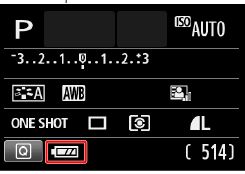
I have been having low battery indicator on the camera for a while. I changed to a OEM battery, no respite. I change the charger thinking the charger is not charging it to full capacity, still no respite.
This is what it looks when I pop in a "Fully" charged battery in my Camera
I have no idea what setting is casuing and who is the culprit, Camera , or the Battery
T
What should I be looking at as the next steps
18 REPLIES 18


Options
- Mark as New
- Bookmark
- Subscribe
- Mute
- Subscribe to RSS Feed
- Permalink
- Report Inappropriate Content
10-07-2017 09:38 AM
@RobertTheFat wrote:
@jrhoffman75 wrote:The manual background is white, so it couldn’t show the battery in white.
Maybe be it would have been more clear if the manual showed a screenshot of the back of the camera.
There's no reason they ciouldn't show the battery indicator correctly in the manual. If it needs a black background, just print a black rectangle to show it on. We're talking "correctable oversight" here.
It is being illustraed correctly in the manual. The manual shows multiple bars to indicate a full charge, fewer bars to indicate less than a full charge, and no bars to indicate no charge, which is exactly what the camera does.
If you want to get technical, the manual is showing you how a top LCD display might display battery charge.
--------------------------------------------------------
"Enjoying photography since 1972."
"Enjoying photography since 1972."
Options
- Mark as New
- Bookmark
- Subscribe
- Mute
- Subscribe to RSS Feed
- Permalink
- Report Inappropriate Content
10-07-2017 11:01 AM
For the T5i (and probably other bodies) the LCD screen display can be changed from black with white to white background with black.

John Hoffman
Conway, NH
R6 Mark III, M200 (converted to infrared), RF lenses, Pixma PRO-100, Pixma TR8620a, Lr Classic
Conway, NH
R6 Mark III, M200 (converted to infrared), RF lenses, Pixma PRO-100, Pixma TR8620a, Lr Classic
Options
- Mark as New
- Bookmark
- Subscribe
- Mute
- Subscribe to RSS Feed
- Permalink
- Report Inappropriate Content
02-23-2019 09:54 PM
I replaced the battery with a generic one on-line. After fully charging and inserting the battery the low charge and blinking image appears on the screen. Thinking that it might be the generic battery I purchased a I bought a new Canon battery and after fully charging the same blinking low battery image appears. Is this a problem with the camera or the charger? The camera is 2 1/2 years old and has worked fine until now.
Options
- Mark as New
- Bookmark
- Subscribe
- Mute
- Subscribe to RSS Feed
- Permalink
- Report Inappropriate Content
02-24-2019 09:21 AM
@CanonVictoria wrote:I replaced the battery with a generic one on-line. After fully charging and inserting the battery the low charge and blinking image appears on the screen. Thinking that it might be the generic battery I purchased a I bought a new Canon battery and after fully charging the same blinking low battery image appears. Is this a problem with the camera or the charger? The camera is 2 1/2 years old and has worked fine until now.
You could have a charger problem. Are you using a Canon charger,, or a generic one?
Battery chargers deliver charging current a fixed rates. Batteries are designed to have charging currents delivered a fixed rates. When you start mixing up charger and battery brands, you can wind up with mismatches.
When the charger delivers more than the battery can handle, the battery may heat up. When the charger delivers less than the battery requires, the charger may start heating up, or even stop charging. In this latter case, it may appear that the charger has completed a charging cycle, when in reality is has simply shut down early to protect itself.
--------------------------------------------------------
"Enjoying photography since 1972."
"Enjoying photography since 1972."

Options
- Mark as New
- Bookmark
- Subscribe
- Mute
- Subscribe to RSS Feed
- Permalink
- Report Inappropriate Content
02-24-2019 09:43 AM
Do you have access to a similar camera where you could try the batteries in it. Friends or camera store.
John Hoffman
Conway, NH
R6 Mark III, M200 (converted to infrared), RF lenses, Pixma PRO-100, Pixma TR8620a, Lr Classic
Conway, NH
R6 Mark III, M200 (converted to infrared), RF lenses, Pixma PRO-100, Pixma TR8620a, Lr Classic
Options
- Mark as New
- Bookmark
- Subscribe
- Mute
- Subscribe to RSS Feed
- Permalink
- Report Inappropriate Content
02-24-2019 10:01 AM
I am using the Canon charger that came with the camera. I will take the battery in to the store. If they find that the battery needs charging it looks like I will need a new charger. If they find that the battery is fully charged the problem will be with the camera.

Options
- Mark as New
- Bookmark
- Subscribe
- Mute
- Subscribe to RSS Feed
- Permalink
- Report Inappropriate Content
02-24-2019 10:47 AM
It would be best if you brought all 4 into the store, the batteries, charger, and camera.
Options
- Mark as New
- Bookmark
- Subscribe
- Mute
- Subscribe to RSS Feed
- Permalink
- Report Inappropriate Content
02-24-2019 11:16 AM
That is what I was planning to do. Stay tuned.
Options
- Mark as New
- Bookmark
- Subscribe
- Mute
- Subscribe to RSS Feed
- Permalink
- Report Inappropriate Content
02-24-2019 11:29 AM
Ok and good luck!

- « Previous
-
- 1
- 2
- Next »
- « Previous
-
- 1
- 2
- Next »
Announcements
07/22/2026: New firmware updates are available.
EOS R6 Mark III - Version 1.1.0
05/13/2026: New firmware updates are available.
EOS R5 Mark II - Version 1.3.0
EOS R6 Mark II - Version 1.7.0
04/28/2026: Service Notice: Caution Concerning use of Lithium Batteries
03/17/2026: New firmware updates are available.
SELPHY CP1500 - Version 1.0.7.0
02/23/2026: New firmware update is available for EOS C50- Version 1.0.3.1
01/23/2026: New firmware update is available for RF 24-105mm F4 IS USM- Version 2.0.7
01/20/2026: New firmware updates are available.
10/21/2025: Service Notice: To Users of the Compact Digital Camera PowerShot V1
10/15/2025: New firmware updates are available.
Speedlite EL-5 - Version 1.2.0
Speedlite EL-1 - Version 1.1.0
Speedlite Transmitter ST-E10 - Version 1.2.0
07/28/2025: Notice of Free Repair Service for the Mirrorless Camera EOS R50 (Black)
05/21/2025: New firmware update available for EOS C500 Mark II - Version 1.1.5.1
Related Content
- Canon Remote BR-E2 Battery Problem: Unable to open battery compartment in Camera Accessories
- How to hold EOS R5 Mark II: Hold the lens, the body, or both? in EOS DSLR & Mirrorless Cameras
- Brand New Canon - EOS R6 V 7K Full Frame Mirrorless Camera Not Turning On in EOS DSLR & Mirrorless Cameras
- Can't update firmware on EOS R50 in EOS DSLR & Mirrorless Cameras
- Canon EOS R10: Lagging in manual movie mode when shutter speed under 25 in EOS DSLR & Mirrorless Cameras

Ⓒ 2026
Canon U.S.A Inc. All Rights Reserved. Reproduction in whole or part without permission is prohibited.
