Turn on suggestions
Auto-suggest helps you quickly narrow down your search results by suggesting possible matches as you type.
- Canon Community
- Discussions & Help
- Camera
- EOS DSLR & Mirrorless Cameras
- Re: Canon R5 Issue: Same image, same settings but ...
Options
- Subscribe to RSS Feed
- Mark Topic as New
- Mark Topic as Read
- Float this Topic for Current User
- Bookmark
- Subscribe
- Mute
- Printer Friendly Page
Canon R5 Issue: Same image, same settings but totally different exposures, taken one second.

Options
- Mark as New
- Bookmark
- Subscribe
- Mute
- Subscribe to RSS Feed
- Permalink
- Report Inappropriate Content
08-28-2023 11:55 AM
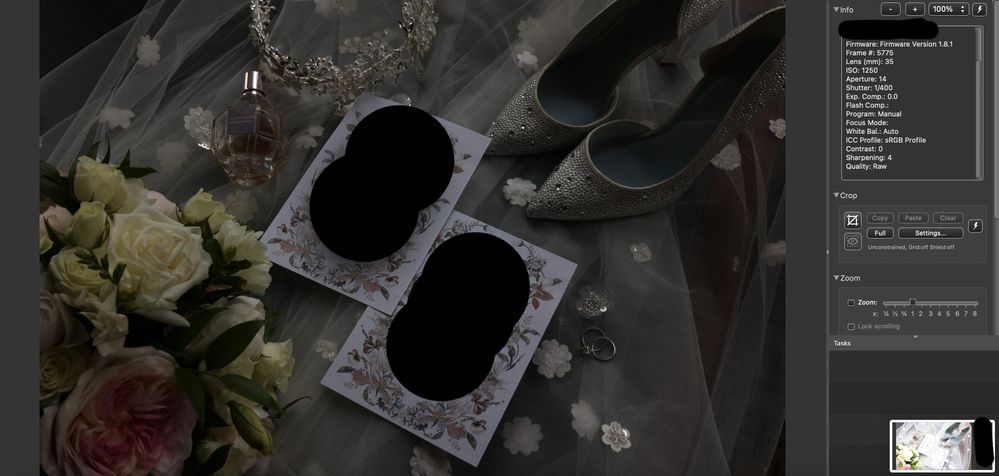
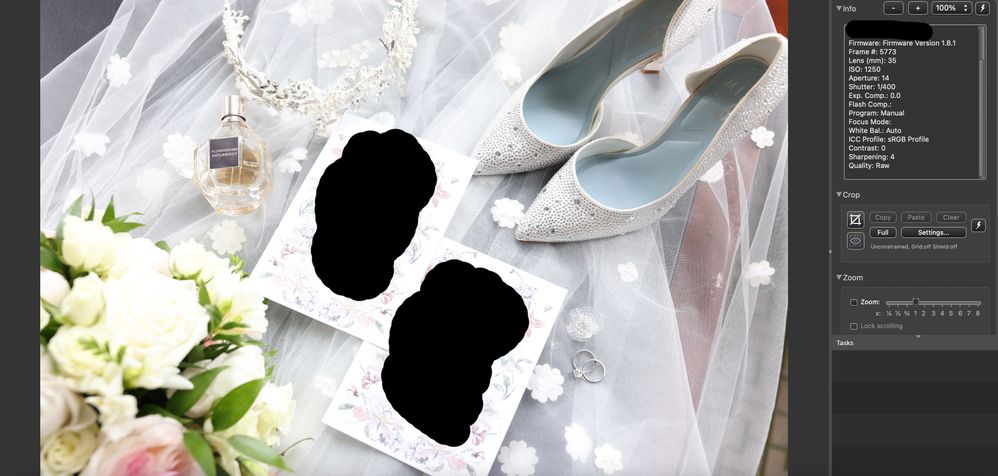
Canon EOS R5 Issue: Same image, same settings but totally different exposures, taken one second apart. WHY is this happening?
I have TWO Canon EOS R5's and it seems to be happening on BOTH. I'm using a Canon 35mm 1.4 with adapter.
It also occasionally will show the incorrect exposure on the back screen despite exposure simulation being on. Not all the time, just occasionally?I've attached a photo. I've obviously blanked out the invite information for the couple's privacy.
What's going on?!
9 REPLIES 9


Options
- Mark as New
- Bookmark
- Subscribe
- Mute
- Subscribe to RSS Feed
- Permalink
- Report Inappropriate Content
08-28-2023 11:57 AM
Wondering if the aperture blades are sticking in your lens? And not always able to close down?
Do you have other lenses you can try along with using f/14 or another stopped down value?
--
Ricky
Camera: EOS R5 II, RF 50mm f/1.2L, RF 135mm f/1.8L
Lighting: Profoto Lights & Modifiers
Ricky
Camera: EOS R5 II, RF 50mm f/1.2L, RF 135mm f/1.8L
Lighting: Profoto Lights & Modifiers


Options
- Mark as New
- Bookmark
- Subscribe
- Mute
- Subscribe to RSS Feed
- Permalink
- Report Inappropriate Content
08-28-2023 12:02 PM
(Not a tech) Could it be the Auto White Balance? The first image is skewing gray, while the second is skewing white. There isn't a lot of contrast in the shot.
Also - are you shooting under fluorescent or LED lights? Do you have Anti-Flicker enabled? It could be the lights cycling, and while we (humans) don't see it, the camera might. (I'm just guessing because I don't have enough info to go off of.)
Options
- Mark as New
- Bookmark
- Subscribe
- Mute
- Subscribe to RSS Feed
- Permalink
- Report Inappropriate Content
08-28-2023 12:10 PM
No flicker enables and It's only natural light in this particular image. It happens often, so that photo is just one example sadly. Indoors, outdoors - and with auto white balance on or off. 😞
Options
- Mark as New
- Bookmark
- Subscribe
- Mute
- Subscribe to RSS Feed
- Permalink
- Report Inappropriate Content
08-28-2023 12:11 PM
Thanks for the reply. You might be right with the lens. It's the only common element here. I'll test with another lens. Frustratingly, it's not all the time, just occasionally. Maybe 3-5 times within a 10 hour shoot. But I'll test that out. Thanks again!

Options
- Mark as New
- Bookmark
- Subscribe
- Mute
- Subscribe to RSS Feed
- Permalink
- Report Inappropriate Content
08-28-2023 12:48 PM
There was similar post a few weeks ago:
EF 35mm 1.4 Overexposing Images - Canon Community
Is your lens an adapted EF lens? Maybe a generic problem with that lens?
John Hoffman
Conway, NH
R6 Mark III, M200 (converted to infrared), RF lenses, Pixma PRO-100, Pixma TR8620a, Lr Classic
Conway, NH
R6 Mark III, M200 (converted to infrared), RF lenses, Pixma PRO-100, Pixma TR8620a, Lr Classic
Options
- Mark as New
- Bookmark
- Subscribe
- Mute
- Subscribe to RSS Feed
- Permalink
- Report Inappropriate Content
08-28-2023 01:04 PM
Thank you!! That seems to make more sense given the testing on two different R5's. It must be an issue with the lens. Yes, it's the canon 35mm 1.4 (not an RF lens).
Options
- Mark as New
- Bookmark
- Subscribe
- Mute
- Subscribe to RSS Feed
- Permalink
- Report Inappropriate Content
08-28-2023 02:09 PM
I don't know if this is the same problem: I see the opposite effect with my R6, usually when the camera is waking up after going to sleep. The image is greatly overexposed, and the exposure doesn't correct within a few seconds. I usually cycle the power, and after power-up the exposure returns to normal. In my case it's the 24-105 f/4 kit lens.
Options
- Mark as New
- Bookmark
- Subscribe
- Mute
- Subscribe to RSS Feed
- Permalink
- Report Inappropriate Content
12-11-2023 01:36 PM
I have exactly the same issue and I use Canon native lenses. Did you find a solution?
Options
- Mark as New
- Bookmark
- Subscribe
- Mute
- Subscribe to RSS Feed
- Permalink
- Report Inappropriate Content
01-04-2024 09:55 AM
I am shooting on an R5 C using the RF24-70mm F2.8 L IS USM. I shoot fully manual, noticed it happening as I was shooting, and confirmed on review. The common trigger seems to be images taken in rapid succession resulting in significant changes to exposure. It's not clear to me whether auto white balance could be at issue here, and more tests are needed, but seems unlikely.

Announcements
07/22/2026: New firmware updates are available.
EOS R6 Mark III - Version 1.1.0
05/13/2026: New firmware updates are available.
EOS R5 Mark II - Version 1.3.0
EOS R6 Mark II - Version 1.7.0
04/28/2026: Service Notice: Caution Concerning use of Lithium Batteries
03/17/2026: New firmware updates are available.
SELPHY CP1500 - Version 1.0.7.0
02/23/2026: New firmware update is available for EOS C50- Version 1.0.3.1
01/23/2026: New firmware update is available for RF 24-105mm F4 IS USM- Version 2.0.7
01/20/2026: New firmware updates are available.
10/21/2025: Service Notice: To Users of the Compact Digital Camera PowerShot V1
10/15/2025: New firmware updates are available.
Speedlite EL-5 - Version 1.2.0
Speedlite EL-1 - Version 1.1.0
Speedlite Transmitter ST-E10 - Version 1.2.0
07/28/2025: Notice of Free Repair Service for the Mirrorless Camera EOS R50 (Black)
05/21/2025: New firmware update available for EOS C500 Mark II - Version 1.1.5.1
Related Content
- PowerShot V1 file name numbers? in Point & Shoot Digital Cameras
- EOS R5 Mark II How and Why to Use Picture Style settings and In-Camera Sharpening in EOS DSLR & Mirrorless Cameras
- T8i AEB and 2 second time delay in EOS DSLR & Mirrorless Cameras
- USB-C not charging my EOS R50 V in EOS DSLR & Mirrorless Cameras
- Rebel SL3 - Screen is dark (can't see subject matter) when I choose "on" setting in EOS DSLR & Mirrorless Cameras

Ⓒ 2026
Canon U.S.A Inc. All Rights Reserved. Reproduction in whole or part without permission is prohibited.
