Turn on suggestions
Auto-suggest helps you quickly narrow down your search results by suggesting possible matches as you type.
- Canon Community
- Discussions & Help
- Camera
- EOS DSLR & Mirrorless Cameras
- Re: Canon 1100D Vertical Lines
Options
- Subscribe to RSS Feed
- Mark Topic as New
- Mark Topic as Read
- Float this Topic for Current User
- Bookmark
- Subscribe
- Mute
- Printer Friendly Page
Canon 1100D Vertical Lines

Options
- Mark as New
- Bookmark
- Subscribe
- Mute
- Subscribe to RSS Feed
- Permalink
- Report Inappropriate Content
08-05-2023 07:14 AM
Hello Canon Family.
Recently I am facing with a strange situation.
First of all I apologize for the gramer mistakes.
During the preview mode some strange vertical lines appearing on my screen after few minutes. When I turn off the camera after few minutes they are dissapearing. But they appear again after few minutes of usage with preview mode.
I have tried with different lenses, with a new sd card and the battery. Seems like nothing solved the problem yet.
here is a sample photo
Thank you for any help ❤️
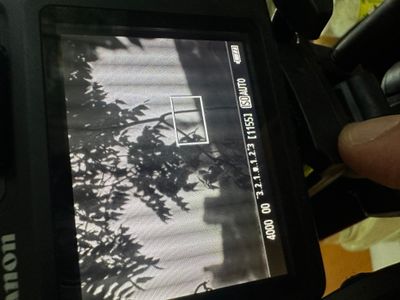
6 REPLIES 6


Options
- Mark as New
- Bookmark
- Subscribe
- Mute
- Subscribe to RSS Feed
- Permalink
- Report Inappropriate Content
08-05-2023 07:46 AM
Sounds like a hardware issue. When electronics is warmed up, that can sometimes lead to it revealing issues. Also assuming that the lines do not show up in your photos (only an issue with the camera's display)?
You can try resetting the camera, but doubtful that will change anything.
If you remove the lens, memory card and any other accessory, does the problem still occur?
You probably need to call up Canon to schedule a repair.
--
Ricky
Camera: EOS R5 II, RF 50mm f/1.2L, RF 135mm f/1.8L
Lighting: Profoto Lights & Modifiers
Ricky
Camera: EOS R5 II, RF 50mm f/1.2L, RF 135mm f/1.8L
Lighting: Profoto Lights & Modifiers

Options
- Mark as New
- Bookmark
- Subscribe
- Mute
- Subscribe to RSS Feed
- Permalink
- Report Inappropriate Content
08-05-2023 11:07 AM
Does the issue occur both indoors and outdoors?
--------------------------------------------------------
"Enjoying photography since 1972."
"Enjoying photography since 1972."
Options
- Mark as New
- Bookmark
- Subscribe
- Mute
- Subscribe to RSS Feed
- Permalink
- Report Inappropriate Content
08-05-2023 11:14 AM
Hello again and thank you for your answers. The photos are perfectly fine without the preview mode.
Right now i realized that the preview mode is working around 3-4 minutes without problem. But after few minutes of using the vertical lines are appering again.
The vertical lines are also visible on the photos as it seems on the lcd.
Options
- Mark as New
- Bookmark
- Subscribe
- Mute
- Subscribe to RSS Feed
- Permalink
- Report Inappropriate Content
08-05-2023 11:53 AM
You mean visible on the photos only when viewing the photos on the rear LCD screen? Assuming the photos viewed on other devices (computer, phone, etc) are all ok.
Should call up Canon to see about a repair.
--
Ricky
Camera: EOS R5 II, RF 50mm f/1.2L, RF 135mm f/1.8L
Lighting: Profoto Lights & Modifiers
Ricky
Camera: EOS R5 II, RF 50mm f/1.2L, RF 135mm f/1.8L
Lighting: Profoto Lights & Modifiers
Options
- Mark as New
- Bookmark
- Subscribe
- Mute
- Subscribe to RSS Feed
- Permalink
- Report Inappropriate Content
12-30-2025 11:26 AM
I have the same problem with my 1100D, but not "always". The images here are cropped because the stripes disappear when I upload full size images - which in turn are down-sampled through the web posting process.
Any suggestions why? Hard


Options
- Mark as New
- Bookmark
- Subscribe
- Mute
- Subscribe to RSS Feed
- Permalink
- Report Inappropriate Content
12-30-2025 12:23 PM
Greetings,
First. In the future, please consider starting your own topic. This ensures your problem or issue gets the attention it deserves. This threat is now 2 years old. It's also not possible for you to mark a thread as resolved if it belongs to someone else. Thanks in advance.
Is all of your gear Canon?
Your testing is not conclusive since you said the lines disappear when you upload/transfer full size images.
Is your storage media full size SD or microSD with adapter? Have you tested with a different card formatted in camera?
What is your "web posting process"? Please describe this for us. Card reader, cable connection to? If you're using a cable connection, have you tried with a different cable? Do these lines appear on your camera's LCD. The images you see on the camera's LCD are jpegs. Even when the camera is capturing in RAW.
We'll do our best to assist once we hear back from you 😉
~Rick
Bay Area - CA
~R5 C (1.1.3.1), ~RF Trinity, ~RF 100 Macro, ~RF 100~400, ~RF 100~500, ~RF 200-800, ~RF 1.4x TC, BG-R10, 430EX III-RT ~DxO PhotoLab Elite ~DaVinci Resolve Studio ~ImageClass MF644Cdw MF656Cdw ~Pixel 10 ~CarePaks Are Worth It

Announcements
07/22/2026: New firmware updates are available.
EOS R6 Mark III - Version 1.1.0
05/13/2026: New firmware updates are available.
EOS R5 Mark II - Version 1.3.0
EOS R6 Mark II - Version 1.7.0
04/28/2026: Service Notice: Caution Concerning use of Lithium Batteries
03/17/2026: New firmware updates are available.
SELPHY CP1500 - Version 1.0.7.0
02/23/2026: New firmware update is available for EOS C50- Version 1.0.3.1
01/23/2026: New firmware update is available for RF 24-105mm F4 IS USM- Version 2.0.7
01/20/2026: New firmware updates are available.
10/21/2025: Service Notice: To Users of the Compact Digital Camera PowerShot V1
10/15/2025: New firmware updates are available.
Speedlite EL-5 - Version 1.2.0
Speedlite EL-1 - Version 1.1.0
Speedlite Transmitter ST-E10 - Version 1.2.0
07/28/2025: Notice of Free Repair Service for the Mirrorless Camera EOS R50 (Black)
05/21/2025: New firmware update available for EOS C500 Mark II - Version 1.1.5.1
Related Content
- Vertical banding on LCD when articulating screen — Canon R6 Mark II in EOS DSLR & Mirrorless Cameras
- vertical line on my canon ixus 145 in Point & Shoot Digital Cameras
- PowerShot IXY 650/ELPH 360 Vertical colored lines on LCD screen in Point & Shoot Digital Cameras
- Determining a Nodal Point (no Parallax Point) in EF & RF Lenses
- Is this normal? White vertical lines in EOS 5D Mark IV images in EOS DSLR & Mirrorless Cameras

Ⓒ 2026
Canon U.S.A Inc. All Rights Reserved. Reproduction in whole or part without permission is prohibited.
