Turn on suggestions
Auto-suggest helps you quickly narrow down your search results by suggesting possible matches as you type.
- Canon Community
- Discussions & Help
- Camera
- EOS DSLR & Mirrorless Cameras
- Re: 6d Liveview tacksharp, Eyeview fuzzy
Options
- Subscribe to RSS Feed
- Mark Topic as New
- Mark Topic as Read
- Float this Topic for Current User
- Bookmark
- Subscribe
- Mute
- Printer Friendly Page
6d Liveview tacksharp, Eyeview fuzzy

Options
- Mark as New
- Bookmark
- Subscribe
- Mute
- Subscribe to RSS Feed
- Permalink
- Report Inappropriate Content
03-17-2015 08:31 PM
I have Canon 6d with 3 different Canon lens'. Regardless of the lens, shutter speed, F-stop, etc. my pictures are always significantly sharper in live view than when using the "eye view" mode. (I am using wireless remote control )
In my tests I am using a tripod and test target. In addition I have run FoCal on my lens to see if the lens are improperly calibrated.
I have even switched to manual focus after focusing the target automatically under liveview and then switching to regular eye view mode and the results are always the same. I have also tried mirror lock up under eye view mode and still not as clear as Live view
I sent my camera in to service to be looked at, but I am at a loss of what could be causing it..
I dont see how it could be focus related because I have focused the lens on the target using Liveview/AF and then switched to Eyefocus mode with MF..
The focal point should not change between Liveview and Eyeview right??
Not looking for a fix,( I already sent it in to be looked at). Just looking for an logical explanation as to how they could be different..
20 REPLIES 20
Options
- Mark as New
- Bookmark
- Subscribe
- Mute
- Subscribe to RSS Feed
- Permalink
- Report Inappropriate Content
03-25-2015 03:54 PM
I am new to the site, I don't see any option for performing uploads of pics


Options
- Mark as New
- Bookmark
- Subscribe
- Mute
- Subscribe to RSS Feed
- Permalink
- Report Inappropriate Content
03-25-2015 05:59 PM
@dsullens wrote:
I am new to the site, I don't see any option for performing uploads of pics
Choose the REPLY (not quick reply) and at the top of the reply box there is a icon with mountains and a sun that allows you to insert a photo.
Options
- Mark as New
- Bookmark
- Subscribe
- Mute
- Subscribe to RSS Feed
- Permalink
- Report Inappropriate Content
03-25-2015 10:04 PM
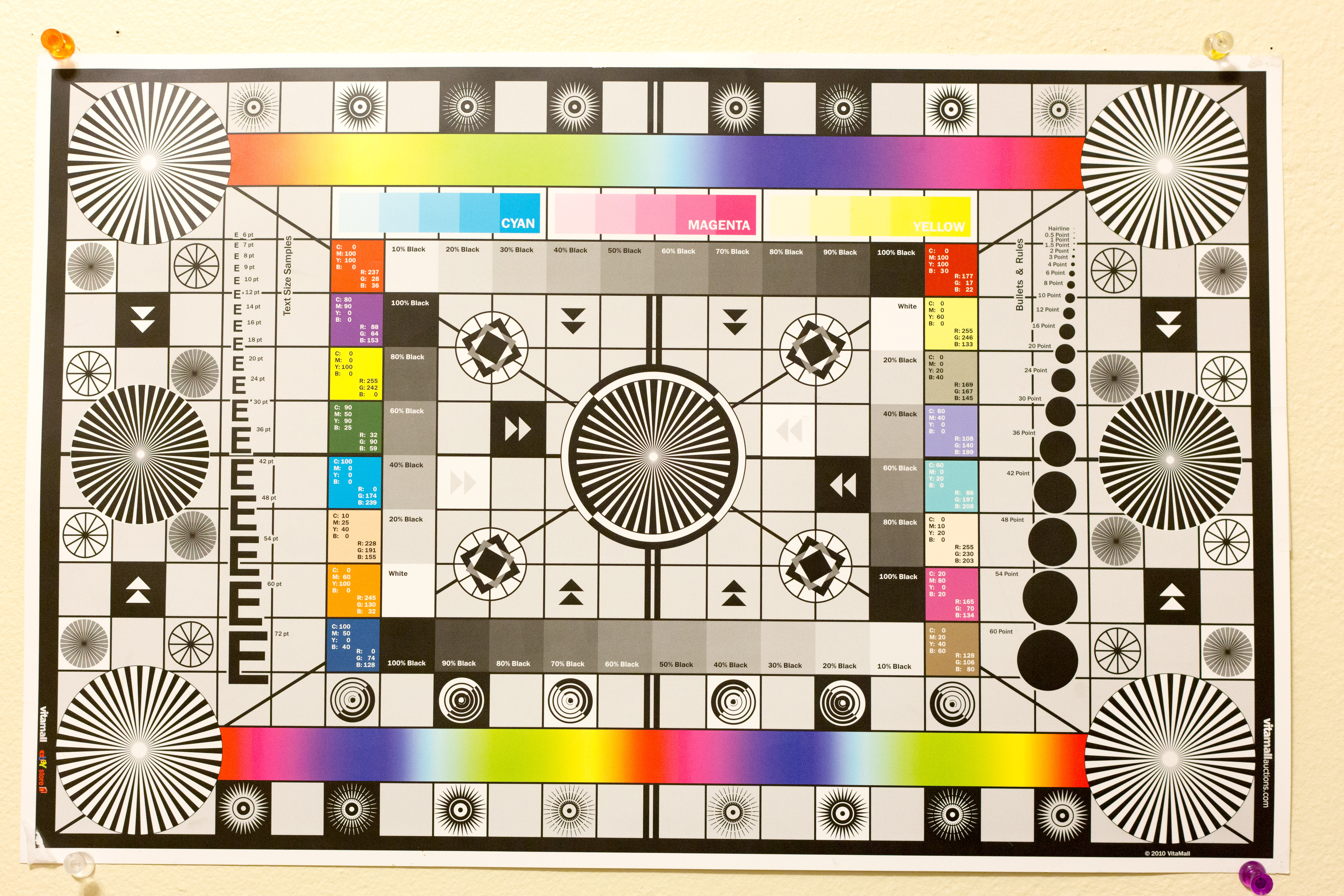
LiveView
Options
- Mark as New
- Bookmark
- Subscribe
- Mute
- Subscribe to RSS Feed
- Permalink
- Report Inappropriate Content
03-25-2015 10:05 PM
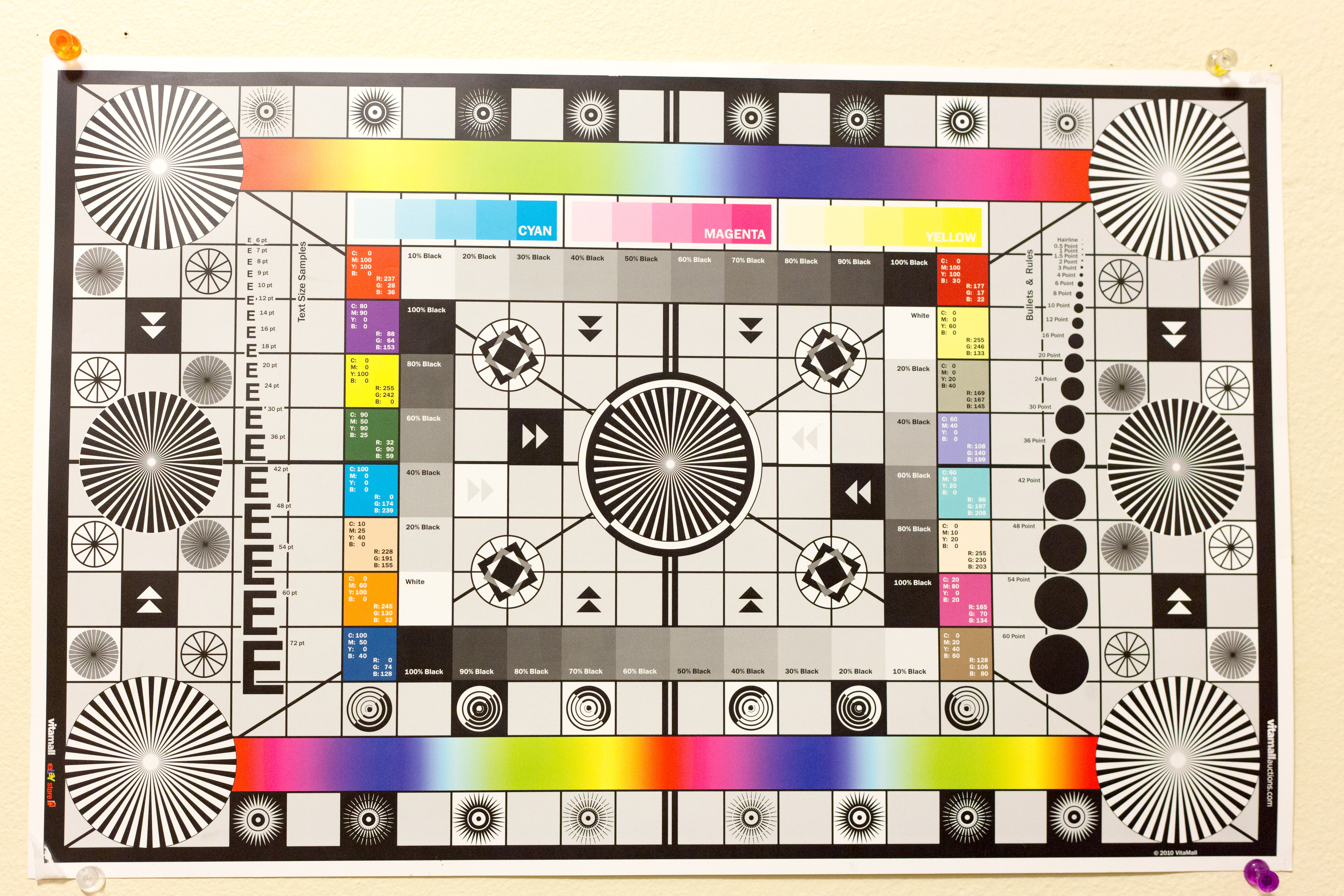
Eyeview
Options
- Mark as New
- Bookmark
- Subscribe
- Mute
- Subscribe to RSS Feed
- Permalink
- Report Inappropriate Content
03-25-2015 10:08 PM
Live

Options
- Mark as New
- Bookmark
- Subscribe
- Mute
- Subscribe to RSS Feed
- Permalink
- Report Inappropriate Content
03-25-2015 10:09 PM
Eye

Options
- Mark as New
- Bookmark
- Subscribe
- Mute
- Subscribe to RSS Feed
- Permalink
- Report Inappropriate Content
03-25-2015 10:11 PM
Both shots: 50mm lens, ISO 800, F4.5, 1/160

Options
- Mark as New
- Bookmark
- Subscribe
- Mute
- Subscribe to RSS Feed
- Permalink
- Report Inappropriate Content
03-26-2015 01:14 PM
Have you tried autofocus microadjustment? The images suggest to me that that's what's needed. The focus is correct in live view, because you're looking at what the sensor actually sees. But when you use the viewfinder, the focus mechanism has to emulate the sensor via separate hardware, because the mirror blocks access to the sensor itself. If the alternate light path is too long or too short, the resulting image will be OOF relative to the sensor.
Bob
Philadelphia, Pennsylvania USA
Philadelphia, Pennsylvania USA
Options
- Mark as New
- Bookmark
- Subscribe
- Mute
- Subscribe to RSS Feed
- Permalink
- Report Inappropriate Content
03-26-2015 01:34 PM
Yes I have using a program called focal
Options
- Mark as New
- Bookmark
- Subscribe
- Mute
- Subscribe to RSS Feed
- Permalink
- Report Inappropriate Content
03-26-2015 03:32 PM
@dsullens wrote:Eye
Are you saying the eyeview photo above was focused in liveview, then switched to MF, and taken in 'eyeview' with mirror lock up, like you said in a previous post?


Announcements
05/13/2026: New firmware updates are available.
EOS R5 Mark II - Version 1.3.0
EOS R6 Mark II - Version 1.7.0
04/28/2026: Service Notice: Caution Concerning use of Lithium Batteries
03/17/2026: New firmware updates are available.
SELPHY CP1500 - Version 1.0.7.0
02/23/2026: New firmware update is available for EOS C50- Version 1.0.3.1
01/23/2026: New firmware update is available for RF 24-105mm F4 IS USM- Version 2.0.7
01/20/2026: New firmware updates are available.
12/22/2025: New firmware update is available for EOS R6 Mark III- Version 1.0.2
10/21/2025: Service Notice: To Users of the Compact Digital Camera PowerShot V1
10/15/2025: New firmware updates are available.
Speedlite EL-5 - Version 1.2.0
Speedlite EL-1 - Version 1.1.0
Speedlite Transmitter ST-E10 - Version 1.2.0
07/28/2025: Notice of Free Repair Service for the Mirrorless Camera EOS R50 (Black)
05/21/2025: New firmware update available for EOS C500 Mark II - Version 1.1.5.1

Ⓒ 2026
Canon U.S.A Inc. All Rights Reserved. Reproduction in whole or part without permission is prohibited.
