Turn on suggestions
Auto-suggest helps you quickly narrow down your search results by suggesting possible matches as you type.
- Canon Community
- Discussions & Help
- Printer
- Desktop Inkjet Printers
- margin problems
Options
- Subscribe to RSS Feed
- Mark Topic as New
- Mark Topic as Read
- Float this Topic for Current User
- Bookmark
- Subscribe
- Mute
- Printer Friendly Page
margin problems

Options
- Mark as New
- Bookmark
- Subscribe
- Mute
- Subscribe to RSS Feed
- Permalink
- Report Inappropriate Content
09-24-2018 07:48 PM
I'm using a canon pixma MG2520 all in one printer. When I try to print portrait (paper shown below),
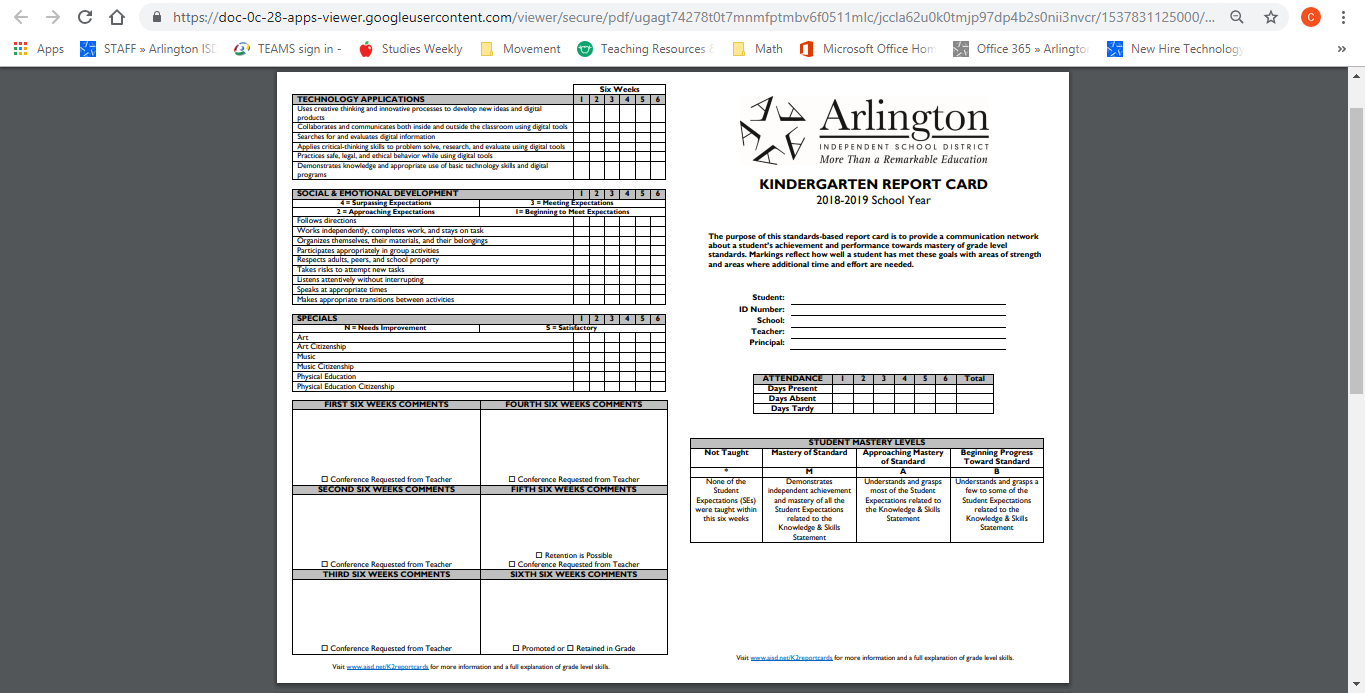
it will cut off the left side of the paper, as much as the "tech" in the technology applications seen in the top left of the paper. The next picture is my printer's default page setup preferences and chrome's print screen.
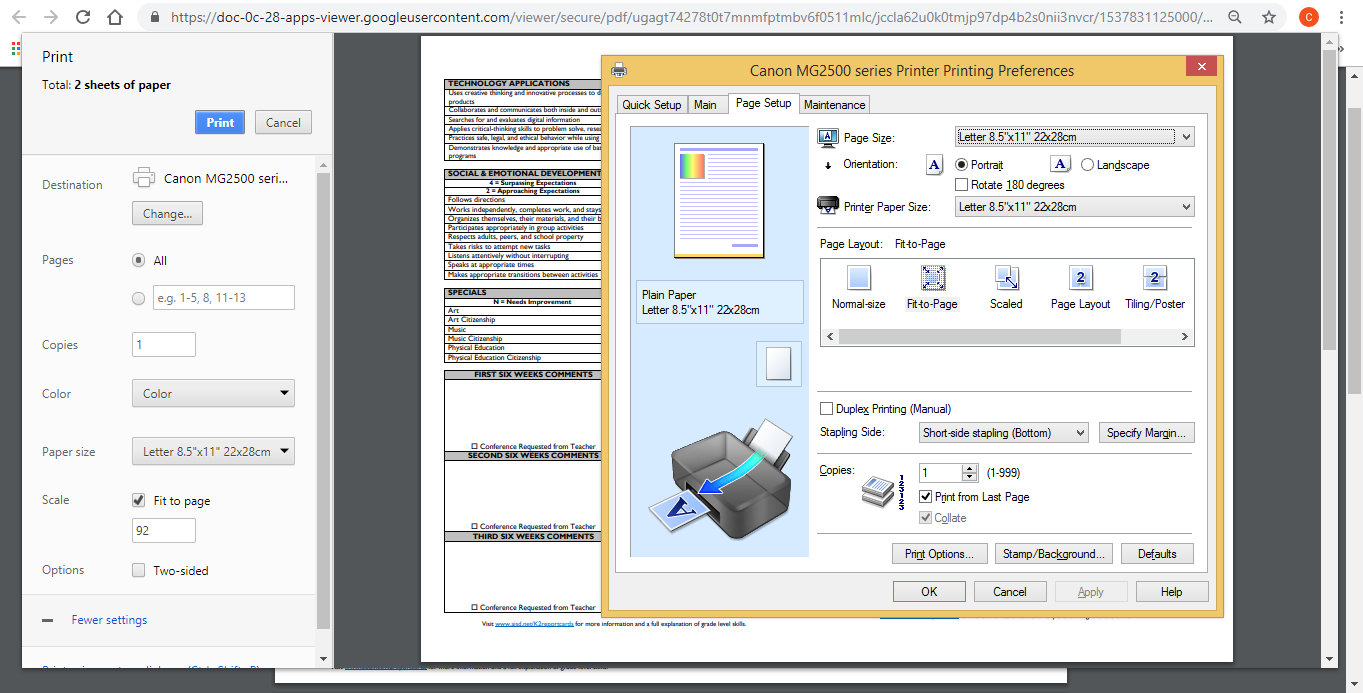
Is there a way to edit the printable section of paper? The problem happens in microsoft word as well as chrome. When the document is landscape, it's the left hand side that gets cut, and when the document's portrait it's the bottom that gets cut.
Also, it seems like it's adding extra blank space on a certain side. When printing as seen in the above pictures, there's about an inch and a half of blank space to the right of the document. When I pick the option in page setup to "rotate 180 degrees", there's about an inch and a half of blank space to the left side of the document and the right side becomes cut off (up to the "ss" in "beginning progress" in the student mastery levels chart at the bottom right).
4 REPLIES 4

Options
- Mark as New
- Bookmark
- Subscribe
- Mute
- Subscribe to RSS Feed
- Permalink
- Report Inappropriate Content
09-24-2018 09:21 PM
Hi garret245,
In order to better assist you, allow me to ask a couple questions:
- What program are you printing from?
- Do you get the same effect when printing from other programs?
- Are you able to make a photocopy?
I look forward to your reply.
Options
- Mark as New
- Bookmark
- Subscribe
- Mute
- Subscribe to RSS Feed
- Permalink
- Report Inappropriate Content
09-24-2018 09:59 PM
google chrome
yes. it happens in microsoft word as well
I've never tried scanning or copying on the printer. I can test it tomorrow though.
Options
- Mark as New
- Bookmark
- Subscribe
- Mute
- Subscribe to RSS Feed
- Permalink
- Report Inappropriate Content
09-24-2018 10:26 PM
Hi garret245,
The printer itself does not adjust the print settings, so if you are able to make a photocopy normally, we can be certain that this is a software issue. If you are unable to make a photocopy, there may be a problem with the hardware.
This didn't answer your question or issue? Please call or email us at one of the methods on the Contact Us page for further assistance.
Did this answer your question? Please click the Accept as Solution button so that others may find the answer as well.
Options
- Mark as New
- Bookmark
- Subscribe
- Mute
- Subscribe to RSS Feed
- Permalink
- Report Inappropriate Content
09-25-2018 06:02 PM - edited 09-25-2018 06:21 PM
I edited this comment. please ignore anything that came before this.
I photocopied a black piece of construction paper and while viewing it as portrait, the left and right sides show a small margin (about 1 cm), the top has a small margin (about .3 cm) and the bottom has a large white margin (1.5 cm, or 3/4 of an inch). A bit of the bottom of the document (what is printed last) seems to have a little bit cut off, but it doesn't seem to be adding extra white space as it did when I printed from google chrome.


Announcements
07/22/2026: New firmware updates are available.
EOS R6 Mark III - Version 1.1.0
05/13/2026: New firmware updates are available.
EOS R5 Mark II - Version 1.3.0
EOS R6 Mark II - Version 1.7.0
04/28/2026: Service Notice: Caution Concerning use of Lithium Batteries
03/17/2026: New firmware updates are available.
SELPHY CP1500 - Version 1.0.7.0
02/23/2026: New firmware update is available for EOS C50- Version 1.0.3.1
01/23/2026: New firmware update is available for RF 24-105mm F4 IS USM- Version 2.0.7
01/20/2026: New firmware updates are available.
10/21/2025: Service Notice: To Users of the Compact Digital Camera PowerShot V1
10/15/2025: New firmware updates are available.
Speedlite EL-5 - Version 1.2.0
Speedlite EL-1 - Version 1.1.0
Speedlite Transmitter ST-E10 - Version 1.2.0
07/28/2025: Notice of Free Repair Service for the Mirrorless Camera EOS R50 (Black)
05/21/2025: New firmware update available for EOS C500 Mark II - Version 1.1.5.1
Related Content
- imageCLASS MFC743Cdw - No scan, no print, not working and can't reach Canon support after months. in Office Printers
- printer not printing..TS3722. I want to resolve my problem.....not read about others problems... in Desktop Inkjet Printers
- PIXMA TS6420a - Won't Connect to Router in Printer Software & Networking
- Latest Photo Printer Software for TR8620 Printer, or 3rd party suggestions in Printer Software & Networking
- Calidad cartridges locking up PIXMA MG3600 series printer and TS3420 in Desktop Inkjet Printers

Ⓒ 2026
Canon U.S.A Inc. All Rights Reserved. Reproduction in whole or part without permission is prohibited.
