Turn on suggestions
Auto-suggest helps you quickly narrow down your search results by suggesting possible matches as you type.
- Canon Community
- Discussions & Help
- Printer
- Desktop Inkjet Printers
- White lines when printing in color only.
Options
- Subscribe to RSS Feed
- Mark Topic as New
- Mark Topic as Read
- Float this Topic for Current User
- Bookmark
- Subscribe
- Mute
- Printer Friendly Page
White lines when printing in color only.

Options
- Mark as New
- Bookmark
- Subscribe
- Mute
- Subscribe to RSS Feed
- Permalink
- Report Inappropriate Content
01-09-2021 11:41 PM
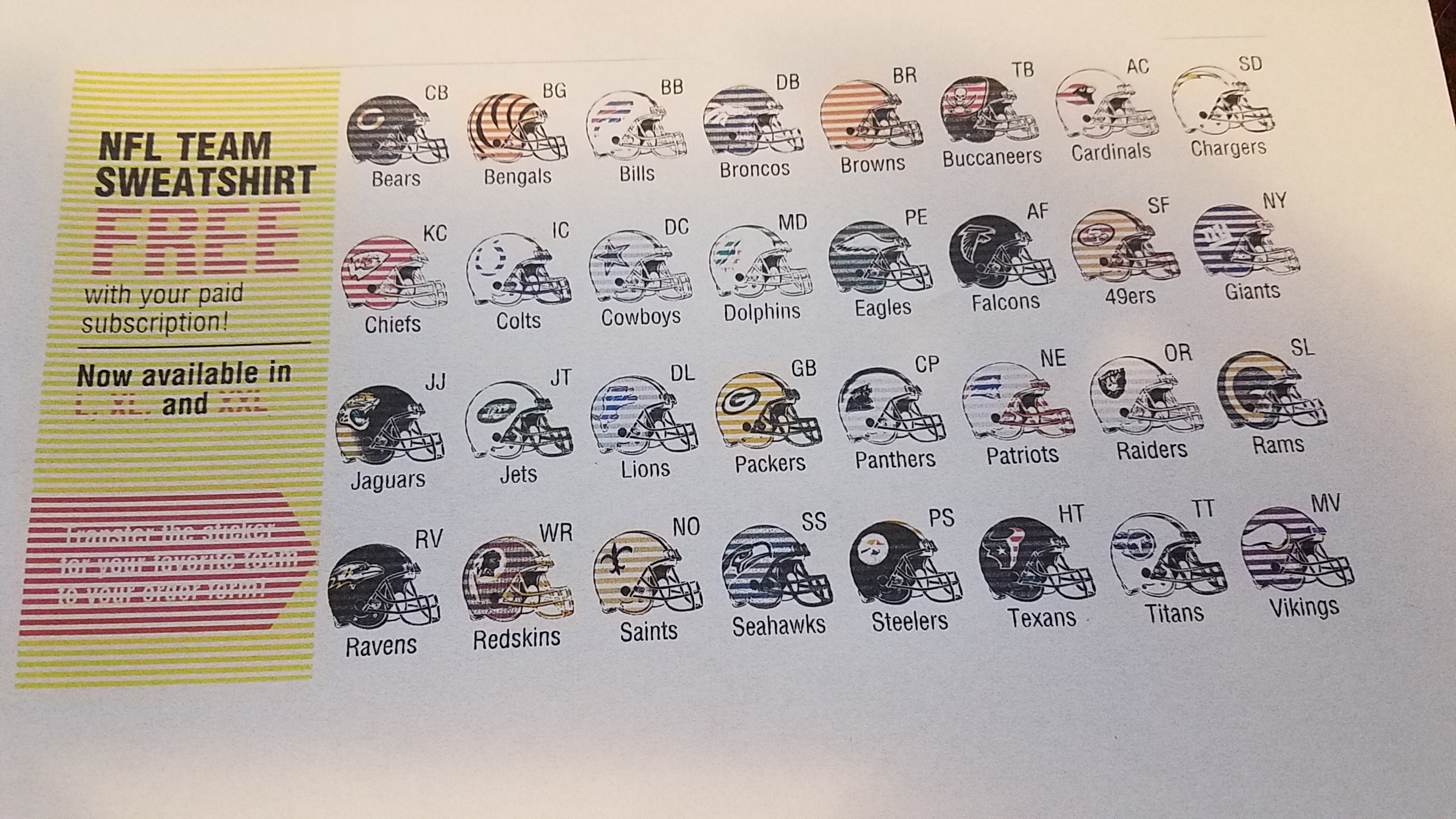
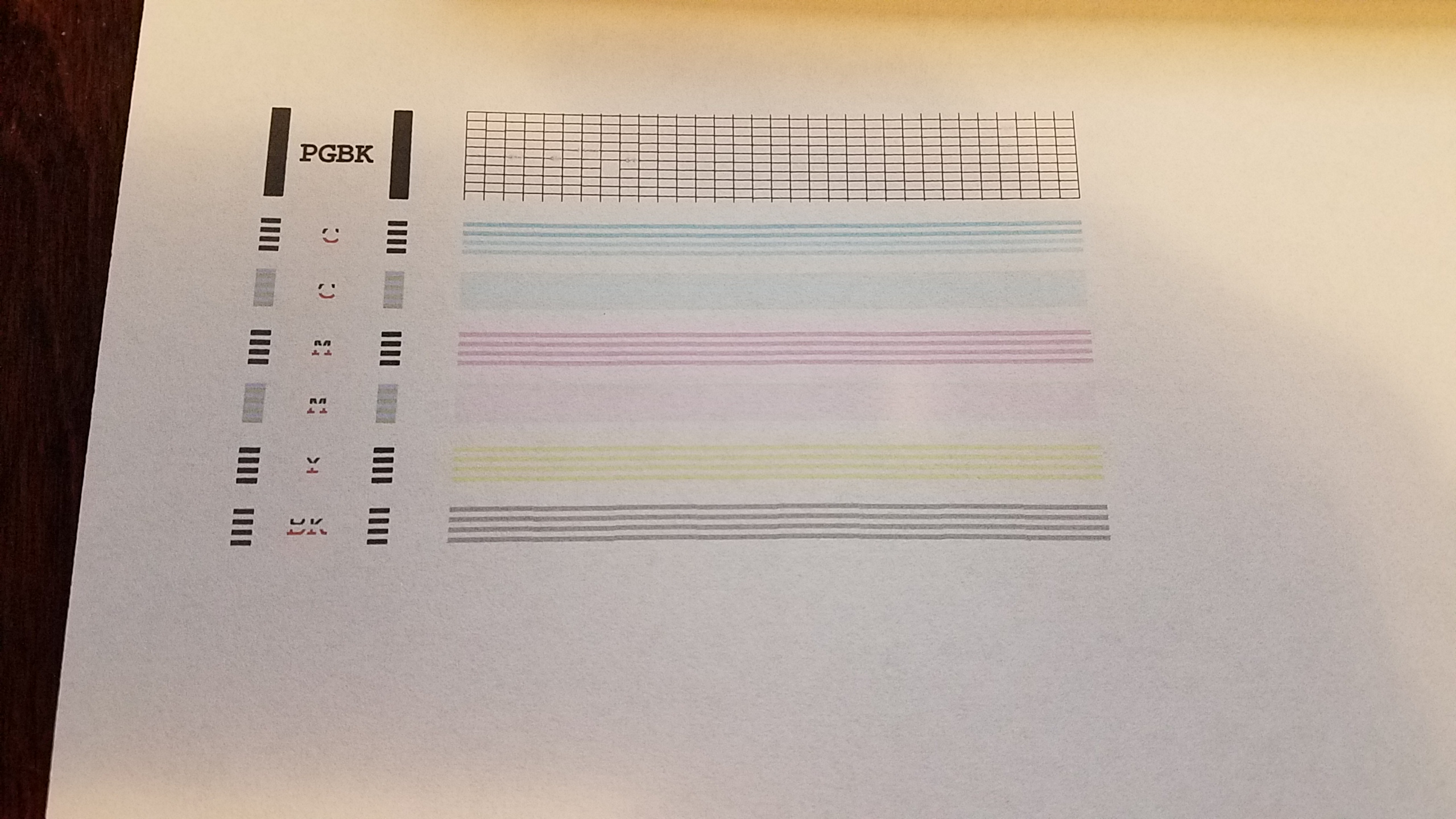
Hello. I have done everything thing possible ( running all the maintence options on the printer to cleaning the print head to all the options on youtube ) to try to fix this problem. When I print something in color, there is always white lines between the picture. When I print in black and white, there is no lines. Please see attached. Any suggestions on how to fix this problem would be greatly appreciated. Cannon MP530 printer.
2 REPLIES 2


Options
- Mark as New
- Bookmark
- Subscribe
- Mute
- Subscribe to RSS Feed
- Permalink
- Report Inappropriate Content
01-10-2021 09:48 AM
Canon Knowledge Base - Printing the Nozzle Check Pattern MP530
Did you try deep cleaning?
John Hoffman
Conway, NH
R6 Mark III, M200 (converted to infrared), RF lenses, Pixma PRO-100, Pixma TR8620a, Lr Classic
Conway, NH
R6 Mark III, M200 (converted to infrared), RF lenses, Pixma PRO-100, Pixma TR8620a, Lr Classic
Options
- Mark as New
- Bookmark
- Subscribe
- Mute
- Subscribe to RSS Feed
- Permalink
- Report Inappropriate Content
01-10-2021 10:14 AM
Yes. As I have stated, I've used all the options available on the printer. Head Cleaning, Deep Cleaning, Align Heads, etc. I've manualy cleaned the print head ( shown on youtube as a solution ), replaced all the ink cartridges, cleaned the clean plastic strip inside the printer ( shown on youtube ) and nothing has fixed the problem.


Announcements
07/22/2026: New firmware updates are available.
EOS R6 Mark III - Version 1.1.0
05/13/2026: New firmware updates are available.
EOS R5 Mark II - Version 1.3.0
EOS R6 Mark II - Version 1.7.0
04/28/2026: Service Notice: Caution Concerning use of Lithium Batteries
03/17/2026: New firmware updates are available.
SELPHY CP1500 - Version 1.0.7.0
02/23/2026: New firmware update is available for EOS C50- Version 1.0.3.1
01/23/2026: New firmware update is available for RF 24-105mm F4 IS USM- Version 2.0.7
01/20/2026: New firmware updates are available.
10/21/2025: Service Notice: To Users of the Compact Digital Camera PowerShot V1
10/15/2025: New firmware updates are available.
Speedlite EL-5 - Version 1.2.0
Speedlite EL-1 - Version 1.1.0
Speedlite Transmitter ST-E10 - Version 1.2.0
07/28/2025: Notice of Free Repair Service for the Mirrorless Camera EOS R50 (Black)
05/21/2025: New firmware update available for EOS C500 Mark II - Version 1.1.5.1
Related Content
- PIXMA G3272 Lines appearing in prints in Desktop Inkjet Printers
- PIXMA G7020: Ink running out during print even with full ink in Desktop Inkjet Printers
- Driver PIXMA G5010 & G6010 for macOS 26 in Desktop Inkjet Printers
- Month-old PIXMA TR4720 not working in a myriad of baffling and frustrating ways in Desktop Inkjet Printers
- PIXMA G3290 won't print vivid colors in Desktop Inkjet Printers

Ⓒ 2026
Canon U.S.A Inc. All Rights Reserved. Reproduction in whole or part without permission is prohibited.
