Turn on suggestions
Auto-suggest helps you quickly narrow down your search results by suggesting possible matches as you type.
- Canon Community
- Discussions & Help
- Printer
- Desktop Inkjet Printers
- Printing problems from OSX 10.12.5
Options
- Subscribe to RSS Feed
- Mark Topic as New
- Mark Topic as Read
- Float this Topic for Current User
- Bookmark
- Subscribe
- Mute
- Printer Friendly Page
Printing problems from OSX 10.12.5

Options
- Mark as New
- Bookmark
- Subscribe
- Mute
- Subscribe to RSS Feed
- Permalink
- Report Inappropriate Content
05-30-2017 05:56 AM
Problem 1: When I try to print to my Pixma 2450, a high quality photograph, I get an error. Fast or draft works but of course the quality is no good.
Problem 2: Now the **bleep** thing won't print at all! 'Error occurred while printing'
23 REPLIES 23
Options
- Mark as New
- Bookmark
- Subscribe
- Mute
- Subscribe to RSS Feed
- Permalink
- Report Inappropriate Content
06-22-2017 09:30 AM
Nope, just the 2400 series
Options
- Mark as New
- Bookmark
- Subscribe
- Mute
- Subscribe to RSS Feed
- Permalink
- Report Inappropriate Content
06-23-2017 07:32 AM
Thank you for taking the time to post that information.
Curiously, I had already attempted that download, to no avail. I have just tried a second time, and lo and behold, everything is back up, and working.
I can can find both printers in system preferences, whereas there was a blank page previously, and both are working as they should.
Whatever, I am beginning to think the time has come to think about upgrading my "ancient" MacBook Pro.
Thanks again.
Options
- Mark as New
- Bookmark
- Subscribe
- Mute
- Subscribe to RSS Feed
- Permalink
- Report Inappropriate Content
07-02-2017 04:15 AM
No I don't. This printer is a piece of garbage! I'm throwing it away and get a proper printer. The problem lies with the printer settings. So if I choose 'glossy paper' or in fact anything other than 'fast', it gives me an error that the paper is the wrong size etc (which it ain't). Worse still, even printing using 'Fast', the **bleep** thing ignores the scale settings! It's junk, pure and simple.
Options
- Mark as New
- Bookmark
- Subscribe
- Mute
- Subscribe to RSS Feed
- Permalink
- Report Inappropriate Content
07-07-2017 08:06 AM
Update: just installed the latest Apple print drivers but it makes no difference! still can't print high quality. Get this message (which is incorrect):
Support Code : 4102 The media type and paper size are not set correctly. Press the printer's Stop button to cancel printing, change the media type or paper size setting, and print again. Refer to the manual for the media type and paper size settings.
Support Code : 4102 The media type and paper size are not set correctly. Press the printer's Stop button to cancel printing, change the media type or paper size setting, and print again. Refer to the manual for the media type and paper size settings.


Options
- Mark as New
- Bookmark
- Subscribe
- Mute
- Subscribe to RSS Feed
- Permalink
- Report Inappropriate Content
07-07-2017 09:34 AM
Can you post exactly what paper and what settings you are using? Maybe a screen shot of the Canon driver window.
John Hoffman
Conway, NH
R6 Mark III, M200 (converted to infrared), RF lenses, Pixma PRO-100, Pixma TR8620a, Lr Classic
Conway, NH
R6 Mark III, M200 (converted to infrared), RF lenses, Pixma PRO-100, Pixma TR8620a, Lr Classic
Options
- Mark as New
- Bookmark
- Subscribe
- Mute
- Subscribe to RSS Feed
- Permalink
- Report Inappropriate Content
07-07-2017 12:32 PM
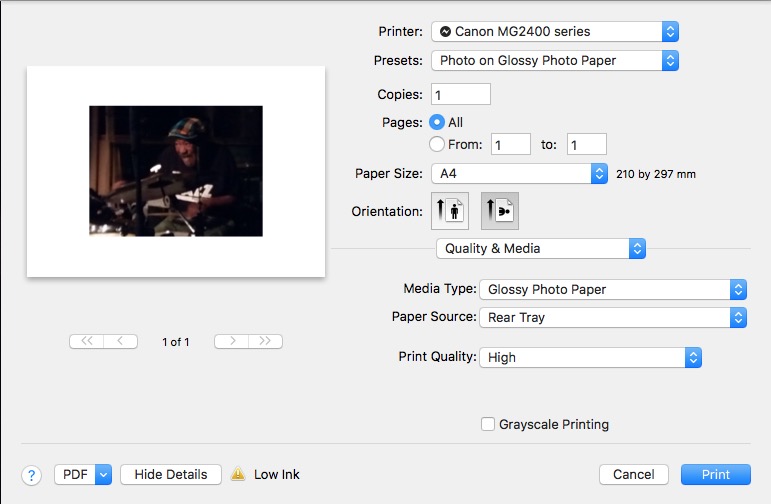
Options
- Mark as New
- Bookmark
- Subscribe
- Mute
- Subscribe to RSS Feed
- Permalink
- Report Inappropriate Content
07-07-2017 12:51 PM
What software are you printing from? Is there an option to not use a preset? Is it possible that the photo software and the printer driver are both trying to control the print?
John Hoffman
Conway, NH
R6 Mark III, M200 (converted to infrared), RF lenses, Pixma PRO-100, Pixma TR8620a, Lr Classic
Conway, NH
R6 Mark III, M200 (converted to infrared), RF lenses, Pixma PRO-100, Pixma TR8620a, Lr Classic
Options
- Mark as New
- Bookmark
- Subscribe
- Mute
- Subscribe to RSS Feed
- Permalink
- Report Inappropriate Content
07-07-2017 01:50 PM
Apple Preview, Photoshop, three or four different packages.
What you see is what you get. Period. There are no other controls to set.
What you see is what you get. Period. There are no other controls to set.
Options
- Mark as New
- Bookmark
- Subscribe
- Mute
- Subscribe to RSS Feed
- Permalink
- Report Inappropriate Content
07-10-2017 06:47 AM
More on this piece of junk called a printer:
Even though there's plenty of ink, it now can't print a page correctly, most of it is missing/faint. So I decide to do a deep clean, which it does even though it says the printer is not connected!!!!!???? BTW, the Test Page prints just fine, so it's obviously NOT the printer but the useless Canon/Apple software.
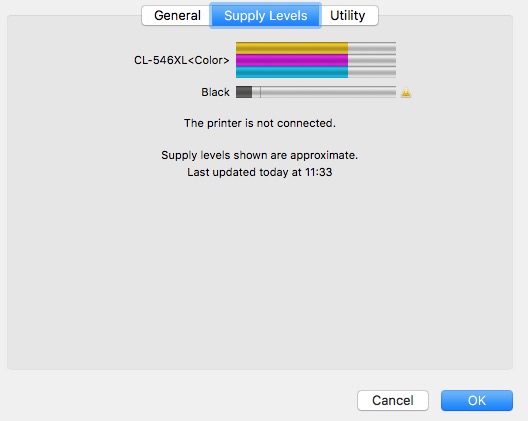
So after cleaning I ran (wasted) another print 0ff (it's just text printed in the Fast mode). It starts out almost ok (last line missing off Page 1) but by the third and fourth pages it's degenerated into nothing.
Options
- Mark as New
- Bookmark
- Subscribe
- Mute
- Subscribe to RSS Feed
- Permalink
- Report Inappropriate Content
07-12-2017 11:01 AM
Further Update: It seems the only way I can get it to print (in fast mode) is one page at a time. Not encouraging.

Announcements
07/22/2026: New firmware updates are available.
EOS R6 Mark III - Version 1.1.0
05/13/2026: New firmware updates are available.
EOS R5 Mark II - Version 1.3.0
EOS R6 Mark II - Version 1.7.0
04/28/2026: Service Notice: Caution Concerning use of Lithium Batteries
03/17/2026: New firmware updates are available.
SELPHY CP1500 - Version 1.0.7.0
02/23/2026: New firmware update is available for EOS C50- Version 1.0.3.1
01/23/2026: New firmware update is available for RF 24-105mm F4 IS USM- Version 2.0.7
01/20/2026: New firmware updates are available.
10/21/2025: Service Notice: To Users of the Compact Digital Camera PowerShot V1
10/15/2025: New firmware updates are available.
Speedlite EL-5 - Version 1.2.0
Speedlite EL-1 - Version 1.1.0
Speedlite Transmitter ST-E10 - Version 1.2.0
07/28/2025: Notice of Free Repair Service for the Mirrorless Camera EOS R50 (Black)
05/21/2025: New firmware update available for EOS C500 Mark II - Version 1.1.5.1
Related Content
- Latest Photo Printer Software for TR8620 Printer, or 3rd party suggestions in Desktop Inkjet Printers
- Checking out a used MF731Cdw: prints wide horizontal color bars in Office Printers
- PIXMA TS3750 A complete non starter in Desktop Inkjet Printers
- imageprograf pro-2000 only printing small images? in Professional Photo Printers
- TS7720 I cannot print after installing Tahoe OS 26.6on my Mac Book Air in Desktop Inkjet Printers

Ⓒ 2026
Canon U.S.A Inc. All Rights Reserved. Reproduction in whole or part without permission is prohibited.
