Turn on suggestions
Auto-suggest helps you quickly narrow down your search results by suggesting possible matches as you type.
- Canon Community
- Discussions & Help
- Printer
- Desktop Inkjet Printers
- Pixma TR8520 Copy question
Options
- Subscribe to RSS Feed
- Mark Topic as New
- Mark Topic as Read
- Float this Topic for Current User
- Bookmark
- Subscribe
- Mute
- Printer Friendly Page

Options
- Mark as New
- Bookmark
- Subscribe
- Mute
- Subscribe to RSS Feed
- Permalink
- Report Inappropriate Content
03-12-2019 04:29 PM
I just got this printer and when trying to copy, it will only print from the rear paper. How can I make it print from the cassette when copying?
Solved! Go to Solution.
1 ACCEPTED SOLUTION
Accepted Solutions


Options
- Mark as New
- Bookmark
- Subscribe
- Mute
- Subscribe to RSS Feed
- Permalink
- Report Inappropriate Content
03-15-2019 01:24 PM
Hi oldg,
You can set the printer to use the cassette. When you have the copy menu on the printer screen, press settings (C) in the picture below:
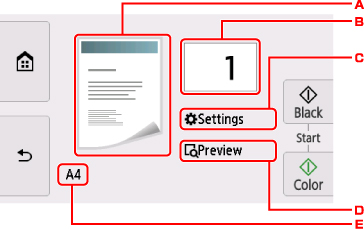
From the settings menu, swipe down until you see Paper scrc. It should be set to Auto. Tap on it and change it to Cassette. The printer will now pull paper from the cassette when making copies.
Did this answer your question? Please click the Accept as Solution button so that others may find the answer as well.
2 REPLIES 2
Options
- Mark as New
- Bookmark
- Subscribe
- Mute
- Subscribe to RSS Feed
- Permalink
- Report Inappropriate Content
03-15-2019 01:24 PM
Hi oldg,
You can set the printer to use the cassette. When you have the copy menu on the printer screen, press settings (C) in the picture below:
From the settings menu, swipe down until you see Paper scrc. It should be set to Auto. Tap on it and change it to Cassette. The printer will now pull paper from the cassette when making copies.
Did this answer your question? Please click the Accept as Solution button so that others may find the answer as well.
Options
- Mark as New
- Bookmark
- Subscribe
- Mute
- Subscribe to RSS Feed
- Permalink
- Report Inappropriate Content
03-15-2019 01:47 PM
This answer resolved my question. Thanks.

Announcements
07/22/2026: New firmware updates are available.
EOS R6 Mark III - Version 1.1.0
05/13/2026: New firmware updates are available.
EOS R5 Mark II - Version 1.3.0
EOS R6 Mark II - Version 1.7.0
04/28/2026: Service Notice: Caution Concerning use of Lithium Batteries
03/17/2026: New firmware updates are available.
SELPHY CP1500 - Version 1.0.7.0
02/23/2026: New firmware update is available for EOS C50- Version 1.0.3.1
01/23/2026: New firmware update is available for RF 24-105mm F4 IS USM- Version 2.0.7
01/20/2026: New firmware updates are available.
10/21/2025: Service Notice: To Users of the Compact Digital Camera PowerShot V1
10/15/2025: New firmware updates are available.
Speedlite EL-5 - Version 1.2.0
Speedlite EL-1 - Version 1.1.0
Speedlite Transmitter ST-E10 - Version 1.2.0
07/28/2025: Notice of Free Repair Service for the Mirrorless Camera EOS R50 (Black)
05/21/2025: New firmware update available for EOS C500 Mark II - Version 1.1.5.1
Related Content
- PIXMA TS8220 End of life question, will ink still be available for purchase? in Desktop Inkjet Printers
- PIXMA TR8520 Wireless will not connect to my Netgear Orbi 770 Tri-Band WiFi7 Mesh router in Printer Software & Networking
- How to access scanned document via My Image Garden in Printer Software & Networking
- PIXMA TS6520 Won’t Power Down in Desktop Inkjet Printers
- PIXMA TR8520 prints OK but when attempting to scan get can't connect message in Desktop Inkjet Printers

Ⓒ 2026
Canon U.S.A Inc. All Rights Reserved. Reproduction in whole or part without permission is prohibited.
