Turn on suggestions
Auto-suggest helps you quickly narrow down your search results by suggesting possible matches as you type.
- Canon Community
- Discussions & Help
- Printer
- Desktop Inkjet Printers
- Re: PIXMA TR7520 Scans Save as PDF Instead of JPG
Options
- Subscribe to RSS Feed
- Mark Topic as New
- Mark Topic as Read
- Float this Topic for Current User
- Bookmark
- Subscribe
- Mute
- Printer Friendly Page
PIXMA TR7520 Scans Save as PDF Instead of JPG

Options
- Mark as New
- Bookmark
- Subscribe
- Mute
- Subscribe to RSS Feed
- Permalink
- Report Inappropriate Content
01-07-2023
12:20 PM
- last edited on
01-07-2023
12:28 PM
by
 Danny
Danny
How do I get the scanner to save my scans as JPG files. Everything I scan currently saves as a PDF file.
7 REPLIES 7

Options
- Mark as New
- Bookmark
- Subscribe
- Mute
- Subscribe to RSS Feed
- Permalink
- Report Inappropriate Content
01-07-2023 12:29 PM
Hi, Baja58!
So that the Community can help you better, we need to know exactly which operating system is running on your computer (i.e. Windows or macOS, and which version thereof) and which application you're scanning with. That, and any other details you'd like to give will help the Community better understand your issue!
If this is a time-sensitive matter, click HERE search our knowledge base or find additional support options HERE.
Thanks and have a great day!


Options
- Mark as New
- Bookmark
- Subscribe
- Mute
- Subscribe to RSS Feed
- Permalink
- Report Inappropriate Content
01-07-2023 01:00 PM
Does the program you're using have different scan options.....Photo, Document, ????
Scanning as a document usually defaults to PDF. Scanning a photo usually defaults to JPG.
Options
- Mark as New
- Bookmark
- Subscribe
- Mute
- Subscribe to RSS Feed
- Permalink
- Report Inappropriate Content
01-08-2023 04:08 PM
Hi Danny,
It uses Windows 10 Home, version 21H2
Ron
Options
- Mark as New
- Bookmark
- Subscribe
- Mute
- Subscribe to RSS Feed
- Permalink
- Report Inappropriate Content
01-14-2023 05:16 PM
I am almost totally clueless how to use this copier/scanner. I just scanned a catalog page as a photo and it resulted in 10 separate JPG files with each showing just a small segment (all different) of the full catalog page.
When I click on Settings, a box pops up showing 10 different categories like "Save to PC (AUTO)" or "Document Scan" or "Photo Scan" or "Attach To e-Mail (Document) and others, each with many variables to choose from and I don't understand it at all.
Attached are 2 screen shots of the 'Settings" pop up box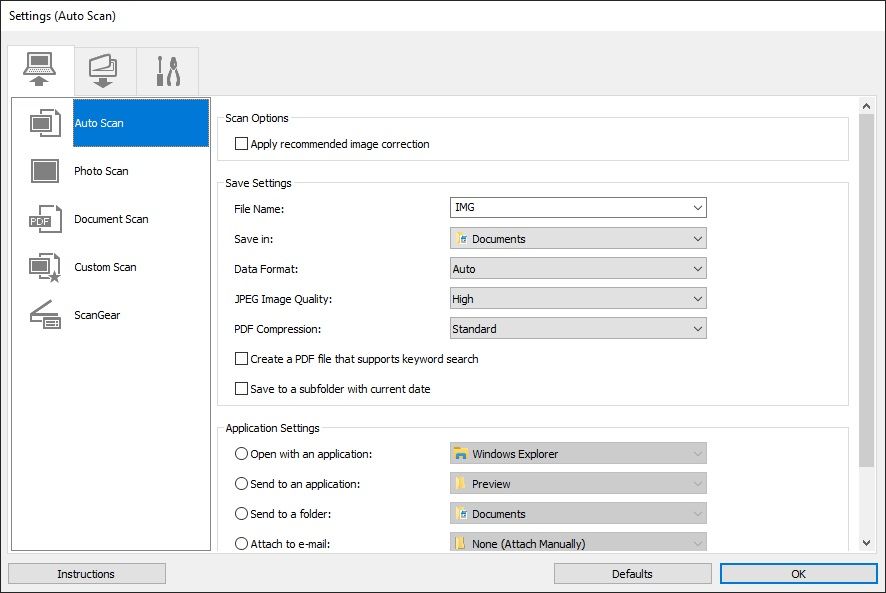
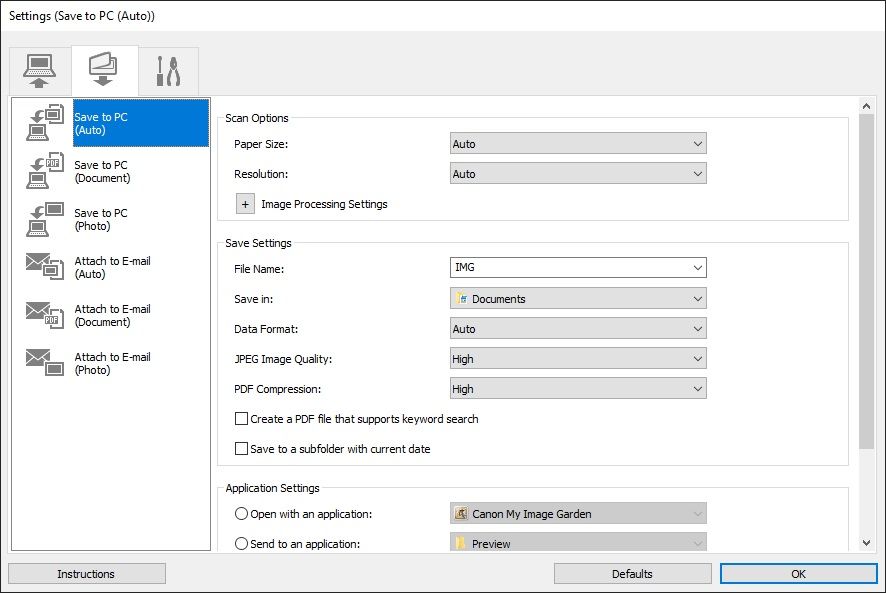
that I just mentioned. I don't even know if choosing the correct settings in those pop up boxes will get me to be able to scan different things the way I would like and I sure as hell don't have a clue what settings to choose anyway.
Why the hell do they make this stuff so incredibly difficult and even impossible to understand? How can I possibly use this copier/scanner and if I can't, why would I even think about buying another Canon piece of equipment?

Options
- Mark as New
- Bookmark
- Subscribe
- Mute
- Subscribe to RSS Feed
- Permalink
- Report Inappropriate Content
01-16-2023 10:57 AM
Hi Baja58,
When using the IJ Scan Utility, you can use the "Photo" button to scan and save as JPEG and you can use the "Document" button to scan and save as PDF.
More information can be viewed using the link below:
https://ij.manual.canon/ij/webmanual/ScanUtility/W/TR7500%20series/1.1/EN/SU/Top.html
Options
- Mark as New
- Bookmark
- Subscribe
- Mute
- Subscribe to RSS Feed
- Permalink
- Report Inappropriate Content
02-09-2026 03:50 PM
Yes, I finally discovered what you say above, but I am still equally furious about the changes in Scan settings. What is even more annoying is how the printer has almost no information and it constantly refers me to the website with the manual. This is beyond absurd. Does Canon have any idea how long this takes a user?? I have printed manuals for my 2 previous Canons. I can find what I want in seconds. Even w/o that, a more convenient pdf would be better. I am not pleased with my latest Canon and I hope this feedback goes to management.

Options
- Mark as New
- Bookmark
- Subscribe
- Mute
- Subscribe to RSS Feed
- Permalink
- Report Inappropriate Content
02-09-2026 05:56 PM
Greetings,
Not sure I'm understanding your disappointment? Documents save as .PDF by default. Image files save as .JPG. That's standard.
The manual referenced can be downloaded, searched or printed.
PDF for the printer is available here:
https://downloads.canon.com/hsg2023/ijprinters/manuals/TR7500ser_OnlineManual_Win_EN_V02.pdf
This is a 3 yr old topic. Since it's not possible for you to mark threads as solved unless they are your own, may I ask that you please start your own topic. Thank you in advance.
~Rick
Bay Area - CA
~R5 C (1.1.3.1), ~RF Trinity, ~RF 100 Macro, ~RF 100~400, ~RF 100~500, ~RF 200-800, ~RF 1.4x TC, BG-R10, 430EX III-RT ~DxO PhotoLab Elite ~DaVinci Resolve Studio ~ImageClass MF644Cdw MF656Cdw ~Pixel 10 ~CarePaks Are Worth It

Announcements
07/22/2026: New firmware updates are available.
EOS R6 Mark III - Version 1.1.0
05/13/2026: New firmware updates are available.
EOS R5 Mark II - Version 1.3.0
EOS R6 Mark II - Version 1.7.0
04/28/2026: Service Notice: Caution Concerning use of Lithium Batteries
03/17/2026: New firmware updates are available.
SELPHY CP1500 - Version 1.0.7.0
02/23/2026: New firmware update is available for EOS C50- Version 1.0.3.1
01/23/2026: New firmware update is available for RF 24-105mm F4 IS USM- Version 2.0.7
01/20/2026: New firmware updates are available.
10/21/2025: Service Notice: To Users of the Compact Digital Camera PowerShot V1
10/15/2025: New firmware updates are available.
Speedlite EL-5 - Version 1.2.0
Speedlite EL-1 - Version 1.1.0
Speedlite Transmitter ST-E10 - Version 1.2.0
07/28/2025: Notice of Free Repair Service for the Mirrorless Camera EOS R50 (Black)
05/21/2025: New firmware update available for EOS C500 Mark II - Version 1.1.5.1
Related Content
- pixma tr4722 - Won't Leave "scan mode" in Printer Software & Networking
- IJ Scan Utility needed for PIXMA PRO-200S in Printer Software & Networking
- Lide 220 Disappointment - How do I get my pictures to scan without fading out. in Scanners
- PIXMA TS9521Ca-Can't upload most Problematic Receipt to Register AND Scan print white paper as gray in Desktop Inkjet Printers
- imageCLASS D570 scanner no longer recognizes PC in Office Printers

Ⓒ 2026
Canon U.S.A Inc. All Rights Reserved. Reproduction in whole or part without permission is prohibited.
