Turn on suggestions
Auto-suggest helps you quickly narrow down your search results by suggesting possible matches as you type.
- Canon Community
- Discussions & Help
- Printer
- Desktop Inkjet Printers
- Re: PIXMA G5020 Print Color changes from top to bo...
Options
- Subscribe to RSS Feed
- Mark Topic as New
- Mark Topic as Read
- Float this Topic for Current User
- Bookmark
- Subscribe
- Mute
- Printer Friendly Page
PIXMA G5020 Print Color changes from top to bottom of page.

Options
- Mark as New
- Bookmark
- Subscribe
- Mute
- Subscribe to RSS Feed
- Permalink
- Report Inappropriate Content
11-11-2022
10:46 PM
- last edited on
11-12-2022
08:37 AM
by
 Danny
Danny
Hello,
I was printing fine on a G5020, then the color started changing from the top of the page to the bottom. For example in one a brown skin tone at top starts to change about halfway down the page to purple.
The ink levels are apparently fine. Printing from Photoshop and trying a few different color settings, though doesn't seem that should affect the same color across the page. Any ideas?
Thank you.
4 REPLIES 4

Options
- Mark as New
- Bookmark
- Subscribe
- Mute
- Subscribe to RSS Feed
- Permalink
- Report Inappropriate Content
11-15-2022 01:19 PM
Hi,
Please click HERE for the steps to print a nozzle check. Once it prints, please take a picture and attach it to your next reply.
This will help with troubleshooting your print quality issue.
We look forward to your reply.
If you would like real time assistance, I recommend reaching out to Canon support for this issue. You will need to register your Canon gear HERE to access additional support options.
Options
- Mark as New
- Bookmark
- Subscribe
- Mute
- Subscribe to RSS Feed
- Permalink
- Report Inappropriate Content
11-15-2022 06:01 PM
Attached is the nozzle check print. I tried doing a nozzle cleaning but it did not help.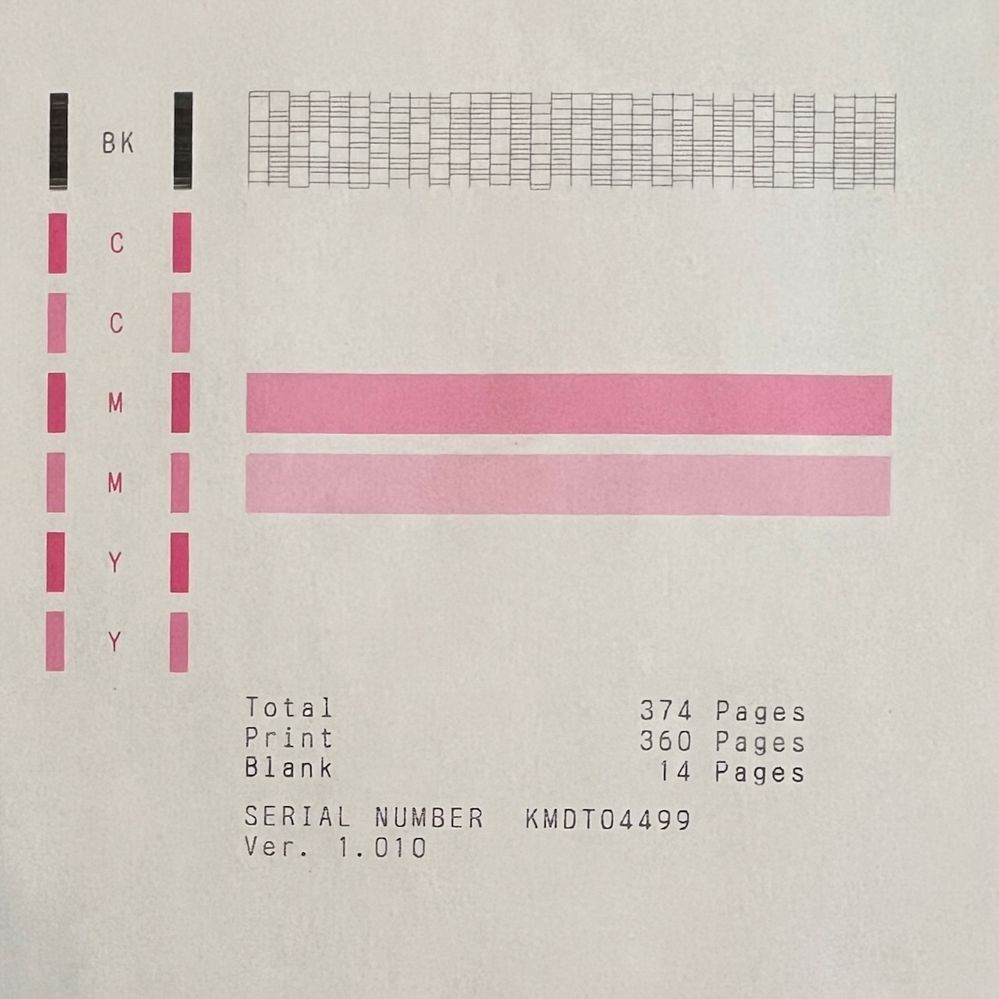
Options
- Mark as New
- Bookmark
- Subscribe
- Mute
- Subscribe to RSS Feed
- Permalink
- Report Inappropriate Content
11-15-2022 06:02 PM
Also, the Supply Levels screen shows all tanks almost full.
Options
- Mark as New
- Bookmark
- Subscribe
- Mute
- Subscribe to RSS Feed
- Permalink
- Report Inappropriate Content
11-16-2022 10:38 AM
Hi,
Please click HERE for the steps to perform an ink flush. You will want to select the color option and when its complete try another nozzle check.
If the issue is not resolved, the printer would require service. If the printer is in it's 1 year warranty, I recommend reaching out to Canon support for this issue. You will need to register your Canon gear HERE to access additional support options.
If the printer is out of warranty, you would qualify for the Canon Upgrade program. This is for out of warranty units which have been diagnosed to require service or are incompatible with a new or upgraded system. This program allows you the opportunity to purchase a replacement product discounted from the list price. Free ground shipping is included with your purchase.
If you would like to take advantage of this offer, please call our Sales Department at (866) 443-8002 Mon-Sat, 9 AM to 9pm EST excluding holidays.
Did this answer your question? Please click the Accept as Solution button so that others may find the answer as well.

Announcements
07/22/2026: New firmware updates are available.
EOS R6 Mark III - Version 1.1.0
05/13/2026: New firmware updates are available.
EOS R5 Mark II - Version 1.3.0
EOS R6 Mark II - Version 1.7.0
04/28/2026: Service Notice: Caution Concerning use of Lithium Batteries
03/17/2026: New firmware updates are available.
SELPHY CP1500 - Version 1.0.7.0
02/23/2026: New firmware update is available for EOS C50- Version 1.0.3.1
01/23/2026: New firmware update is available for RF 24-105mm F4 IS USM- Version 2.0.7
01/20/2026: New firmware updates are available.
10/21/2025: Service Notice: To Users of the Compact Digital Camera PowerShot V1
10/15/2025: New firmware updates are available.
Speedlite EL-5 - Version 1.2.0
Speedlite EL-1 - Version 1.1.0
Speedlite Transmitter ST-E10 - Version 1.2.0
07/28/2025: Notice of Free Repair Service for the Mirrorless Camera EOS R50 (Black)
05/21/2025: New firmware update available for EOS C500 Mark II - Version 1.1.5.1
Related Content
- TS6320 prints blank pages, but test pages and copies are fine in Desktop Inkjet Printers
- printer not responding in Printer Software & Networking
- This has to do with ink tanks for the PIXMA MX 922 in Desktop Inkjet Printers
- Checking out a used MF731Cdw: prints wide horizontal color bars in Office Printers
- PIXMA MX922 printing with pink hue? in Desktop Inkjet Printers

Ⓒ 2026
Canon U.S.A Inc. All Rights Reserved. Reproduction in whole or part without permission is prohibited.
