02-25-2022 01:27 PM
This started unexpectedly with no prior degradation and NO Error Messages. Scan and Print work perfectly. To date I have: 1) Aligned Print Heads; 2) Run Troubleshooter; 3) Performed a Full Rest, 4) Updated All Drivers; 5) Check ALL settings.
I only use Canon ink and all tanks are full and properly installed (even though that is not an issue)
What is wrong? What else can I do?
Thx
03-08-2022 03:07 PM
Hi bertfern,
Please follow these steps:
1. Please press the MENU button on your PIXMA MX922.
2. Use the down arrow key until the wrench and screwdriver icon is selected, then press OK.
3. On Maintenance, press the OK button.
4. Select Print nozzle check pattern and then press OK.
5. Select Yes and then press the OK button.
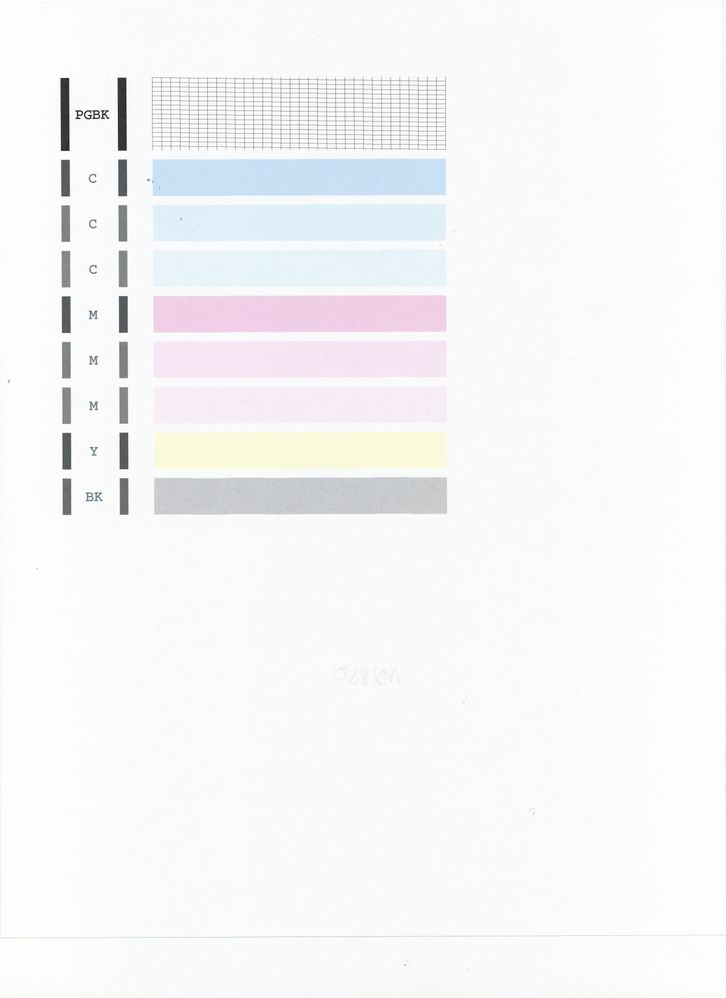
Did a black grid print to the right of |PGBK| at the top of the page?
Are there any boxes missing within the grid?
Below that, did 3 blue, 3 pink, 1 yellow and 1 gray bars print?
Does your printout match the example below?
01/20/2026: New firmware updates are available.
11/20/2025: New firmware updates are available.
EOS R5 Mark II - Version 1.2.0
PowerShot G7 X Mark III - Version 1.4.0
PowerShot SX740 HS - Version 1.0.2
10/15/2025: New firmware updates are available.
Speedlite EL-5 - Version 1.2.0
Speedlite EL-1 - Version 1.1.0
Speedlite Transmitter ST-E10 - Version 1.2.0
7/17/2025: New firmware updates are available.
02/20/2025: New firmware updates are available.
RF70-200mm F2.8 L IS USM Z - Version 1.0.6
RF24-105mm F2.8 L IS USM Z - Version 1.0.9
RF100-300mm F2.8 L IS USM - Version 1.0.8
Canon U.S.A Inc. All Rights Reserved. Reproduction in whole or part without permission is prohibited.


