12-31-2018 02:26 PM
My MX492 suddenly started printing thick solid black lines on every line. I have two columns of solid black. It printed fine yesterday. How can I find the problem and fix it?
12-31-2018 03:58 PM
Hi MDoty,
I recommend performing a nozzle check first. This will help narrow down any hardware issues. Please click HERE for the steps to print the nozzle check.
Once the nozzle check prints, please compare it to the picture below and please let us know if they match.
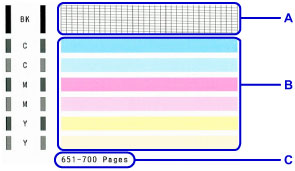
We look forward to your reply.

12/18/2025: New firmware updates are available.
11/20/2025: New firmware updates are available.
EOS R5 Mark II - Version 1.2.0
PowerShot G7 X Mark III - Version 1.4.0
PowerShot SX740 HS - Version 1.0.2
10/15/2025: New firmware updates are available.
Speedlite EL-5 - Version 1.2.0
Speedlite EL-1 - Version 1.1.0
Speedlite Transmitter ST-E10 - Version 1.2.0
7/17/2025: New firmware updates are available.
02/20/2025: New firmware updates are available.
RF70-200mm F2.8 L IS USM Z - Version 1.0.6
RF24-105mm F2.8 L IS USM Z - Version 1.0.9
RF100-300mm F2.8 L IS USM - Version 1.0.8
Canon U.S.A Inc. All Rights Reserved. Reproduction in whole or part without permission is prohibited.

