Turn on suggestions
Auto-suggest helps you quickly narrow down your search results by suggesting possible matches as you type.
- Canon Community
- Discussions & Help
- Printer
- Desktop Inkjet Printers
- Re: Error: Out Of Paper When Tray Is Full
Options
- Subscribe to RSS Feed
- Mark Topic as New
- Mark Topic as Read
- Float this Topic for Current User
- Bookmark
- Subscribe
- Mute
- Printer Friendly Page
Error: Out Of Paper When Tray Is Full

Options
- Mark as New
- Bookmark
- Subscribe
- Mute
- Subscribe to RSS Feed
- Permalink
- Report Inappropriate Content
02-22-2018 07:24 AM - edited 02-22-2018 10:29 AM
Cannon MX920
I recently ran out of paper and it was a few days before I had a chance to buy some more so when I did, I reloaded the cassestte with paper and put it back into the printer and tried to print something when I get the error telling me there is no paper in the printer.
I never had this issue before, This only occured once I ran out of paper and No I didn't try and print anything when I knew the paper tray was empty.
I know that the printer is working fine and there are no jams and that the printer is able to feed the paper because when I tried to make a copy of something It gave me the out of paper error but I restarted the printer and tried again and this time it copied the paper with no issue and printed it so to make sure it was indeed working again I tried to make another copy and sure enough I got that error again so I decied to see what would happen if I restarted the printer and did what I did last time and sure enough as soon as I restarted it and it made the copy with no issue.
So I then went to my computer to try and print out something and it's giving me the "No Paper" error again.
15 REPLIES 15


Options
- Mark as New
- Bookmark
- Subscribe
- Mute
- Subscribe to RSS Feed
- Permalink
- Report Inappropriate Content
02-22-2018 09:19 AM
Hi, TimothyW1686!
So that the Community can help you better, we need to know exactly which Canon printer model you're using. That, and any other details you'd like to give will help the Community better understand your issue!
If this is a time-sensitive matter, search our knowledge base or contact our US-based technical support team at http://canon.us/SupportCF
Thanks and have a great day!
Options
- Mark as New
- Bookmark
- Subscribe
- Mute
- Subscribe to RSS Feed
- Permalink
- Report Inappropriate Content
02-22-2018 10:28 AM - edited 02-22-2018 10:40 AM
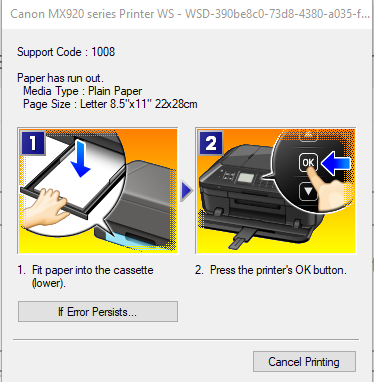
Cannon MX920
Support Code 1008
Options
- Mark as New
- Bookmark
- Subscribe
- Mute
- Subscribe to RSS Feed
- Permalink
- Report Inappropriate Content
02-25-2018 01:22 AM
Bump

Options
- Mark as New
- Bookmark
- Subscribe
- Mute
- Subscribe to RSS Feed
- Permalink
- Report Inappropriate Content
05-02-2018 05:10 PM
I am having the same issue. Did you find a solution?
Options
- Mark as New
- Bookmark
- Subscribe
- Mute
- Subscribe to RSS Feed
- Permalink
- Report Inappropriate Content
05-02-2018 09:37 PM
Nope, I actually went and bought a new printer but had to take it back because it was defective so when I got back home I decided to play with it some more and now all the sudden it's printing without any issues.
I did delete the printer and reinstall it on my PC with the drivers from canon website but don't know if that actually made a difference or not

Options
- Mark as New
- Bookmark
- Subscribe
- Mute
- Subscribe to RSS Feed
- Permalink
- Report Inappropriate Content
05-04-2018 02:22 PM
Hello.
Make sure that the paper is being loaded in the correct paper tray. The MX920 has two paper trays on the front of the unit.
If you continue to have difficulties, find more help at Contact Us.
Did this answer your question? Please click the Accept as Solution button so that others may find the answer as well.
Options
- Mark as New
- Bookmark
- Subscribe
- Mute
- Subscribe to RSS Feed
- Permalink
- Report Inappropriate Content
05-04-2018 03:32 PM
Umm the second tray is for photo paper so it's obivous you can't load printer paper in a tiny photo tray
Options
- Mark as New
- Bookmark
- Subscribe
- Mute
- Subscribe to RSS Feed
- Permalink
- Report Inappropriate Content
05-12-2018 02:32 PM
Check that the paper type is not set for 4x6 for photos which is the default. I transferred the pic to a word doc where the default was A4 and no more error message saying that the printer is out of paper.
Options
- Mark as New
- Bookmark
- Subscribe
- Mute
- Subscribe to RSS Feed
- Permalink
- Report Inappropriate Content
12-09-2018 11:21 AM
Where do you chage paper type?

Announcements
07/22/2026: New firmware updates are available.
EOS R6 Mark III - Version 1.1.0
05/13/2026: New firmware updates are available.
EOS R5 Mark II - Version 1.3.0
EOS R6 Mark II - Version 1.7.0
04/28/2026: Service Notice: Caution Concerning use of Lithium Batteries
03/17/2026: New firmware updates are available.
SELPHY CP1500 - Version 1.0.7.0
02/23/2026: New firmware update is available for EOS C50- Version 1.0.3.1
01/23/2026: New firmware update is available for RF 24-105mm F4 IS USM- Version 2.0.7
01/20/2026: New firmware updates are available.
10/21/2025: Service Notice: To Users of the Compact Digital Camera PowerShot V1
10/15/2025: New firmware updates are available.
Speedlite EL-5 - Version 1.2.0
Speedlite EL-1 - Version 1.1.0
Speedlite Transmitter ST-E10 - Version 1.2.0
07/28/2025: Notice of Free Repair Service for the Mirrorless Camera EOS R50 (Black)
05/21/2025: New firmware update available for EOS C500 Mark II - Version 1.1.5.1
Related Content
- imageCLASS MF273dw won't connect, unable to print test page, no paper error in Printer Software & Networking
- PIXMA iP2600 won't print, Ink absorber is full error in Desktop Inkjet Printers
- Paper is stuck in my canon printer PIXMA G6020 in Desktop Inkjet Printers
- PIXMA MG3640 - "No Paper" error even when paper present in Desktop Inkjet Printers
- ImagePro 300 and Error Code 1700 in Professional Photo Printers

Ⓒ 2026
Canon U.S.A Inc. All Rights Reserved. Reproduction in whole or part without permission is prohibited.
