Turn on suggestions
Auto-suggest helps you quickly narrow down your search results by suggesting possible matches as you type.
- Canon Community
- Discussions & Help
- Printer
- Desktop Inkjet Printers
- Re: Canon MP Navigator EX 5.0 not working
Options
- Subscribe to RSS Feed
- Mark Topic as New
- Mark Topic as Read
- Float this Topic for Current User
- Bookmark
- Subscribe
- Mute
- Printer Friendly Page
Canon MP Navigator EX 5.0 not working

Options
- Mark as New
- Bookmark
- Subscribe
- Mute
- Subscribe to RSS Feed
- Permalink
- Report Inappropriate Content
10-26-2019 12:31 AM
Hi. I just installed the Canon MP on my new computer, which is a Lenovo Yoga C930. I can the Canon MG5300 series printer. When I try to open the MP Navigator I get a message:
Cannot start the MP Navigator EX. Check the following points.
1. The supported model of this software is as follows. Check your product model is listed.
Canon E500 series
Canon MG2100 series
Canon MG 3100 series
Canon MG 4100 series
Canon MG 5300 series
Canon MG 6200 series
Canon MG 8200 series
When your product model is not listed, install correspondent MP Navigator or MP Navigator EX.
2. MP driver/scanner driver which supports your product is installed.
3. Your product model is connected to PC properly and the power is ON, if there is a power supply.
4. Reconnect the USB cable when connected with USB.
I seem to have this problem every time I set up the MP Navigator on a new computer. In the past, if I plugged it to a USB cable the first time, it would work via WiFi thereafter. I have connected the USB cord from my printer to my computer and I am sitll getting the error message.
Any help would be appreciated.
Thanks.
6 REPLIES 6


Options
- Mark as New
- Bookmark
- Subscribe
- Mute
- Subscribe to RSS Feed
- Permalink
- Report Inappropriate Content
10-26-2019 10:53 AM - edited 10-26-2019 10:55 AM
Greetings,
This supplemental driver looks like it might apply to your specific situation.
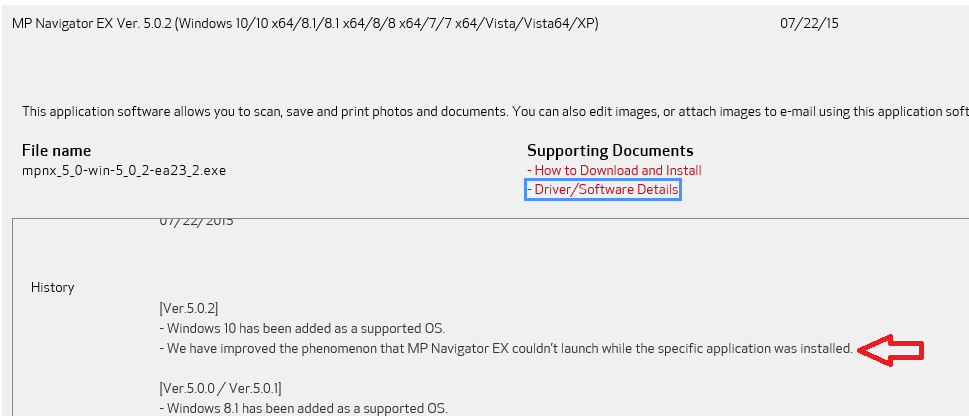
Here is the download so you don't have to hunt for it.
~Rick
Bay Area - CA
~R5 C (1.1.3.1), ~RF Trinity, ~RF 100 Macro, ~RF 100~400, ~RF 100~500, ~RF 200-800, ~RF 1.4x TC, BG-R10, 430EX III-RT ~DxO PhotoLab Elite ~DaVinci Resolve Studio ~ImageClass MF644Cdw MF656Cdw ~Pixel 10 ~CarePaks Are Worth It
Options
- Mark as New
- Bookmark
- Subscribe
- Mute
- Subscribe to RSS Feed
- Permalink
- Report Inappropriate Content
10-28-2019 12:12 PM
Hi, Rick! Thanks for the response. I'm not sure if I'm an idiot, but I can't find where the download is that you said is included in yor post. I'm sorry if I'm being dense!


Options
- Mark as New
- Bookmark
- Subscribe
- Mute
- Subscribe to RSS Feed
- Permalink
- Report Inappropriate Content
11-04-2019 01:33 PM
Hi icaptiontv,
You can download MP Navigator EX Ver. 5.0.2 by clicking HERE.
Did this answer your question? Please click the Accept as Solution button so that others may find the answer as well.
Options
- Mark as New
- Bookmark
- Subscribe
- Mute
- Subscribe to RSS Feed
- Permalink
- Report Inappropriate Content
11-04-2019 02:33 PM
Hi! Thank you. That is the version that is downloaded on the new computer that isn't working. I still haven't figured out a solution to this.
Options
- Mark as New
- Bookmark
- Subscribe
- Mute
- Subscribe to RSS Feed
- Permalink
- Report Inappropriate Content
11-21-2019 11:33 AM
I just wanted to update this issue. Today Windows 10 had a massive update. After my computer updated, the Canon MP Navigator now works!

Options
- Mark as New
- Bookmark
- Subscribe
- Mute
- Subscribe to RSS Feed
- Permalink
- Report Inappropriate Content
03-26-2022 08:23 PM
I have this same error on windows 10 64bit and Canoscan9000F. I hare deleted Scan App and drivers and rebooted multiple times and the Scan App will still not load with the error: "Cannot start the MP Navigator EX. Check the following points. Check your product model is listed." What am I missing?

Announcements
07/22/2026: New firmware updates are available.
EOS R6 Mark III - Version 1.1.0
05/13/2026: New firmware updates are available.
EOS R5 Mark II - Version 1.3.0
EOS R6 Mark II - Version 1.7.0
04/28/2026: Service Notice: Caution Concerning use of Lithium Batteries
03/17/2026: New firmware updates are available.
SELPHY CP1500 - Version 1.0.7.0
02/23/2026: New firmware update is available for EOS C50- Version 1.0.3.1
01/23/2026: New firmware update is available for RF 24-105mm F4 IS USM- Version 2.0.7
01/20/2026: New firmware updates are available.
10/21/2025: Service Notice: To Users of the Compact Digital Camera PowerShot V1
10/15/2025: New firmware updates are available.
Speedlite EL-5 - Version 1.2.0
Speedlite EL-1 - Version 1.1.0
Speedlite Transmitter ST-E10 - Version 1.2.0
07/28/2025: Notice of Free Repair Service for the Mirrorless Camera EOS R50 (Black)
05/21/2025: New firmware update available for EOS C500 Mark II - Version 1.1.5.1
Related Content
- MG3620 can’t connect my phone through wifi in Printer Software & Networking
- imageCLASS MF455DW not connecting to the scanner, I am using Mac OS 26 and Latest Drivers in Office Printers
- imageCLASS MF753Cdw reset procedure not working in Office Printers
- Driver PIXMA G5010 & G6010 for macOS 26 in Desktop Inkjet Printers
- Sensing Unit not working as it should (Canon v1000) in Production Printing

Ⓒ 2026
Canon U.S.A Inc. All Rights Reserved. Reproduction in whole or part without permission is prohibited.
