Turn on suggestions
Auto-suggest helps you quickly narrow down your search results by suggesting possible matches as you type.
- Canon Community
- Discussions & Help
- Camera
- Camera Software
- iOS Monterey | 5D Mark II
Options
- Subscribe to RSS Feed
- Mark Topic as New
- Mark Topic as Read
- Float this Topic for Current User
- Bookmark
- Subscribe
- Mute
- Printer Friendly Page
iOS Monterey | 5D Mark II

Options
- Mark as New
- Bookmark
- Subscribe
- Mute
- Subscribe to RSS Feed
- Permalink
- Report Inappropriate Content
11-25-2021 05:59 PM
I'm attempting to transfer files (camera to iMac) utilizing an IFC-200U cable. The computer isn't detecting the camera at all, and I've downloaded the newest software versions that are shown from the Support Downloads Page.
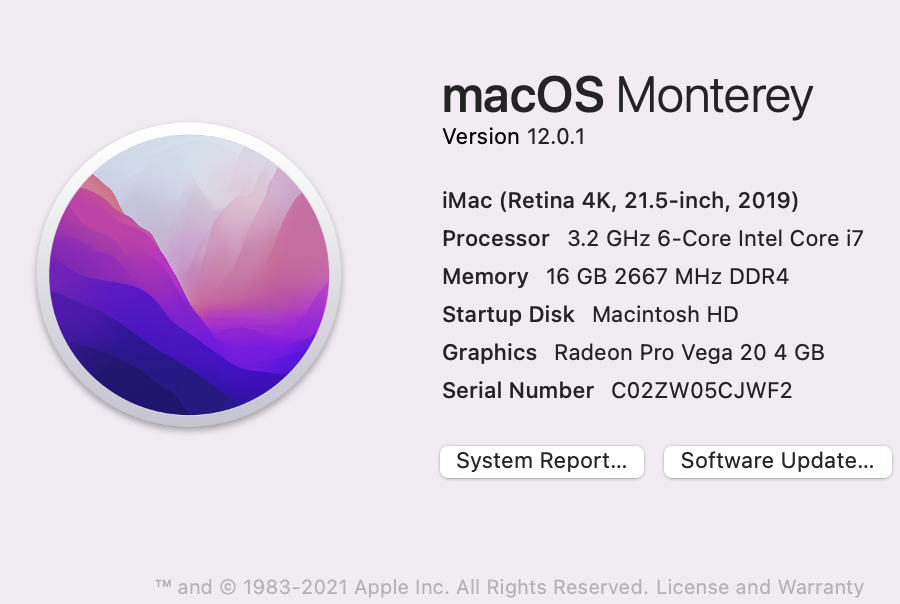
Even though the Canon website lists "Catalina" as the iOS version it's detecting I use, I'm running the updated iOS.
Any advice/help out there on how to be able to get data off of the CF cards w/out needing to get CF readers?
9 REPLIES 9


Options
- Mark as New
- Bookmark
- Subscribe
- Mute
- Subscribe to RSS Feed
- Permalink
- Report Inappropriate Content
11-25-2021 07:25 PM
I assume you want to use the Apple software. My T6S shows up just fine on my M1 iMac24 with Monterey.
Sometimes you have to run Image Capture directly to set up the computer for imports. Once you do that, things should happen automatically.
Options
- Mark as New
- Bookmark
- Subscribe
- Mute
- Subscribe to RSS Feed
- Permalink
- Report Inappropriate Content
11-25-2021 08:35 PM
How do I get the software to get the images off the camera since EOS solution disk is no longer supported for the newer machines?
Options
- Mark as New
- Bookmark
- Subscribe
- Mute
- Subscribe to RSS Feed
- Permalink
- Report Inappropriate Content
11-25-2021 08:36 PM
I'll use the Canon software if it will work... however both of what I downloaded that is shown in the original post doesn't offer the option for me to transfer the RAW files into the computer.

Options
- Mark as New
- Bookmark
- Subscribe
- Mute
- Subscribe to RSS Feed
- Permalink
- Report Inappropriate Content
11-25-2021 08:48 PM
Does your iMac have an SD card slot? If so, that's typically much easier to deal with.
--
Ricky
Camera: EOS R5 II, RF 50mm f/1.2L, RF 135mm f/1.8L
Lighting: Profoto Lights & Modifiers
Ricky
Camera: EOS R5 II, RF 50mm f/1.2L, RF 135mm f/1.8L
Lighting: Profoto Lights & Modifiers
Options
- Mark as New
- Bookmark
- Subscribe
- Mute
- Subscribe to RSS Feed
- Permalink
- Report Inappropriate Content
11-25-2021 08:50 PM
Yes, it does, however, the 5D Mark II runs off of a Compact Flash card.
Options
- Mark as New
- Bookmark
- Subscribe
- Mute
- Subscribe to RSS Feed
- Permalink
- Report Inappropriate Content
11-26-2021 10:58 AM
For now, until Canon releases a vesion for Monterey, Go ahead and use Image Capture. It does not hurt anything, and you can transition to Canon's software when it is ready.
Options
- Mark as New
- Bookmark
- Subscribe
- Mute
- Subscribe to RSS Feed
- Permalink
- Report Inappropriate Content
11-26-2021 02:36 PM
Sorry about that; I didn't remember that the 5D II was CF-only.
--
Ricky
Camera: EOS R5 II, RF 50mm f/1.2L, RF 135mm f/1.8L
Lighting: Profoto Lights & Modifiers
Ricky
Camera: EOS R5 II, RF 50mm f/1.2L, RF 135mm f/1.8L
Lighting: Profoto Lights & Modifiers
Options
- Mark as New
- Bookmark
- Subscribe
- Mute
- Subscribe to RSS Feed
- Permalink
- Report Inappropriate Content
11-28-2021 02:23 PM
How do I get image capture at this point?
It is not offered to me via download from Canon.

Options
- Mark as New
- Bookmark
- Subscribe
- Mute
- Subscribe to RSS Feed
- Permalink
- Report Inappropriate Content
11-28-2021 06:12 PM
Image Capture is a macOS app and installed as part of the operating system.
John Hoffman
Conway, NH
R6 Mark III, M200 (converted to infrared), RF lenses, Pixma PRO-100, Pixma TR8620a, Lr Classic
Conway, NH
R6 Mark III, M200 (converted to infrared), RF lenses, Pixma PRO-100, Pixma TR8620a, Lr Classic


Announcements
07/22/2026: New firmware updates are available.
EOS R6 Mark III - Version 1.1.0
05/13/2026: New firmware updates are available.
EOS R5 Mark II - Version 1.3.0
EOS R6 Mark II - Version 1.7.0
04/28/2026: Service Notice: Caution Concerning use of Lithium Batteries
03/17/2026: New firmware updates are available.
SELPHY CP1500 - Version 1.0.7.0
02/23/2026: New firmware update is available for EOS C50- Version 1.0.3.1
01/23/2026: New firmware update is available for RF 24-105mm F4 IS USM- Version 2.0.7
01/20/2026: New firmware updates are available.
10/21/2025: Service Notice: To Users of the Compact Digital Camera PowerShot V1
10/15/2025: New firmware updates are available.
Speedlite EL-5 - Version 1.2.0
Speedlite EL-1 - Version 1.1.0
Speedlite Transmitter ST-E10 - Version 1.2.0
07/28/2025: Notice of Free Repair Service for the Mirrorless Camera EOS R50 (Black)
05/21/2025: New firmware update available for EOS C500 Mark II - Version 1.1.5.1
Related Content
- Lenses in EOS DSLR & Mirrorless Cameras
- EOS R5 Mark II with 6 Stop ND filter: Example images and situations? in EOS DSLR & Mirrorless Cameras
- Will there be another firmware update for the R5 Mark 2 that includes Micro-adjustment of focus? in EOS DSLR & Mirrorless Cameras
- New Firmware Available For All R5 Mark II Owners... in EOS DSLR & Mirrorless Cameras
- Trying to estimate the Manufacture Date for the Canon R5 Mark II camera in EOS DSLR & Mirrorless Cameras

Ⓒ 2026
Canon U.S.A Inc. All Rights Reserved. Reproduction in whole or part without permission is prohibited.
