Turn on suggestions
Auto-suggest helps you quickly narrow down your search results by suggesting possible matches as you type.
- Canon Community
- Discussions & Help
- Camera
- Camera Software
- eos software install failure
Options
- Subscribe to RSS Feed
- Mark Topic as New
- Mark Topic as Read
- Float this Topic for Current User
- Bookmark
- Subscribe
- Mute
- Printer Friendly Page
eos software install failure

Options
- Mark as New
- Bookmark
- Subscribe
- Mute
- Subscribe to RSS Feed
- Permalink
- Report Inappropriate Content
05-28-2020 01:02 PM - edited 05-28-2020 01:41 PM
hey everyone,
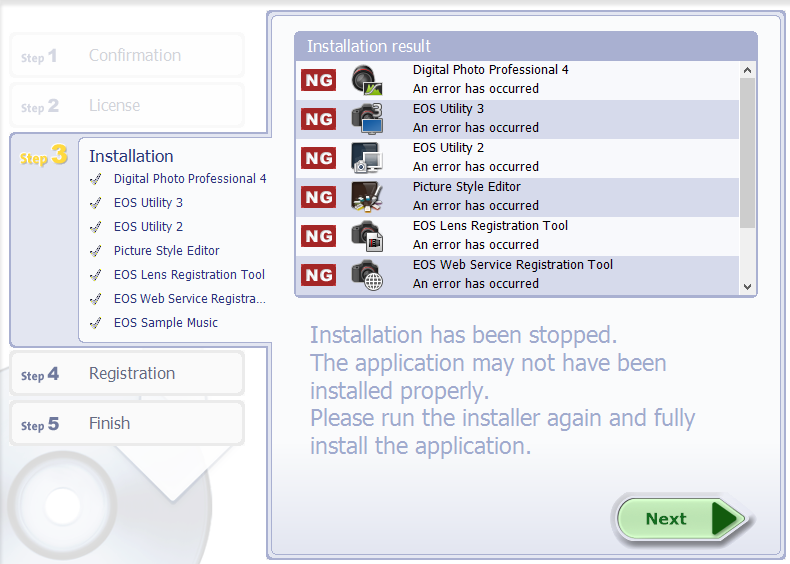
reguardless which eos installer version iu use, i keep getting this completly uninformative error page. any ideas why its failing? ive tried about 8 different times now. i have the rebel t7i and am trying to install the software on a windows 10 64 bit machine
thanks.
4 REPLIES 4


Options
- Mark as New
- Bookmark
- Subscribe
- Mute
- Subscribe to RSS Feed
- Permalink
- Report Inappropriate Content
05-28-2020 01:12 PM
Hello!
So that the Community can help you better, we will need to know exactly what model camera you have, and the Computer Operating System you're using (Windows Vista/7/8/10 or macOS 10.x).
Any other details you'd like to give will only help the Community better understand your issue!
If you're in the United States, and this is an urgent support need, please click HERE to visit your My Canon Account to discover your personalized support options.
If you're outside of the USA, please click HERE to find support options in your country.
Thanks and have a great day!
Options
- Mark as New
- Bookmark
- Subscribe
- Mute
- Subscribe to RSS Feed
- Permalink
- Report Inappropriate Content
05-28-2020 01:16 PM
edited original post to include info


Options
- Mark as New
- Bookmark
- Subscribe
- Mute
- Subscribe to RSS Feed
- Permalink
- Report Inappropriate Content
05-28-2020 04:30 PM
I don't have any real help to offer since I am able to install all the Canon software on my W10 machine; never had a problem.
My only suggestion would be to download the disk image at the very bottom of the T7i Windows 10 software support page and try that.
If that doesn't work give Canon a call at 1-800-OK-CANON.
John Hoffman
Conway, NH
R6 Mark III, M200 (converted to infrared), RF lenses, Pixma PRO-100, Pixma TR8620a, Lr Classic
Conway, NH
R6 Mark III, M200 (converted to infrared), RF lenses, Pixma PRO-100, Pixma TR8620a, Lr Classic
Options
- Mark as New
- Bookmark
- Subscribe
- Mute
- Subscribe to RSS Feed
- Permalink
- Report Inappropriate Content
12-19-2021 08:20 AM
Hello to the experts. I have today discovered the same failure with the same error messages on my PC when trying to update my old EOS software installation. Nothing has helped so far, e.g. Installation as Windows Admin, creating a new account, deinstalling before,....Has somebody already found a solution for this type of failure. My Operating System is Windows 10, 64 Bit. The current DPP version I have installed on my PC is 4.12.10.2 - it works w/o any issues. Thank you.


Announcements
07/22/2026: New firmware updates are available.
EOS R6 Mark III - Version 1.1.0
05/13/2026: New firmware updates are available.
EOS R5 Mark II - Version 1.3.0
EOS R6 Mark II - Version 1.7.0
04/28/2026: Service Notice: Caution Concerning use of Lithium Batteries
03/17/2026: New firmware updates are available.
SELPHY CP1500 - Version 1.0.7.0
02/23/2026: New firmware update is available for EOS C50- Version 1.0.3.1
01/23/2026: New firmware update is available for RF 24-105mm F4 IS USM- Version 2.0.7
01/20/2026: New firmware updates are available.
10/21/2025: Service Notice: To Users of the Compact Digital Camera PowerShot V1
10/15/2025: New firmware updates are available.
Speedlite EL-5 - Version 1.2.0
Speedlite EL-1 - Version 1.1.0
Speedlite Transmitter ST-E10 - Version 1.2.0
07/28/2025: Notice of Free Repair Service for the Mirrorless Camera EOS R50 (Black)
05/21/2025: New firmware update available for EOS C500 Mark II - Version 1.1.5.1
Related Content
- DPP4: "Target file does not exist" in Camera Software
- Received a Product Advisory - EOS Network Setting Tool in Camera Software
- I prompted Claude AI to write a program to manipulate camera raw files in Camera Software
- Trouble finding EOS Utility for macOS to use Mac as monitor for EOS Rebel T3i in Camera Software
- Digital Camera Software v7.1: "Could not connect to internet" on install in Camera Software

Ⓒ 2026
Canon U.S.A Inc. All Rights Reserved. Reproduction in whole or part without permission is prohibited.
