Turn on suggestions
Auto-suggest helps you quickly narrow down your search results by suggesting possible matches as you type.
- Canon Community
- Discussions & Help
- Camera
- Camera Software
- Re: WiFi connection issues with IXUS 265 and Camer...
Options
- Subscribe to RSS Feed
- Mark Topic as New
- Mark Topic as Read
- Float this Topic for Current User
- Bookmark
- Subscribe
- Mute
- Printer Friendly Page
WiFi connection issues with IXUS 265 and Camerawindow DC8

Options
- Mark as New
- Bookmark
- Subscribe
- Mute
- Subscribe to RSS Feed
- Permalink
- Report Inappropriate Content
12-26-2020 04:42 PM
Hi,
I hope someone can help. I'm using an IXUS 265 camera with Camerawindow DC8. When I installed these on my original PC, then running Windows 7, everything worked fine and I could transfer images either by USB or WiFi (having run the WiFi setup). When I upgraded to Windows 10 it was still fine. But now I have changed my PC to a new one, running Windows 10 from the start and I'm having problems. I installed the software exactly as before and performed the WiFi setup which didn't report any errors. However, while I can transfer images by USB, I cannot do so by WiFi. The camera searches for and finds the computer, says it has connected to it, but nothing happens and it eventually times out. I can see from a Wireshark trace that there is communication between camera and computer. I have tried disabling the PC firewall to no avail. There must be some setting that's missing, can someone suggest what it might be, please?
5 REPLIES 5


Options
- Mark as New
- Bookmark
- Subscribe
- Mute
- Subscribe to RSS Feed
- Permalink
- Report Inappropriate Content
12-27-2020 02:08 AM
These forums are provided as a service by Canon USA to US customers. The model number that you have cited is one that is not normally sold in the US. However, many of the software appications are nearly identical in the US to those made available by other Canon web sites provideing customer service for other countries.
All of the latest Canon software for Windows 10 requires PCs running native installations of Windows 10.
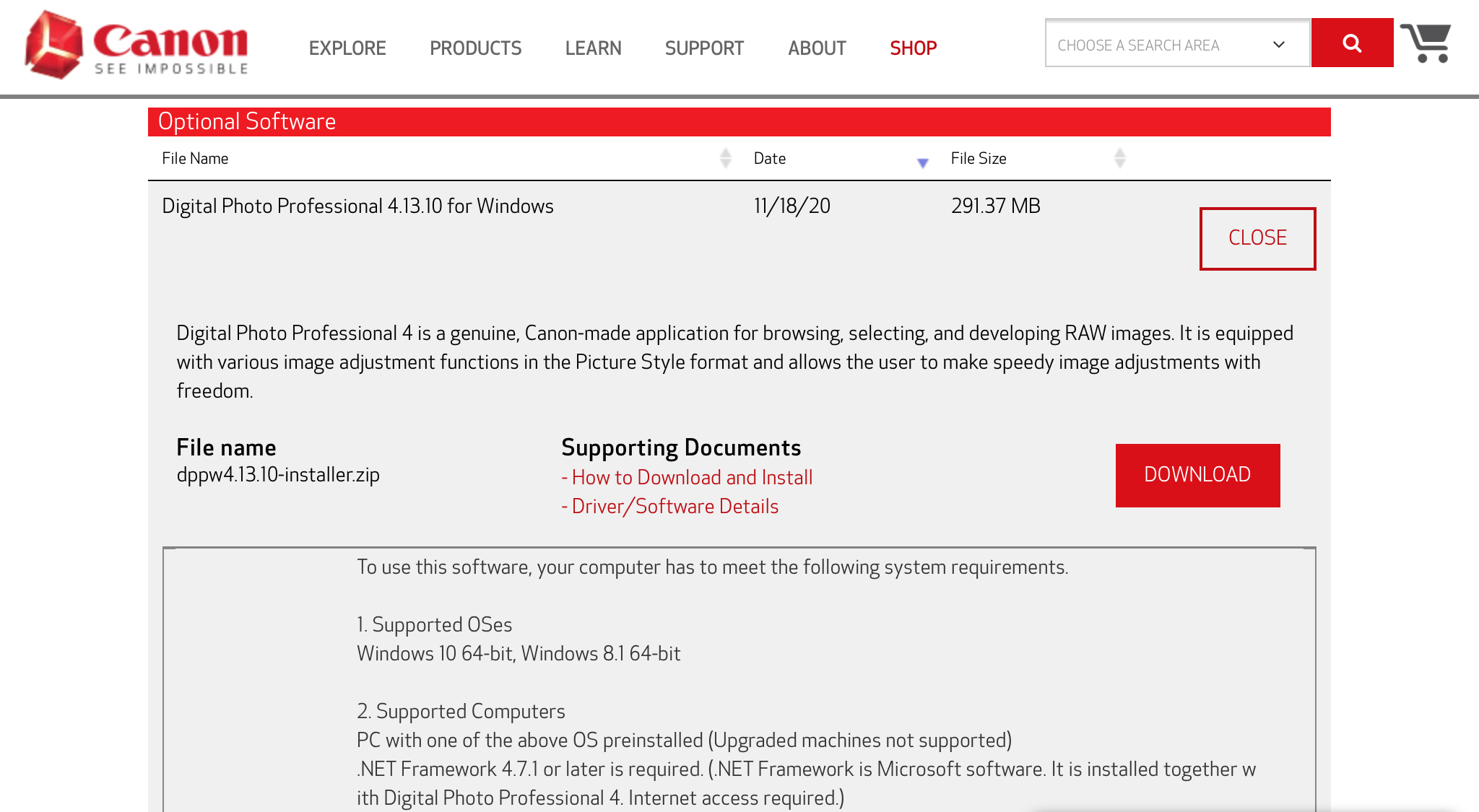
Notice "2. Supported Computers."
You may need to upgrade your computer. If you download older copies of the software applications, I have no idea whether or not they would work on your upgraded Windows 10 OS. Every computer manufacturer did it slightly differently.
For example, an upgrade disk for a Lenovo computer would not work on a different brand of computer.
--------------------------------------------------------
"Enjoying photography since 1972."
"Enjoying photography since 1972."
Options
- Mark as New
- Bookmark
- Subscribe
- Mute
- Subscribe to RSS Feed
- Permalink
- Report Inappropriate Content
12-27-2020 08:36 AM
Thanks, but it's the other way round: it works on the upgraded OS, not on the native one! My feeling is that it's in some way connected to "media streaming" because this is something that appears to have changed between Windows 7 and Windows 10, but perhaps I'm completely wrong.
Options
- Mark as New
- Bookmark
- Subscribe
- Mute
- Subscribe to RSS Feed
- Permalink
- Report Inappropriate Content
12-27-2020 09:17 AM
@Nigel555 wrote:Thanks, but it's the other way round: it works on the upgraded OS, not on the native one! My feeling is that it's in some way connected to "media streaming" because this is something that appears to have changed between Windows 7 and Windows 10, but perhaps I'm completely wrong.
What is the brand of the PC with the native Windows 10 installation? Is it running an Intel chipset? Or, is it running AMD?
--------------------------------------------------------
"Enjoying photography since 1972."
"Enjoying photography since 1972."

Options
- Mark as New
- Bookmark
- Subscribe
- Mute
- Subscribe to RSS Feed
- Permalink
- Report Inappropriate Content
12-27-2020 09:34 AM - edited 12-27-2020 09:36 AM
Greetings,
MS releases different variants of Windows 10 depending on region. Licensing of certain features may or may not be included depending on where you live.
Below is an example:
Media feature pack for Windows 10 N and Windows 10 KN editions (microsoft.com)
For all versions of Windows 10:
Media Feature Pack list for Windows N editions (microsoft.com)
I am not suggesting that you install this software, only demonstrating what differences some versions of W10 do or don't include depending on region and location.
Here's everything I could find for your camera:
IXUS 265 HS - Support - Download drivers, software and manuals - Canon Europe (canon-europe.com)
We hope this helps or guides you to a solution.
~Rick
Bay Area - CA
~R5 C (1.1.3.1), ~RF Trinity, ~RF 100 Macro, ~RF 100~400, ~RF 100~500, ~RF 200-800, ~RF 1.4x TC, BG-R10, 430EX III-RT ~DxO PhotoLab Elite ~DaVinci Resolve Studio ~ImageClass MF644Cdw MF656Cdw ~Pixel 10 ~CarePaks Are Worth It
Options
- Mark as New
- Bookmark
- Subscribe
- Mute
- Subscribe to RSS Feed
- Permalink
- Report Inappropriate Content
12-28-2020 09:58 AM
I finally solved this one; I think it must have been down to a change somewhere along the way from Windows 7 to the latest Windows 10. For the benefit of anyone else having similar problems (because I think it will apply to any Canon camera that uses CameraWindow DC8), the steps I followed (not all of which may have been necessary) were:
1. Install CameraWindow
2. Run CameraWindow WiFi setup
3. Connect the camera via USB and verify that that works (i.e opens CameraWindow - if not, change the settings in Autoplay)
4. On the camera, go to the WiFi setup and make a new connection to the computer
** extra steps below **
5. When the camera says it has connected, on the PC go to ControlPanel ->Hardware and Sound->Devices and Printers and click "Add Device". The PC should find the camera.
6. Click OK to add the device.
7. Go to ControlPanel ->Hardware and Sound->AutoPlay, scroll to find the newly-added camera (there will be two entries, one being the original USB one and one the WiFi one; the latter will say "Choose a default" and that's the one you want)
8. Set the default to be "Downloads Images from Canon Camera (Canon CameraWindow)
9. Disconnect the camera
10. Reconnect the camera and CameraWindow should open

Announcements
07/22/2026: New firmware updates are available.
EOS R6 Mark III - Version 1.1.0
05/13/2026: New firmware updates are available.
EOS R5 Mark II - Version 1.3.0
EOS R6 Mark II - Version 1.7.0
04/28/2026: Service Notice: Caution Concerning use of Lithium Batteries
03/17/2026: New firmware updates are available.
SELPHY CP1500 - Version 1.0.7.0
02/23/2026: New firmware update is available for EOS C50- Version 1.0.3.1
01/23/2026: New firmware update is available for RF 24-105mm F4 IS USM- Version 2.0.7
01/20/2026: New firmware updates are available.
10/21/2025: Service Notice: To Users of the Compact Digital Camera PowerShot V1
10/15/2025: New firmware updates are available.
Speedlite EL-5 - Version 1.2.0
Speedlite EL-1 - Version 1.1.0
Speedlite Transmitter ST-E10 - Version 1.2.0
07/28/2025: Notice of Free Repair Service for the Mirrorless Camera EOS R50 (Black)
05/21/2025: New firmware update available for EOS C500 Mark II - Version 1.1.5.1
Related Content
- R6 Mark II WiFi Connectivity Issues when pushing to SFTP in EOS DSLR & Mirrorless Cameras
- New Features Added For The C80 & C400 And Updates For The C50, C70 & R5C in Camera Software
- EOS R5 Mark II minor Firmware Update, Version 1.3.1 in Camera Software
- R5 Mark II Owners Update Your Firmware to Version 1.3.1 in EOS DSLR & Mirrorless Cameras
- PowerShot V1 - Can't transfer images to Computer via USB in Point & Shoot Digital Cameras

Ⓒ 2026
Canon U.S.A Inc. All Rights Reserved. Reproduction in whole or part without permission is prohibited.
