Turn on suggestions
Auto-suggest helps you quickly narrow down your search results by suggesting possible matches as you type.
- Canon Community
- Discussions & Help
- Camera
- Camera Software
- Re: Connect R8 to EOS Utility on a Mac
Options
- Subscribe to RSS Feed
- Mark Topic as New
- Mark Topic as Read
- Float this Topic for Current User
- Bookmark
- Subscribe
- Mute
- Printer Friendly Page

Options
- Mark as New
- Bookmark
- Subscribe
- Mute
- Subscribe to RSS Feed
- Permalink
- Report Inappropriate Content
07-15-2023
08:09 PM
- last edited on
09-26-2023
08:27 AM
by
 Danny
Danny
I am having issues connecting my R8 to my Mac via the EOS Utility. I have the latest software and have gone through the user manual. The message I keep getting is:
"Communication with the camera via USB cannot be established.
Start EOS Utility after closing all the apps that communicate with the camera, and then turn on the camera again."
I am unaware of any apps that I have that would be trying to communicate with my camera in the background. Anyone know what's going on? Thanks in advance.
Solved! Go to Solution.
80 REPLIES 80
Options
- Mark as New
- Bookmark
- Subscribe
- Mute
- Subscribe to RSS Feed
- Permalink
- Report Inappropriate Content
07-16-2023 05:31 PM
Sounds like either Apple or Canon would need to provide the solution via an update of some kind and I'm not banking on the speed of Canon updates...
Options
- Mark as New
- Bookmark
- Subscribe
- Mute
- Subscribe to RSS Feed
- Permalink
- Report Inappropriate Content
09-21-2023 03:32 PM
So why do i have to wait for apple to fix it instead of canon just updating their broken program? Don't understand that... yes, maybe it's apples fault, that it's no longer working but what stops canon from fixing it?

Options
- Mark as New
- Bookmark
- Subscribe
- Mute
- Subscribe to RSS Feed
- Permalink
- Report Inappropriate Content
09-21-2023 05:30 PM
I have often wondered why Apple keeps breaking other programs with every OS update?
Options
- Mark as New
- Bookmark
- Subscribe
- Mute
- Subscribe to RSS Feed
- Permalink
- Report Inappropriate Content
09-24-2023 12:38 PM
I'm running macOS 13.6 now. Everything is working just fine with EOS Utility.
Options
- Mark as New
- Bookmark
- Subscribe
- Mute
- Subscribe to RSS Feed
- Permalink
- Report Inappropriate Content
09-24-2023 12:55 PM
Good to hear it works with macOS 13.6. Thanks for updating us on your results.


Options
- Mark as New
- Bookmark
- Subscribe
- Mute
- Subscribe to RSS Feed
- Permalink
- Report Inappropriate Content
09-24-2023 01:16 PM
Unfortunately, still not working for me. Apple Image Capture sees the camera. EOSU3 still generates the can't connect error message.
John Hoffman
Conway, NH
R6 Mark III, M200 (converted to infrared), RF lenses, Pixma PRO-100, Pixma TR8620a, Lr Classic
Conway, NH
R6 Mark III, M200 (converted to infrared), RF lenses, Pixma PRO-100, Pixma TR8620a, Lr Classic
Options
- Mark as New
- Bookmark
- Subscribe
- Mute
- Subscribe to RSS Feed
- Permalink
- Report Inappropriate Content
09-26-2023 08:24 AM - edited 09-26-2023 08:47 AM
@jrhoffman75 wrote:Unfortunately, still not working for me. Apple Image Capture sees the camera. EOSU3 still generates the can't connect error message.
Same for me... (running macOS 13.6)

Options
- Mark as New
- Bookmark
- Subscribe
- Mute
- Subscribe to RSS Feed
- Permalink
- Report Inappropriate Content
09-26-2023 09:15 AM
Maybe we will get a fix today when Sonoma is released.
John Hoffman
Conway, NH
R6 Mark III, M200 (converted to infrared), RF lenses, Pixma PRO-100, Pixma TR8620a, Lr Classic
Conway, NH
R6 Mark III, M200 (converted to infrared), RF lenses, Pixma PRO-100, Pixma TR8620a, Lr Classic
Options
- Mark as New
- Bookmark
- Subscribe
- Mute
- Subscribe to RSS Feed
- Permalink
- Report Inappropriate Content
09-26-2023 02:45 PM
I had the same problem.
I upgraded to Mac OS 14.0 (Sonoma) which did not solve the problem.
I was able to solve the problem as follows:
1. Make sure that the Wifi connection is disabled on the camera.
2. Shut down all applications which communicate with the camera such as Digital Photo Professional 4 and EOS utility (original) so that only EOS utility 3 is running.
3. Turn off the Wifi on the Mac.
4. Plug in the camera, open EOS utility 3 then turn on the camera.
Hope that helps for everyone else.
The need to disable wifi is frustrating.
Options
- Mark as New
- Bookmark
- Subscribe
- Mute
- Subscribe to RSS Feed
- Permalink
- Report Inappropriate Content
09-26-2023 04:17 PM
The solution is to go to Settings -> Privacy and Security -> Camera and then disable all the apps that are given access to camera.
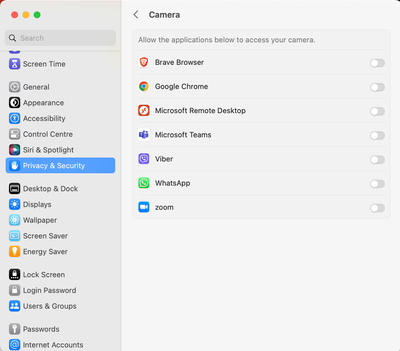
After this EOS Utility will start without an issue.
Best,
Hus Rona
EOS 5D Mark III

Announcements
07/22/2026: New firmware updates are available.
EOS R6 Mark III - Version 1.1.0
05/13/2026: New firmware updates are available.
EOS R5 Mark II - Version 1.3.0
EOS R6 Mark II - Version 1.7.0
04/28/2026: Service Notice: Caution Concerning use of Lithium Batteries
03/17/2026: New firmware updates are available.
SELPHY CP1500 - Version 1.0.7.0
02/23/2026: New firmware update is available for EOS C50- Version 1.0.3.1
01/23/2026: New firmware update is available for RF 24-105mm F4 IS USM- Version 2.0.7
01/20/2026: New firmware updates are available.
10/21/2025: Service Notice: To Users of the Compact Digital Camera PowerShot V1
10/15/2025: New firmware updates are available.
Speedlite EL-5 - Version 1.2.0
Speedlite EL-1 - Version 1.1.0
Speedlite Transmitter ST-E10 - Version 1.2.0
07/28/2025: Notice of Free Repair Service for the Mirrorless Camera EOS R50 (Black)
05/21/2025: New firmware update available for EOS C500 Mark II - Version 1.1.5.1
Related Content
- EOS R50 Failed Bluetooth Connection in EOS DSLR & Mirrorless Cameras
- Where to download Canon Camera Connect v3 for Windows 11 in Camera Software
- Best way to transfer/back up photo and video files to external SSD in EOS DSLR & Mirrorless Cameras
- Cannot batch-select / select all photos by date in Camera Connect App (IXUS 255 HS & iPhone 12) in Camera Software
- R6 Mark II WiFi Connectivity Issues when pushing to SFTP in EOS DSLR & Mirrorless Cameras

Ⓒ 2026
Canon U.S.A Inc. All Rights Reserved. Reproduction in whole or part without permission is prohibited.
