Turn on suggestions
Auto-suggest helps you quickly narrow down your search results by suggesting possible matches as you type.
- Canon Community
- Discussions & Help
- Camera
- Camera Software
- Software Not Loading
Options
- Subscribe to RSS Feed
- Mark Topic as New
- Mark Topic as Read
- Float this Topic for Current User
- Bookmark
- Subscribe
- Mute
- Printer Friendly Page
Software Not Loading

Options
- Mark as New
- Bookmark
- Subscribe
- Mute
- Subscribe to RSS Feed
- Permalink
- Report Inappropriate Content
01-23-2013 09:18 PM - edited 01-23-2013 09:23 PM
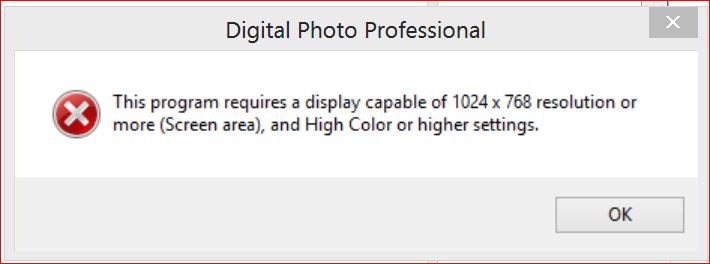
What causes a warning when I try to open "Digital Photo Professional" (ver 3.12, of "This Program requires 1024x768 or more and High Color or higher setting" ??
19 REPLIES 19
Options
- Mark as New
- Bookmark
- Subscribe
- Mute
- Subscribe to RSS Feed
- Permalink
- Report Inappropriate Content
01-25-2013 04:55 PM
Hi fastedi7,
I am sorry that you are seeing an inadequate display resolution issue within Digital Photo Professional. This issue can sometimes come up in Windows 7 and 8 with certain graphics cards and processors. Try the following and see if we can't get this issue resolved:
1. Go to CONTROL PANEL - DISPLAY. Look for the small pull-down on the top right of the control panel if you don't see it. Switch to SMALL ICON and look again.
2. When you get to DISPLAY, look for the option that lets you change RESOLUTION. Ensure that the resolution is at 1024 x 768 at a minimum.
3. Go to the ADVANCED settings. From here you'll want to go to the MONITOR tab. Look for the COLOR tab at the bottom. Once you find it, switch it to 16 bit. Hit APPLY then OK.
From this point on, DPP should work properly. This change in bit depth should not make a noticeable difference on your monitor's display.
Did this answer your question? Please click the Accept as Solution button so that others may find the answer as well.
Options
- Mark as New
- Bookmark
- Subscribe
- Mute
- Subscribe to RSS Feed
- Permalink
- Report Inappropriate Content
04-17-2013 08:27 AM
Hi, Tim... can I jump in here, since I have the same problem/same error message? In Windows 8 (64-bit), there is no color tab at the bottom of that window, and I understand from other reading that you can't change its settings to 16-bit color globally. We've already made that change in DPP (3.13.0.1), but it still won't open. Any ideas? We were wondering if an earlier version of DPP would work?


Options
- Mark as New
- Bookmark
- Subscribe
- Mute
- Subscribe to RSS Feed
- Permalink
- Report Inappropriate Content
04-18-2013 08:38 AM
Try 32-bit and 1980x1080.
EB
EOS 1DX and many lenses.
EOS 1DX and many lenses.
Options
- Mark as New
- Bookmark
- Subscribe
- Mute
- Subscribe to RSS Feed
- Permalink
- Report Inappropriate Content
11-04-2013 03:14 PM
I just added a new LG IPS Monitor 23" with resolution 1920 x 1080 and now my Canon Digital Pro software won't load. It is set at 32 bit and highest resolution. What's up?
Options
- Mark as New
- Bookmark
- Subscribe
- Mute
- Subscribe to RSS Feed
- Permalink
- Report Inappropriate Content
11-04-2013 03:24 PM
Ms. Beber,
You didn't change or do a thing except add the new monitor? Need more info. You have restarted your computer since and have the latest version of DPP?
EB
EOS 1DX and many lenses.
EOS 1DX and many lenses.
Options
- Mark as New
- Bookmark
- Subscribe
- Mute
- Subscribe to RSS Feed
- Permalink
- Report Inappropriate Content
11-04-2013 03:28 PM
That's correct. However, I haven't downloaded a newer version of the DPP software. Do I need to do that?
Options
- Mark as New
- Bookmark
- Subscribe
- Mute
- Subscribe to RSS Feed
- Permalink
- Report Inappropriate Content
11-04-2013 03:43 PM
Okay, downloaded latest DPP software, still same problem. Restarted computer...still same problem.
Options
- Mark as New
- Bookmark
- Subscribe
- Mute
- Subscribe to RSS Feed
- Permalink
- Report Inappropriate Content
11-04-2013 03:46 PM
Just for the sake of having the latest version, yes, I doubt it will help. But you probably should. At any rate I would uninstall it and re-install it. Something has told it something is different than it was.
Your sure you didn't install anything or change anything else? No special drivers for the monitor? No games? Nothing?
Uninstall it and re-install DPP.
EB
EOS 1DX and many lenses.
EOS 1DX and many lenses.
Options
- Mark as New
- Bookmark
- Subscribe
- Mute
- Subscribe to RSS Feed
- Permalink
- Report Inappropriate Content
11-04-2013 03:47 PM
WOW you are quick!
EB
EOS 1DX and many lenses.
EOS 1DX and many lenses.


Announcements
07/22/2026: New firmware updates are available.
EOS R6 Mark III - Version 1.1.0
05/13/2026: New firmware updates are available.
EOS R5 Mark II - Version 1.3.0
EOS R6 Mark II - Version 1.7.0
04/28/2026: Service Notice: Caution Concerning use of Lithium Batteries
03/17/2026: New firmware updates are available.
SELPHY CP1500 - Version 1.0.7.0
02/23/2026: New firmware update is available for EOS C50- Version 1.0.3.1
01/23/2026: New firmware update is available for RF 24-105mm F4 IS USM- Version 2.0.7
01/20/2026: New firmware updates are available.
10/21/2025: Service Notice: To Users of the Compact Digital Camera PowerShot V1
10/15/2025: New firmware updates are available.
Speedlite EL-5 - Version 1.2.0
Speedlite EL-1 - Version 1.1.0
Speedlite Transmitter ST-E10 - Version 1.2.0
07/28/2025: Notice of Free Repair Service for the Mirrorless Camera EOS R50 (Black)
05/21/2025: New firmware update available for EOS C500 Mark II - Version 1.1.5.1
Related Content
- EOS Rebel T6 How to get a shutter count in EOS DSLR & Mirrorless Cameras
- EOS R5 Mark II How and Why to Use Picture Style settings and In-Camera Sharpening in EOS DSLR & Mirrorless Cameras
- EOS Canon R6 mkIII Image write failure in EOS DSLR & Mirrorless Cameras
- Struggling with HDR: Edit highlights and shadows in RAW image before merging in DPP4? in Camera Software
- EOS Rebel T5 software update needed in Camera Software

Ⓒ 2026
Canon U.S.A Inc. All Rights Reserved. Reproduction in whole or part without permission is prohibited.
