Turn on suggestions
Auto-suggest helps you quickly narrow down your search results by suggesting possible matches as you type.
- Canon Community
- Discussions & Help
- Camera
- Camera Software
- Re: New laptop and odd designation of photos
Options
- Subscribe to RSS Feed
- Mark Topic as New
- Mark Topic as Read
- Float this Topic for Current User
- Bookmark
- Subscribe
- Mute
- Printer Friendly Page


Options
- Mark as New
- Bookmark
- Subscribe
- Mute
- Subscribe to RSS Feed
- Permalink
- Report Inappropriate Content
03-19-2023 08:00 PM - edited 03-19-2023 08:01 PM
Been trying to master the new Lenovo laptop which has W11. I found the Adobe PSE 2021 download. So I downloaded it. Everything looks OK so far. On W10, the photos on File Explorer were separated as XXXX.CR2 and XXXX.jpg photos. Now when I click on file and click on Open in Camera RAW, I select the file and the photos are side by side with IMG and the number. However, when I click on a photo, there is no difference until it is loaded into PSE. Then the XXXX.CR2 shows up at the top of the photo. The two photos are identical and are "sorted" with CR2 on the left and the jpg is on the right. Any way to separate them with the CR2 and jpg on the appropriate photo? These are existing photos. Thanks.
(Still trying to figure out to download them from the memory card to a designated file.)
John
Canon EOS T7; EF-S 18-55mm IS; EF 28-135mm IS; EF 75-300mm; Sigma 150-600mm DG
Canon EOS T7; EF-S 18-55mm IS; EF 28-135mm IS; EF 75-300mm; Sigma 150-600mm DG
Solved! Go to Solution.
1 ACCEPTED SOLUTION
Accepted Solutions

Options
- Mark as New
- Bookmark
- Subscribe
- Mute
- Subscribe to RSS Feed
- Permalink
- Report Inappropriate Content
03-19-2023 09:01 PM
Open File Explorer (Windows key +E), go into "View" and enable file extensions... See attachment.
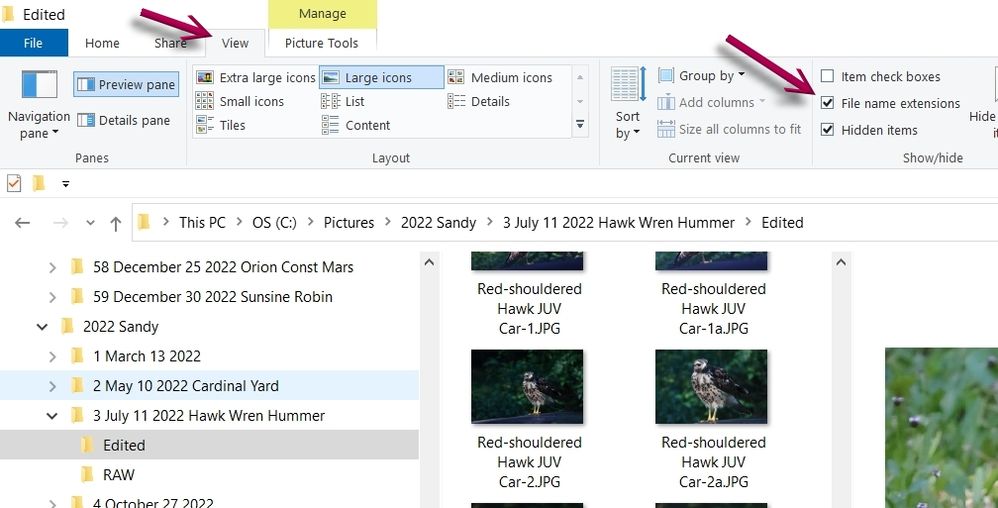
Newton
3 REPLIES 3
Options
- Mark as New
- Bookmark
- Subscribe
- Mute
- Subscribe to RSS Feed
- Permalink
- Report Inappropriate Content
03-19-2023 09:01 PM
Open File Explorer (Windows key +E), go into "View" and enable file extensions... See attachment.
Newton
Options
- Mark as New
- Bookmark
- Subscribe
- Mute
- Subscribe to RSS Feed
- Permalink
- Report Inappropriate Content
03-20-2023 08:51 AM - edited 03-20-2023 09:02 AM
Thanks. Will give it a try. Will copy screen to substitute for my senior memory.
John
Canon EOS T7; EF-S 18-55mm IS; EF 28-135mm IS; EF 75-300mm; Sigma 150-600mm DG
Canon EOS T7; EF-S 18-55mm IS; EF 28-135mm IS; EF 75-300mm; Sigma 150-600mm DG
Options
- Mark as New
- Bookmark
- Subscribe
- Mute
- Subscribe to RSS Feed
- Permalink
- Report Inappropriate Content
03-20-2023 09:03 AM
Newton, that did it! Many thanks. Might have more questions re: Canon T7 and downloading. This might have another "cure" for me.
John
Canon EOS T7; EF-S 18-55mm IS; EF 28-135mm IS; EF 75-300mm; Sigma 150-600mm DG
Canon EOS T7; EF-S 18-55mm IS; EF 28-135mm IS; EF 75-300mm; Sigma 150-600mm DG


Announcements
05/13/2026: New firmware updates are available.
EOS R5 Mark II - Version 1.3.0
EOS R6 Mark II - Version 1.7.0
04/28/2026: Service Notice: Caution Concerning use of Lithium Batteries
03/17/2026: New firmware updates are available.
SELPHY CP1500 - Version 1.0.7.0
02/23/2026: New firmware update is available for EOS C50- Version 1.0.3.1
01/23/2026: New firmware update is available for RF 24-105mm F4 IS USM- Version 2.0.7
01/20/2026: New firmware updates are available.
12/22/2025: New firmware update is available for EOS R6 Mark III- Version 1.0.2
10/21/2025: Service Notice: To Users of the Compact Digital Camera PowerShot V1
10/15/2025: New firmware updates are available.
Speedlite EL-5 - Version 1.2.0
Speedlite EL-1 - Version 1.1.0
Speedlite Transmitter ST-E10 - Version 1.2.0
07/28/2025: Notice of Free Repair Service for the Mirrorless Camera EOS R50 (Black)
05/21/2025: New firmware update available for EOS C500 Mark II - Version 1.1.5.1
Related Content
- Images Being Truncated in Photo Viewers: Only Happens to EOS T1i images on my Win10 Computer in EOS DSLR & Mirrorless Cameras
- Power Shot SD630 Digital ELPH - How to Add Photos to Laptop in Camera Software
- R6 Mk II Missing only todays photos in EOS DSLR & Mirrorless Cameras
- DPP4 crashes when loading newer images with seemingly no differences in Camera Software
- Correct cable for EOS 5D Mark IV laptop connection in Camera Accessories

Ⓒ 2026
Canon U.S.A Inc. All Rights Reserved. Reproduction in whole or part without permission is prohibited.
