Turn on suggestions
Auto-suggest helps you quickly narrow down your search results by suggesting possible matches as you type.
- Canon Community
- Discussions & Help
- Camera
- Camera Software
- Error Saving File - DPP4 Lens Profile
Options
- Subscribe to RSS Feed
- Mark Topic as New
- Mark Topic as Read
- Float this Topic for Current User
- Bookmark
- Subscribe
- Mute
- Printer Friendly Page
Error Saving File - DPP4 Lens Profile

Options
- Mark as New
- Bookmark
- Subscribe
- Mute
- Subscribe to RSS Feed
- Permalink
- Report Inappropriate Content
02-27-2023 06:33 AM
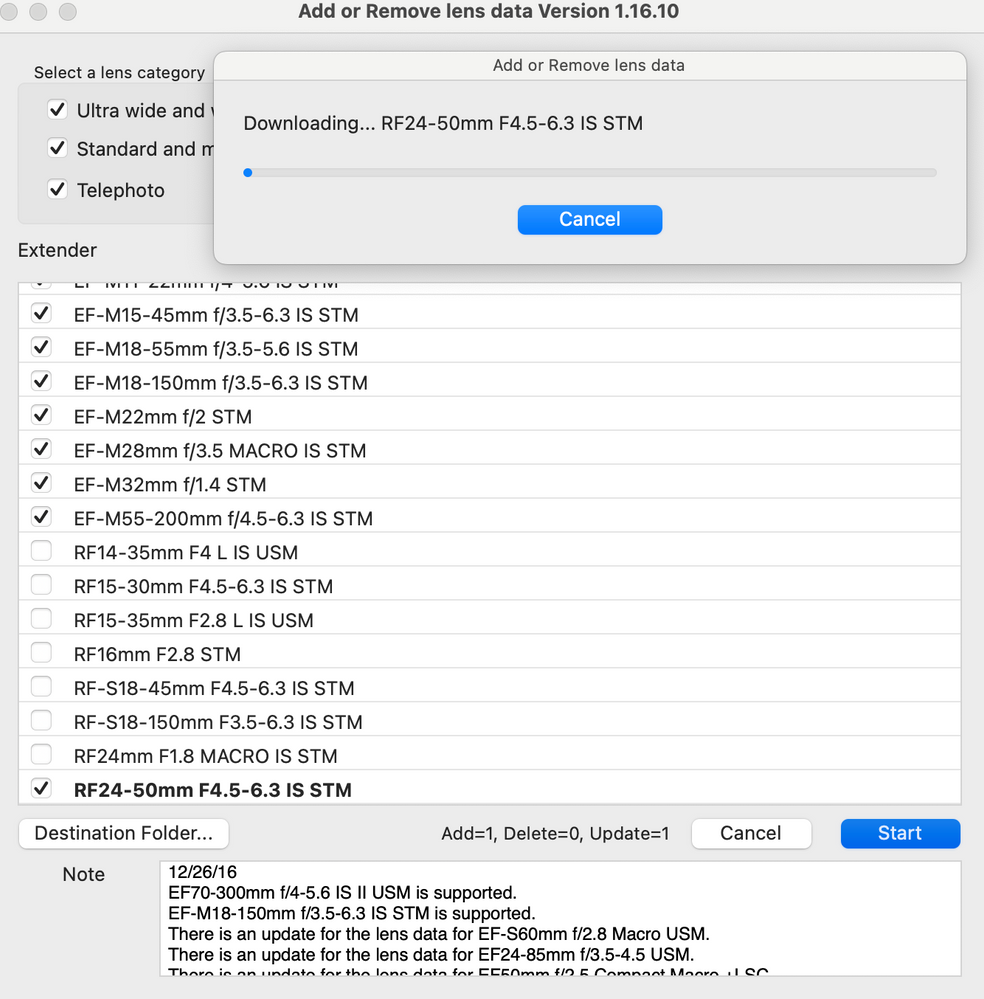
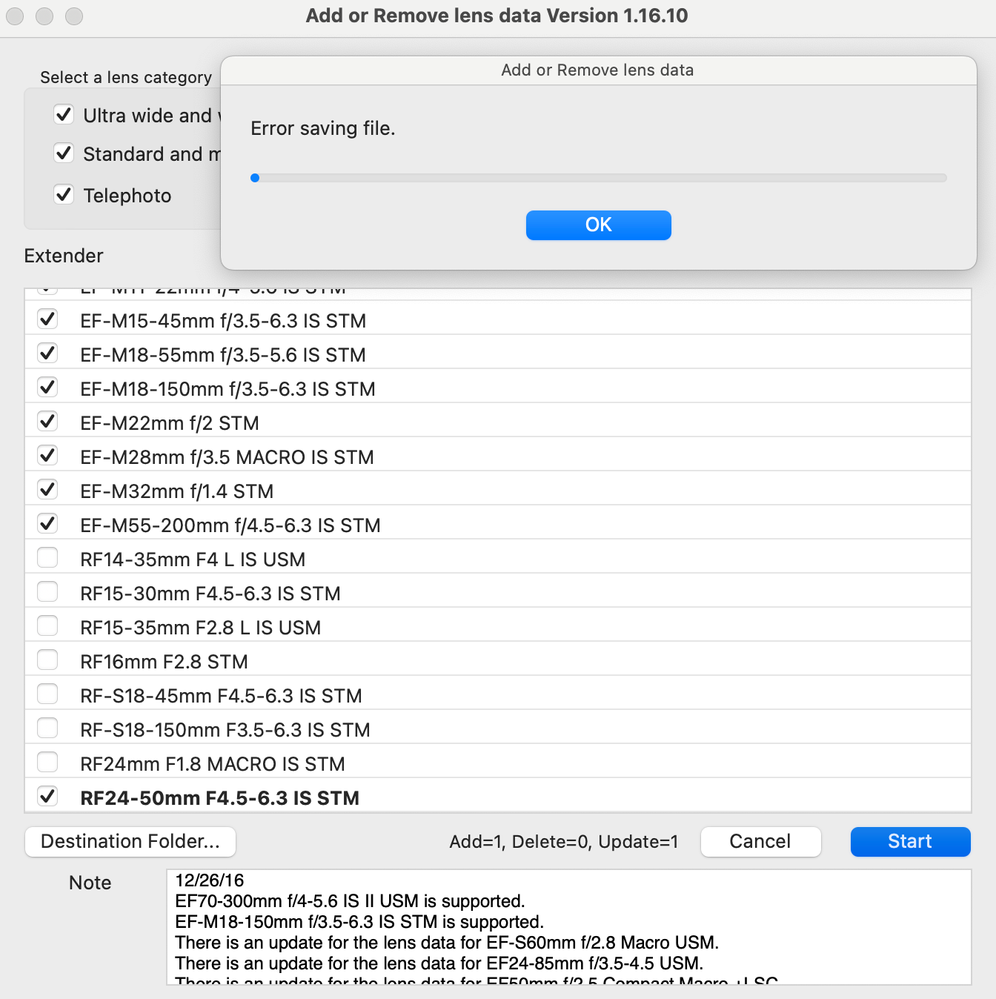


Happens with any lens profile, I should add. RF 24mm f/1.8 Macro included.
9 REPLIES 9


Options
- Mark as New
- Bookmark
- Subscribe
- Mute
- Subscribe to RSS Feed
- Permalink
- Report Inappropriate Content
02-27-2023 07:41 AM
As a guess, check your permissions in Privacy & Security to see if disk access is authorized for DPP4.
John Hoffman
Conway, NH
R6 Mark III, M200 (converted to infrared), RF lenses, Pixma PRO-100, Pixma TR8620a, Lr Classic
Conway, NH
R6 Mark III, M200 (converted to infrared), RF lenses, Pixma PRO-100, Pixma TR8620a, Lr Classic

Options
- Mark as New
- Bookmark
- Subscribe
- Mute
- Subscribe to RSS Feed
- Permalink
- Report Inappropriate Content
02-27-2023 09:20 AM
How many lens profiles have you downloaded? I notice that you have a mixture of every current Canon lens mount. Are you trying to upload all of the different profiles to a camera?
--------------------------------------------------------
"Enjoying photography since 1972."
"Enjoying photography since 1972."
Options
- Mark as New
- Bookmark
- Subscribe
- Mute
- Subscribe to RSS Feed
- Permalink
- Report Inappropriate Content
02-27-2023 09:28 AM
@Waddizzle wrote:How many lens profiles have you downloaded? I notice that you have a mixture of every current Canon lens mount. Are you trying to upload all of the different profiles to a camera?
DPP doesn't upload to camera. The Lens Registration Tool is used for that.
John Hoffman
Conway, NH
R6 Mark III, M200 (converted to infrared), RF lenses, Pixma PRO-100, Pixma TR8620a, Lr Classic
Conway, NH
R6 Mark III, M200 (converted to infrared), RF lenses, Pixma PRO-100, Pixma TR8620a, Lr Classic
Options
- Mark as New
- Bookmark
- Subscribe
- Mute
- Subscribe to RSS Feed
- Permalink
- Report Inappropriate Content
02-27-2023 10:17 AM - edited 02-27-2023 10:19 AM
Aren’t these the same lenses the same lenses that the Lens Registration Tool would see? I know there is a limit on how many lens profiles you can upload to a camera. Do not know if DPP would be subjected to a similar limit.
Judging by the version number at the top of the window, this might be the tool that is running. It almost seems to definitely not be DPP4.
--------------------------------------------------------
"Enjoying photography since 1972."
"Enjoying photography since 1972."
Options
- Mark as New
- Bookmark
- Subscribe
- Mute
- Subscribe to RSS Feed
- Permalink
- Report Inappropriate Content
02-27-2023 10:33 AM
DPP call the Lens Registration Tool to download lens data so it can be used with DLO.
If a camera is connected the LRT can be used to upload data to the camera for in-camera processing (JPEG creation). If one is only shooting RAW it is not necessary to upload lens data to the camera.
John Hoffman
Conway, NH
R6 Mark III, M200 (converted to infrared), RF lenses, Pixma PRO-100, Pixma TR8620a, Lr Classic
Conway, NH
R6 Mark III, M200 (converted to infrared), RF lenses, Pixma PRO-100, Pixma TR8620a, Lr Classic
Options
- Mark as New
- Bookmark
- Subscribe
- Mute
- Subscribe to RSS Feed
- Permalink
- Report Inappropriate Content
02-27-2023 11:26 AM - edited 02-27-2023 11:54 AM
@thetechhimself wrote:
Happens with any lens profile, I should add. RF 24mm f/1.8 Macro included.
I was working on my PC earlier in the day when I responded. Just got on my MacBook Air with macOS 13. I get the same file see error and I verified that DPP4 has full disk access.
I don't do much processing on my macBook, so I can't say that I ever tried downloading lens data before, so I can't say when it actually worked.
John Hoffman
Conway, NH
R6 Mark III, M200 (converted to infrared), RF lenses, Pixma PRO-100, Pixma TR8620a, Lr Classic
Conway, NH
R6 Mark III, M200 (converted to infrared), RF lenses, Pixma PRO-100, Pixma TR8620a, Lr Classic
Options
- Mark as New
- Bookmark
- Subscribe
- Mute
- Subscribe to RSS Feed
- Permalink
- Report Inappropriate Content
02-27-2023 11:44 AM
Where’s the error log for dpp4 on macOS? Messages perhaps?
Options
- Mark as New
- Bookmark
- Subscribe
- Mute
- Subscribe to RSS Feed
- Permalink
- Report Inappropriate Content
02-27-2023 12:17 PM
I don't know.
John Hoffman
Conway, NH
R6 Mark III, M200 (converted to infrared), RF lenses, Pixma PRO-100, Pixma TR8620a, Lr Classic
Conway, NH
R6 Mark III, M200 (converted to infrared), RF lenses, Pixma PRO-100, Pixma TR8620a, Lr Classic
Options
- Mark as New
- Bookmark
- Subscribe
- Mute
- Subscribe to RSS Feed
- Permalink
- Report Inappropriate Content
03-19-2023 11:06 PM
The fix? Change the destination folder (option in the EOS lens registration tool). I changed it from the user/shared to my user under a folder I made. Done.

Announcements
07/22/2026: New firmware updates are available.
EOS R6 Mark III - Version 1.1.0
05/13/2026: New firmware updates are available.
EOS R5 Mark II - Version 1.3.0
EOS R6 Mark II - Version 1.7.0
04/28/2026: Service Notice: Caution Concerning use of Lithium Batteries
03/17/2026: New firmware updates are available.
SELPHY CP1500 - Version 1.0.7.0
02/23/2026: New firmware update is available for EOS C50- Version 1.0.3.1
01/23/2026: New firmware update is available for RF 24-105mm F4 IS USM- Version 2.0.7
01/20/2026: New firmware updates are available.
10/21/2025: Service Notice: To Users of the Compact Digital Camera PowerShot V1
10/15/2025: New firmware updates are available.
Speedlite EL-5 - Version 1.2.0
Speedlite EL-1 - Version 1.1.0
Speedlite Transmitter ST-E10 - Version 1.2.0
07/28/2025: Notice of Free Repair Service for the Mirrorless Camera EOS R50 (Black)
05/21/2025: New firmware update available for EOS C500 Mark II - Version 1.1.5.1
Related Content
- Support Request: Unable to register my Canon EOS R50 (Serial number already registered) in EOS DSLR & Mirrorless Cameras
- EOS R5 Mark II firmware 1.30 notes in Camera Software
- Impossible to save on DPP in Camera Software
- EOS Utility 3 Does not synchronize time with t7i in Camera Software
- Thoughts on DPP Version 4.21.11.0 in Camera Software

Ⓒ 2026
Canon U.S.A Inc. All Rights Reserved. Reproduction in whole or part without permission is prohibited.
