Turn on suggestions
Auto-suggest helps you quickly narrow down your search results by suggesting possible matches as you type.
- Canon Community
- Discussions & Help
- Camera
- Camera Software
- Re: T6 Framework warning
Options
- Subscribe to RSS Feed
- Mark Topic as New
- Mark Topic as Read
- Float this Topic for Current User
- Bookmark
- Subscribe
- Mute
- Printer Friendly Page
EOS Utility .Net Framework warning

Options
- Mark as New
- Bookmark
- Subscribe
- Mute
- Subscribe to RSS Feed
- Permalink
- Report Inappropriate Content
08-31-2023
05:51 PM
- last edited on
09-01-2023
12:21 PM
by
 Danny
Danny
When I connect my eos rebel t6 and try to start eos utility version 3 I get a Net. Framework error message. What do I do?
13 REPLIES 13

Anonymous
Not applicable
Options
- Mark as New
- Bookmark
- Subscribe
- Mute
- Subscribe to RSS Feed
- Permalink
- Report Inappropriate Content
08-31-2023 06:44 PM - edited 09-01-2023 01:11 PM
I would download and re-install EOS Utility to your computer. .Net Framework is a Microsoft utility that should be updated automatically if needed when you install the EOS Utility program.


Options
- Mark as New
- Bookmark
- Subscribe
- Mute
- Subscribe to RSS Feed
- Permalink
- Report Inappropriate Content
08-31-2023 11:16 PM
Greetings,
What version and build of windows are you running?
If windows 10 or earlier, please do the following:
From the start menu, open or search for Control Panel. Now open Programs and Features. If you don't see this listed, look under the Programs Category.
Review the list of installed programs. Do you happen to see Microsoft .Net Runtime. Scroll to the left and let us know what version is installed.
~Rick
Bay Area - CA
~R5 C (1.1.3.1), ~RF Trinity, ~RF 100 Macro, ~RF 100~400, ~RF 100~500, ~RF 200-800, ~RF 1.4x TC, BG-R10, 430EX III-RT ~DxO PhotoLab Elite ~DaVinci Resolve Studio ~ImageClass MF644Cdw MF656Cdw ~Pixel 10 ~CarePaks Are Worth It
Options
- Mark as New
- Bookmark
- Subscribe
- Mute
- Subscribe to RSS Feed
- Permalink
- Report Inappropriate Content
09-01-2023 12:15 PM
It does not show .Net Runtime
Options
- Mark as New
- Bookmark
- Subscribe
- Mute
- Subscribe to RSS Feed
- Permalink
- Report Inappropriate Content
09-01-2023 01:10 PM - edited 09-01-2023 01:15 PM
It is actually .NET Framework. Software that needs Microsoft's .NET Framework, should automatically install it along with the program installation, if you don't already have it on your computer.
Options
- Mark as New
- Bookmark
- Subscribe
- Mute
- Subscribe to RSS Feed
- Permalink
- Report Inappropriate Content
09-01-2023 06:06 PM - edited 09-01-2023 06:09 PM
You didn't say what version of windows you were running?
*If* you have .Net Framework installed and its damaged or corrupt, this should fix it.
Download .NET Framework Repair Tool from Official Microsoft Download Center
If you are running windows 11, it includes .Net Framework v4.8. Try running the repair tool above.
If you are running an earlier version of windows, see the following:
.NET Framework installation guide - .NET Framework | Microsoft Learn
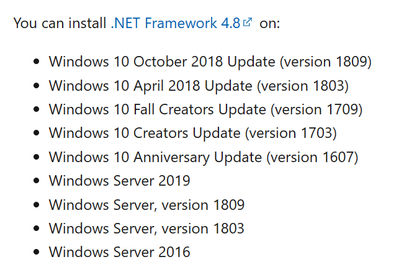
~Rick
Bay Area - CA
~R5 C (1.1.3.1), ~RF Trinity, ~RF 100 Macro, ~RF 100~400, ~RF 100~500, ~RF 200-800, ~RF 1.4x TC, BG-R10, 430EX III-RT ~DxO PhotoLab Elite ~DaVinci Resolve Studio ~ImageClass MF644Cdw MF656Cdw ~Pixel 10 ~CarePaks Are Worth It

Options
- Mark as New
- Bookmark
- Subscribe
- Mute
- Subscribe to RSS Feed
- Permalink
- Report Inappropriate Content
09-02-2023 12:51 PM - edited 09-02-2023 12:52 PM
Does the message about .NET missing have a button/link to install it?
Or else, when you run Windows Updates, is .NET Framework one of the things it wants to install?

Options
- Mark as New
- Bookmark
- Subscribe
- Mute
- Subscribe to RSS Feed
- Permalink
- Report Inappropriate Content
09-02-2023 01:18 PM
Sounds like your OS installation is corrupt, to me. Windows 10/11 rely on the .NET Framework to run properly. Let me put it this way. The OS is written in .NET.
--------------------------------------------------------
"Enjoying photography since 1972."
"Enjoying photography since 1972."
Options
- Mark as New
- Bookmark
- Subscribe
- Mute
- Subscribe to RSS Feed
- Permalink
- Report Inappropriate Content
09-02-2023 05:13 PM
Windows 10
Options
- Mark as New
- Bookmark
- Subscribe
- Mute
- Subscribe to RSS Feed
- Permalink
- Report Inappropriate Content
09-02-2023 05:14 PM
Yes and Yes


Announcements
07/22/2026: New firmware updates are available.
EOS R6 Mark III - Version 1.1.0
05/13/2026: New firmware updates are available.
EOS R5 Mark II - Version 1.3.0
EOS R6 Mark II - Version 1.7.0
04/28/2026: Service Notice: Caution Concerning use of Lithium Batteries
03/17/2026: New firmware updates are available.
SELPHY CP1500 - Version 1.0.7.0
02/23/2026: New firmware update is available for EOS C50- Version 1.0.3.1
01/23/2026: New firmware update is available for RF 24-105mm F4 IS USM- Version 2.0.7
01/20/2026: New firmware updates are available.
10/21/2025: Service Notice: To Users of the Compact Digital Camera PowerShot V1
10/15/2025: New firmware updates are available.
Speedlite EL-5 - Version 1.2.0
Speedlite EL-1 - Version 1.1.0
Speedlite Transmitter ST-E10 - Version 1.2.0
07/28/2025: Notice of Free Repair Service for the Mirrorless Camera EOS R50 (Black)
05/21/2025: New firmware update available for EOS C500 Mark II - Version 1.1.5.1
Related Content
- EOS R8 overheats after 60-120 seconds in EOS DSLR & Mirrorless Cameras
- EOS R5 Mark II firmware 1.30 notes in Camera Software
- Canon R5ii showing overheat warning after 5 minutes and maybe 10 photos... in EOS DSLR & Mirrorless Cameras
- Thoughts on DPP Version 4.21.11.0 in Camera Software
- Can't user vintage lenses on EOS M50 in EOS DSLR & Mirrorless Cameras

Ⓒ 2026
Canon U.S.A Inc. All Rights Reserved. Reproduction in whole or part without permission is prohibited.
