Turn on suggestions
Auto-suggest helps you quickly narrow down your search results by suggesting possible matches as you type.
- Canon Community
- Discussions & Help
- Camera
- Camera Software
- Re: EOS Util 2 > camera setting/remote shooting is...
Options
- Subscribe to RSS Feed
- Mark Topic as New
- Mark Topic as Read
- Float this Topic for Current User
- Bookmark
- Subscribe
- Mute
- Printer Friendly Page
EOS Util 2 > camera setting/remote shooting is disabled >70D

Options
- Mark as New
- Bookmark
- Subscribe
- Mute
- Subscribe to RSS Feed
- Permalink
- Report Inappropriate Content
04-18-2020 12:41 PM
I downloaded the EOS utli sofware, connected my canon 70 to macbook via usb cable. When I start the EOS util 2, the camera setting/remote shooting is disabled.
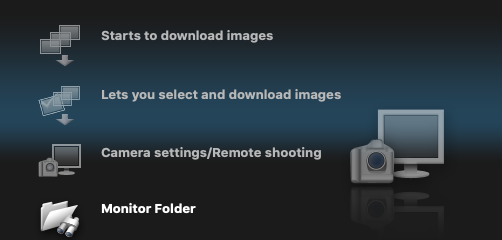
I made sure that the wifi is turned off.
This feature is always greyed out in both video and camera mode.
How can I get this to work?
8 REPLIES 8


Options
- Mark as New
- Bookmark
- Subscribe
- Mute
- Subscribe to RSS Feed
- Permalink
- Report Inappropriate Content
04-18-2020 01:45 PM
@khalidhajsaleh wrote:I downloaded the EOS utli sofware, connected my canon 70 to macbook via usb cable. When I start the EOS util 2, the camera setting/remote shooting is disabled.
I made sure that the wifi is turned off.
This feature is always greyed out in both video and camera mode.
How can I get this to work?
The camera is not being recognized by the computer. Make sure you are using a USB data cable, not a USB charging cable.
--------------------------------------------------------
"Enjoying photography since 1972."
"Enjoying photography since 1972."
Options
- Mark as New
- Bookmark
- Subscribe
- Mute
- Subscribe to RSS Feed
- Permalink
- Report Inappropriate Content
04-18-2020 02:01 PM
But when I plug-in my camera to the cable, the EOS util starts on its own. I searched on amazing for mini usb to usb data cable but all the results show charging cables. How can I find a data cable?

Options
- Mark as New
- Bookmark
- Subscribe
- Mute
- Subscribe to RSS Feed
- Permalink
- Report Inappropriate Content
04-18-2020 07:28 PM
@khalidhajsaleh wrote:
But when I plug-in my camera to the cable, the EOS util starts on its own. I searched on amazing for mini usb to usb data cable but all the results show charging cables. How can I find a data cable?
That doesn't sound as though it's a cable (data vs charging) issue.
The 70D is a fairly recent camera. Are you sure it doesn't require EOSU 3?
Bob
Philadelphia, Pennsylvania USA
Philadelphia, Pennsylvania USA
Options
- Mark as New
- Bookmark
- Subscribe
- Mute
- Subscribe to RSS Feed
- Permalink
- Report Inappropriate Content
04-18-2020 08:05 PM
@RobertTheFat wrote:
@khalidhajsaleh wrote:
But when I plug-in my camera to the cable, the EOS util starts on its own. I searched on amazing for mini usb to usb data cable but all the results show charging cables. How can I find a data cable?That doesn't sound as though it's a cable (data vs charging) issue.
The 70D is a fairly recent camera. Are you sure it doesn't require EOSU 3?
Good question. The 70D Product Support page appears to show MAC OS-X Snow Leopard 10.6 running EOS 2 as part of the EOS Utility CD. The latest downloads for Mac OS Catalina show EOS 3.12.
--------------------------------------------------------
"Enjoying photography since 1972."
"Enjoying photography since 1972."
Options
- Mark as New
- Bookmark
- Subscribe
- Mute
- Subscribe to RSS Feed
- Permalink
- Report Inappropriate Content
04-18-2020 08:35 PM
When I tried the EOS3, I get a messageb that your device is not recognized.
Options
- Mark as New
- Bookmark
- Subscribe
- Mute
- Subscribe to RSS Feed
- Permalink
- Report Inappropriate Content
04-19-2020 03:12 PM
@khalidhajsaleh wrote:
When I tried the EOS3, I get a messageb that your device is not recognized.
Are you deleting the software prior to installing a new version?
Which version of EOSU 3 did you install? You may need to work your way through the upgrade path.
To install EOSU 3, I might try starting at OS X Mountain Lion. That seems to be when a transition might have been made from EOSU 2 to EOSU 3. I have no idea why they transitioned, but it seems to coincide with a change from OS X to MacOS.
--------------------------------------------------------
"Enjoying photography since 1972."
"Enjoying photography since 1972."
Options
- Mark as New
- Bookmark
- Subscribe
- Mute
- Subscribe to RSS Feed
- Permalink
- Report Inappropriate Content
04-19-2020 05:40 PM
it is sort of interesting because I just downloaded the EOS software yesterday from Canon's site. It installed both EOS 2 and 3. By default, when I plugin my 70D it opens EOS 2. I will remove EOS 2 and see if that fixes the problem.
Options
- Mark as New
- Bookmark
- Subscribe
- Mute
- Subscribe to RSS Feed
- Permalink
- Report Inappropriate Content
04-19-2020 11:30 PM
@khalidhajsaleh wrote:it is sort of interesting because I just downloaded the EOS software yesterday from Canon's site. It installed both EOS 2 and 3. By default, when I plugin my 70D it opens EOS 2. I will remove EOS 2 and see if that fixes the problem.
You hare not answering any questions. This makes it difficult to assist you. Deleting the applications means deleing ALL of it, not just some it. On that note, I suggest that you contact Canon Support.
--------------------------------------------------------
"Enjoying photography since 1972."
"Enjoying photography since 1972."


Announcements
07/22/2026: New firmware updates are available.
EOS R6 Mark III - Version 1.1.0
05/13/2026: New firmware updates are available.
EOS R5 Mark II - Version 1.3.0
EOS R6 Mark II - Version 1.7.0
04/28/2026: Service Notice: Caution Concerning use of Lithium Batteries
03/17/2026: New firmware updates are available.
SELPHY CP1500 - Version 1.0.7.0
02/23/2026: New firmware update is available for EOS C50- Version 1.0.3.1
01/23/2026: New firmware update is available for RF 24-105mm F4 IS USM- Version 2.0.7
01/20/2026: New firmware updates are available.
10/21/2025: Service Notice: To Users of the Compact Digital Camera PowerShot V1
10/15/2025: New firmware updates are available.
Speedlite EL-5 - Version 1.2.0
Speedlite EL-1 - Version 1.1.0
Speedlite Transmitter ST-E10 - Version 1.2.0
07/28/2025: Notice of Free Repair Service for the Mirrorless Camera EOS R50 (Black)
05/21/2025: New firmware update available for EOS C500 Mark II - Version 1.1.5.1
Related Content
- vertical line on my canon ixus 145 in Point & Shoot Digital Cameras
- EOS R5 Mark II died after month of using in EOS DSLR & Mirrorless Cameras
- Will Canon release a firmware update for the R6 mkiii that allows us to turn off IBIS and use IS? in EOS DSLR & Mirrorless Cameras
- After a wedding shoot, R5ii did not record images to memory card for a span of about 200 pictures in EOS DSLR & Mirrorless Cameras
- How to hold EOS R5 Mark II: Hold the lens, the body, or both? in EOS DSLR & Mirrorless Cameras

Ⓒ 2026
Canon U.S.A Inc. All Rights Reserved. Reproduction in whole or part without permission is prohibited.
