Turn on suggestions
Auto-suggest helps you quickly narrow down your search results by suggesting possible matches as you type.
- Canon Community
- Discussions & Help
- Camera
- Camera Software
- Re: DPP4 won't open on Windows 10
Options
- Subscribe to RSS Feed
- Mark Topic as New
- Mark Topic as Read
- Float this Topic for Current User
- Bookmark
- Subscribe
- Mute
- Printer Friendly Page
DPP4 won't open on Windows 10

Options
- Mark as New
- Bookmark
- Subscribe
- Mute
- Subscribe to RSS Feed
- Permalink
- Report Inappropriate Content
11-25-2021 08:21 AM
I have installed this program on my new laptop and it will not open. I have been on the phone with a Canon rep and he was unable to help me. The program picture will pop up breifly (black box identifying the name of the program) but then closes. I use Windows 10. I have deleted all antiviral programs. I can open it on my old laptop. Any ideas of what the problem may be?
16 REPLIES 16


Options
- Mark as New
- Bookmark
- Subscribe
- Mute
- Subscribe to RSS Feed
- Permalink
- Report Inappropriate Content
11-25-2021 08:51 AM
Greetings,
We will need more information to try and assist.
Please provide your laptops hardware specs?
Windows 10 - Feature and build # is?
Is your user an administrator?
What version of DPP did you install? (4.15.20 is current as of this post)
Open the System Event Viewer, review sections "Applications" and "System"
See if any infomation about the program (correlates) to when the software fails to open or run.
We will await your reply.
~Rick
Bay Area - CA
~R5 C (1.1.3.1), ~RF Trinity, ~RF 100 Macro, ~RF 100~400, ~RF 100~500, ~RF 200-800, ~RF 1.4x TC, BG-R10, 430EX III-RT ~DxO PhotoLab Elite ~DaVinci Resolve Studio ~ImageClass MF644Cdw MF656Cdw ~Pixel 10 ~CarePaks Are Worth It
Options
- Mark as New
- Bookmark
- Subscribe
- Mute
- Subscribe to RSS Feed
- Permalink
- Report Inappropriate Content
11-25-2021 09:24 AM
Thank you for your response.. please understand my technical skills are limited. I do not know where to locate the system event viewer. There is a program called Tram Reviewer where I can send you permission to access my computer for a 1 x only event. Is this something you would consider?
Options
- Mark as New
- Bookmark
- Subscribe
- Mute
- Subscribe to RSS Feed
- Permalink
- Report Inappropriate Content
11-25-2021 09:39 AM
Windows 10 Pro 21H1 OS build 19043.1348
DDP 4.15.20
I would guess I am the administrator
DDP 4.15.20
I would guess I am the administrator
Options
- Mark as New
- Bookmark
- Subscribe
- Mute
- Subscribe to RSS Feed
- Permalink
- Report Inappropriate Content
11-25-2021 09:52 AM
Ok. I found the event viewer. I see where a it lists the problem with the application. Do not under it though. I have Uninstaller and reinstalled with Canon tech rep and it still did not work
Options
- Mark as New
- Bookmark
- Subscribe
- Mute
- Subscribe to RSS Feed
- Permalink
- Report Inappropriate Content
11-25-2021 10:27 AM - edited 11-25-2021 10:28 AM
Greetings,
Good progress.
Is your system intel or AMD based - CPU / Processor?
If your account is the only one that exists on the machine., it would have admin level permissions by default.
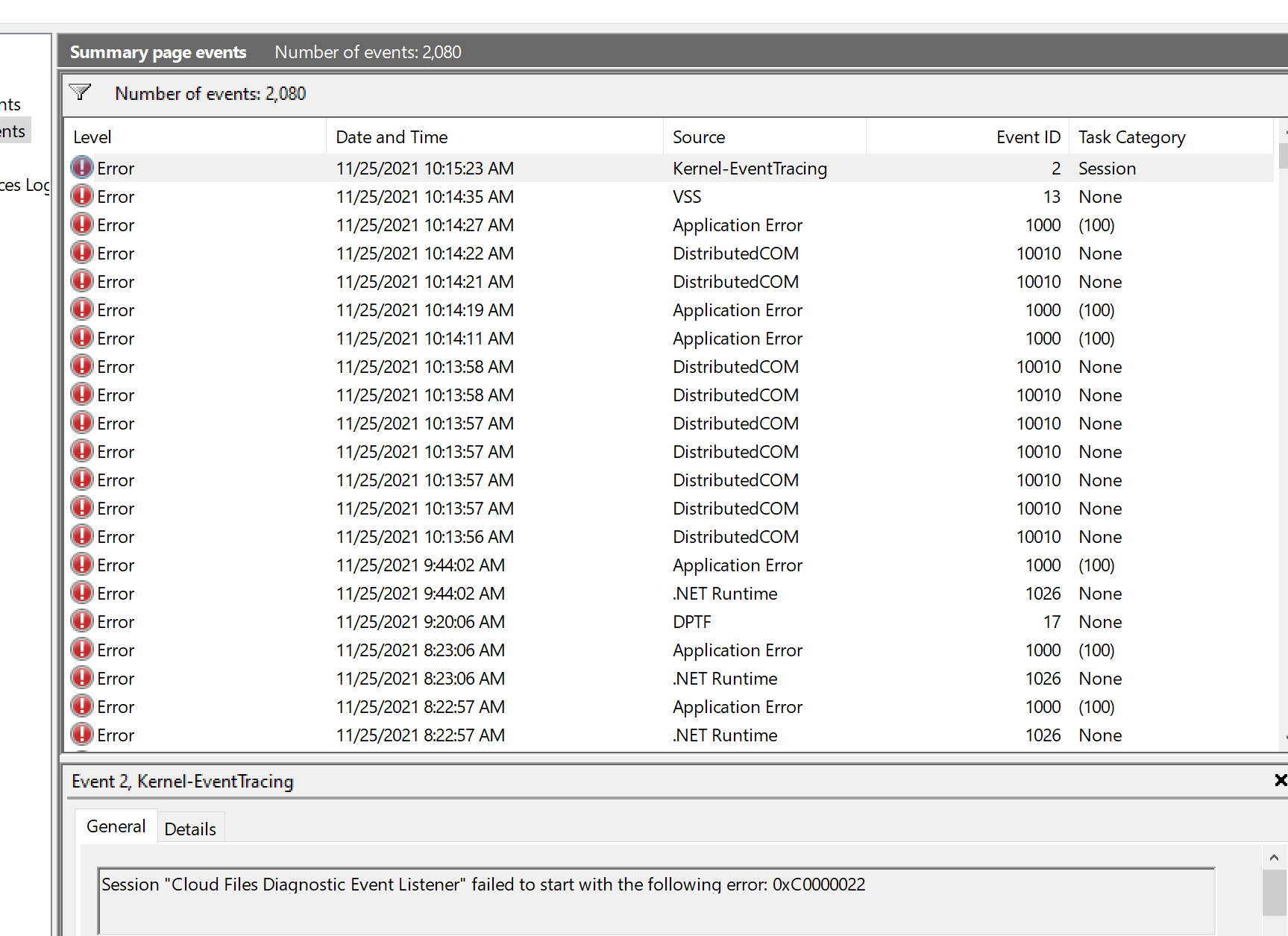
Error listed / Event Viewer. If you double click on the entry, a window will open with the copy option.
Now paste that for us to review.
Team Viewer is a remote control / access software which can be iused for remote support. I don't think this will be neccessary.
~Rick
Bay Area - CA
~R5 C (1.1.3.1), ~RF Trinity, ~RF 100 Macro, ~RF 100~400, ~RF 100~500, ~RF 200-800, ~RF 1.4x TC, BG-R10, 430EX III-RT ~DxO PhotoLab Elite ~DaVinci Resolve Studio ~ImageClass MF644Cdw MF656Cdw ~Pixel 10 ~CarePaks Are Worth It
Options
- Mark as New
- Bookmark
- Subscribe
- Mute
- Subscribe to RSS Feed
- Permalink
- Report Inappropriate Content
11-25-2021 10:54 AM
Intel , CPU 16 GB 64 bit x64 processor
Options
- Mark as New
- Bookmark
- Subscribe
- Mute
- Subscribe to RSS Feed
- Permalink
- Report Inappropriate Content
11-25-2021 03:42 PM - edited 11-25-2021 03:48 PM
Greetings,
You are very close.
Double click on one of the Application error entries. That will open the dialog I was referecing above. Does it indicate a problem with DPP? Confirm that for me.
Next step.
Start menu type cmd
This time however, select Run As Administrator

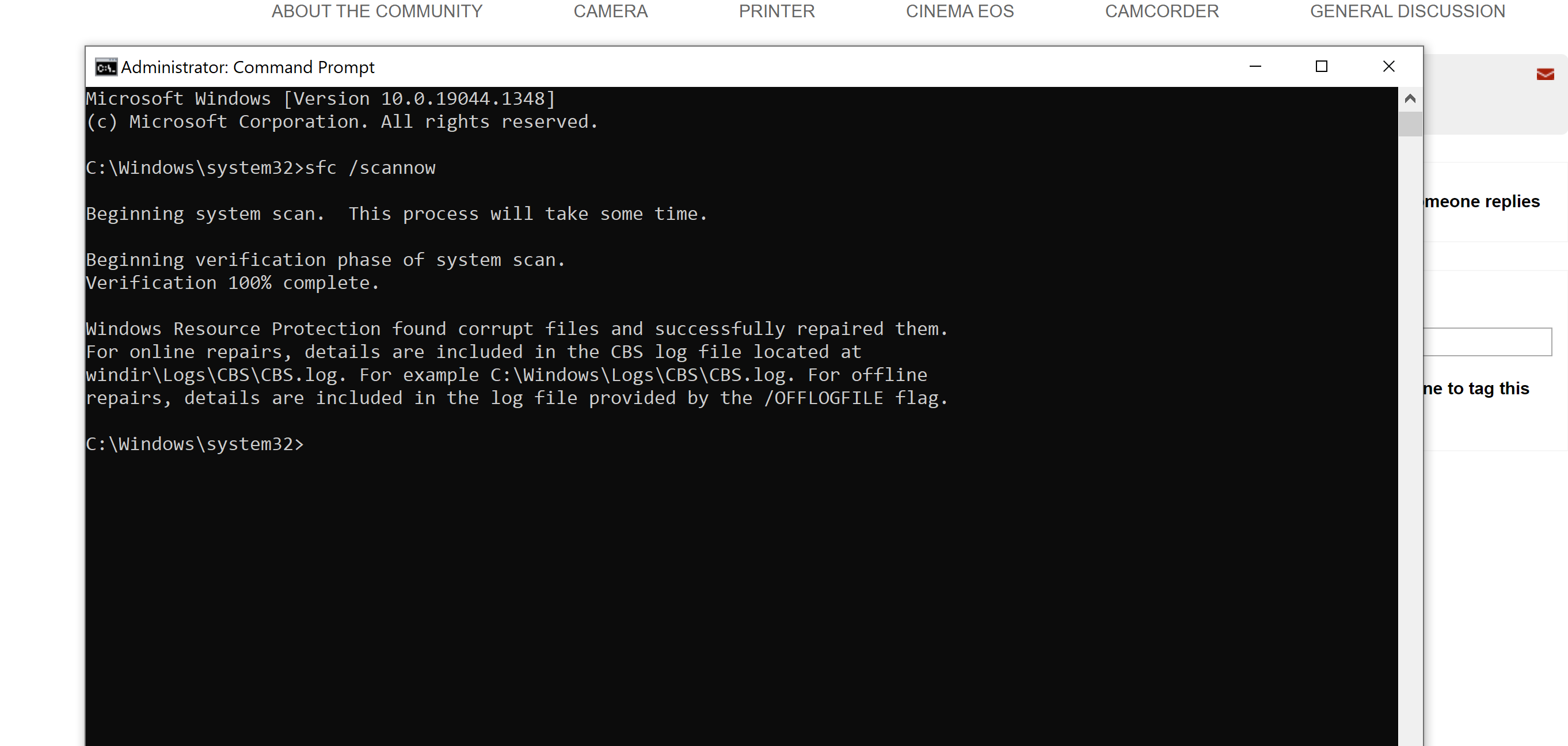
At the prompt type >sfc /scannow
(note there is a space between sfc and the forward slash)
Press enter
Let this run. It should complete in under 3 min.
Let me know the result.
"Windows did not detect any integrity violations"
"Windows found corrupt files and repaired them successfully"
or
Windows found corrupt files and could not repair them"
If corrupt files were found and repaired succesfully, close the command prompt window. Restart your system and test opening DPP for me.
~Rick
Bay Area - CA
~R5 C (1.1.3.1), ~RF Trinity, ~RF 100 Macro, ~RF 100~400, ~RF 100~500, ~RF 200-800, ~RF 1.4x TC, BG-R10, 430EX III-RT ~DxO PhotoLab Elite ~DaVinci Resolve Studio ~ImageClass MF644Cdw MF656Cdw ~Pixel 10 ~CarePaks Are Worth It
Options
- Mark as New
- Bookmark
- Subscribe
- Mute
- Subscribe to RSS Feed
- Permalink
- Report Inappropriate Content
11-25-2021 05:05 PM
Options
- Mark as New
- Bookmark
- Subscribe
- Mute
- Subscribe to RSS Feed
- Permalink
- Report Inappropriate Content
11-25-2021 05:09 PM
UGH!!!! No it didn't open


Announcements
07/22/2026: New firmware updates are available.
EOS R6 Mark III - Version 1.1.0
05/13/2026: New firmware updates are available.
EOS R5 Mark II - Version 1.3.0
EOS R6 Mark II - Version 1.7.0
04/28/2026: Service Notice: Caution Concerning use of Lithium Batteries
03/17/2026: New firmware updates are available.
SELPHY CP1500 - Version 1.0.7.0
02/23/2026: New firmware update is available for EOS C50- Version 1.0.3.1
01/23/2026: New firmware update is available for RF 24-105mm F4 IS USM- Version 2.0.7
01/20/2026: New firmware updates are available.
10/21/2025: Service Notice: To Users of the Compact Digital Camera PowerShot V1
10/15/2025: New firmware updates are available.
Speedlite EL-5 - Version 1.2.0
Speedlite EL-1 - Version 1.1.0
Speedlite Transmitter ST-E10 - Version 1.2.0
07/28/2025: Notice of Free Repair Service for the Mirrorless Camera EOS R50 (Black)
05/21/2025: New firmware update available for EOS C500 Mark II - Version 1.1.5.1
Related Content
- Dropped my canon powershot elph360 A in Point & Shoot Digital Cameras
- EOS Utility Launcher not detecting EOS R7 in Camera Software
- Having trouble uploading photos from my EOS Rebel T2i to new Macbook :( in EOS DSLR & Mirrorless Cameras
- DPP4 Missing Subfolder (Just One) in Camera Software
- Canon PowerShot SX620 HS Shutter wont open when I turn it on in Point & Shoot Digital Cameras

Ⓒ 2026
Canon U.S.A Inc. All Rights Reserved. Reproduction in whole or part without permission is prohibited.
